
Inspiring
January 29, 2010
Answered

how to snap guides in illustrator?

  • January 29, 2010
  • 4 replies
  • 76412 views

hello

.

id like to know as in ps we can snap our guide lines to the middle of the canvas and they snap making a nice intersection so we know where the middle of the canvas is,so we can place our object,how can it be done in illustrator?the guide lines do not snap,although snap to point is checked.do i have to make the canvas a perfect symmetric and then use the grid in order for the guides to snap?

any suggestions?

thank you.
    This topic has been closed for replies.
    Correct answer tromboniator

    Inquestflash,

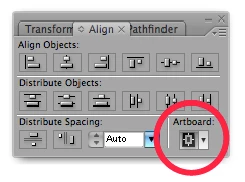
    Click here before you click the align buttons:

    Peter

    4 replies

    Participating Frequently
    March 3, 2015

    it's been a long time, no doubt, but if you've moved on to Illustrator CC, my buddy made an extension that does exactly what you want.

    https://creative.adobe.com/addons/products/5912#.VPYtabPF_sc

    I've been using it for about 2 years and I still use it every day. Worth every penny. to get the zero point in the center of your artboard, just click the middle button with nothing selected.

    Cheers!

    Participant
    March 18, 2011

    Hi,

    I am having guides trouble too with CS5.

    They will not align to artboard and every time I click align to artboard>center it moves (each click, further to right) completely off the art board.

    I have a custom action I created to align/center objects and it used to work with guides. It still works for other objects but the guides won't align anymore… I have to manually enter the coordinates to center them.

    What happened?

    Thanks

    Participating Frequently
    January 3, 2012

    Chuck - did you ever find out what was going on? I have the same problem. I have the "Align to artboard" setting switched as above, but when I try and centre guides, it sends them way down on the canvas, off the artboard.

    Kurt Gold
    Community Expert
    Community Expert
    January 3, 2012

    That's a bug that occurs when the Use Preview Bounds option is turned on (see Align Palette menu or inside the general programme preferences).

    Turn the option off, then guides should align properly.

    tromboniator
    Community Expert
    tromboniatorCommunity ExpertCorrect answer
    Community Expert
    January 29, 2010

    Inquestflash,

    Click here before you click the align buttons:

    Peter

    Inspiring
    January 30, 2010

    spot on dude great asnwer ;-)

    January 29, 2010

    That would work, turn on Grids and Snap to Grid. You could also unlock guides then select one and use the Align palette to align them in the middle of your artboard.

    Inspiring
    January 29, 2010

    seems reasonalbe,but im trying to align the guide lines i make 2 of em in the centre of the canvas,then i select them both and in the align pallet i click on horizontal align centre and then vertical align centre,BUT and the guides dont align in the middle of the canvas but  outside on the boundareis on the white canvas.

    i do have also the aligh to art board checked as well.

    whats going wrong?