
tomasr72113865
Participant
August 30, 2020
Answered

How to stop Outline Stroke from keeping original path
  • August 30, 2020
  • 2 replies
  • 272 views

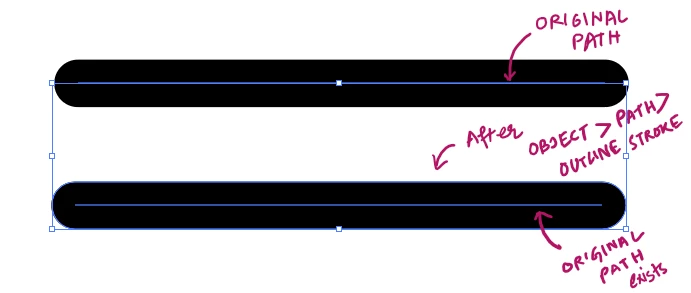
When I select a Path and "Outline Stroke" it, it's supposed to create an outline and the original path is supposed to disappear. This is not happening and instead the original path persists. How do stop Outline Stroke from keeping original path?


PS. I'm using AI 2020. Is this a new bug?
PPS. Please don't suggest deleting the path manually. It's impossible in my case.

This topic has been closed for replies.
Correct answer Monika Gause

There is probably a fill applied to that stroke.

2 replies

Monika Gause
Community Expert
Monika GauseCommunity ExpertCorrect answer
Community Expert
August 30, 2020

There is probably a fill applied to that stroke.

Jacob Bugge
Community Expert
Community Expert
August 30, 2020

Tomas,


What Monika is about to say.