Exit
  • Global community
    • Language:
      • Deutsch
      • English
      • Español
      • Français
      • Português
  • 日本語コミュニティ
  • 한국 커뮤니티
1

How to stop the colour changing when exporting a Illustrator to a JPEG

New Here ,
Feb 27, 2019 Feb 27, 2019

Please can someone help...

When I export an illustrator file to a JPEG the colour and tones of the content change.  Does anyone know how to stop this from happening?

[Here is the list of all Adobe forums... https://forums.adobe.com/welcome]

[Moved from generic Cloud/Setup forum to the specific Program forum... Mod]

6.6K
Translate
Report
Community guidelines
Be kind and respectful, give credit to the original source of content, and search for duplicates before posting. Learn more
community guidelines
Adobe
Community Expert ,
Feb 27, 2019 Feb 27, 2019

Which version?

How do you export the image?

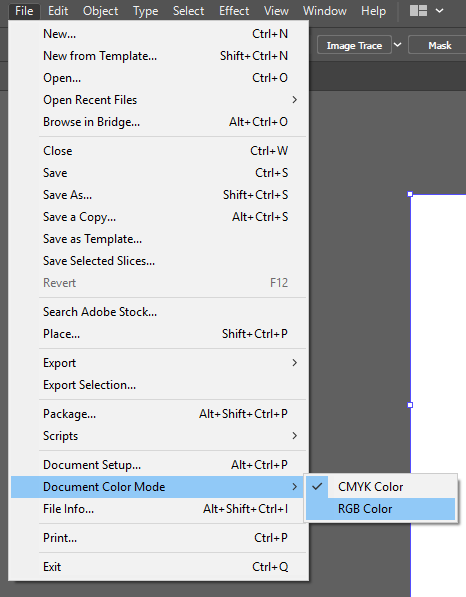
Which document color mode is the image?

In which way do the colors change?

Is your color management set up correctly?

Translate
Report
Community guidelines
Be kind and respectful, give credit to the original source of content, and search for duplicates before posting. Learn more
community guidelines
New Here ,
Feb 27, 2019 Feb 27, 2019

Hi

- Illustrator 2019

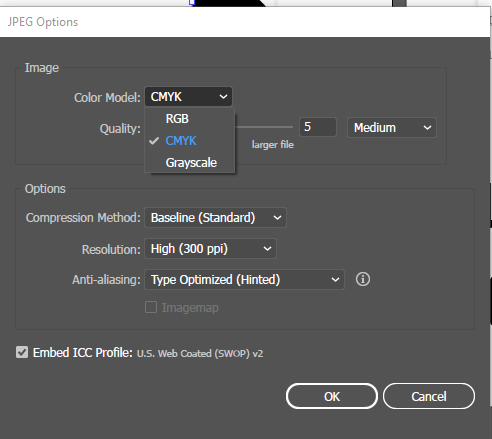
- File - Exprot - Export as - JPEG

- RGB

- The colours become more yellowy, it's like a sepia edit has been added.  It also looses the subtle definition in the line.

- I have no idea if it's set up correctly - please can you advise?

Translate
Report
Community guidelines
Be kind and respectful, give credit to the original source of content, and search for duplicates before posting. Learn more
community guidelines
Community Expert ,
Feb 27, 2019 Feb 27, 2019

Please show screenshots.

Translate
Report
Community guidelines
Be kind and respectful, give credit to the original source of content, and search for duplicates before posting. Learn more
community guidelines
Adobe Employee ,
Feb 27, 2019 Feb 27, 2019

Hi Aiveen,

Sorry to hear about this. Could you please confirm when you create the file in Illustrator what is the document color mode?

And when you export it to JPEG make sure you are selecting the same settings.

Regards,

Srishti

Translate
Report
Community guidelines
Be kind and respectful, give credit to the original source of content, and search for duplicates before posting. Learn more
community guidelines
Community Expert ,
Feb 27, 2019 Feb 27, 2019
LATEST

This usually happens when you're RGB export is something other than sRGB which is the web standard. So for example if your RGB settings export to Adobe RGB or Pro Photo RGB, then when you open it in a W3 standard compliant browser display (Chrome, or even apps like Powerpoint) will shift the color from the original.

This is based on the idea that you are working in RGB from Illustrator in the first place. If you are working in CMYK and then exporting to JPG it is doing an RGB conversion from CMYK which can cause another level of conversion issue.

Translate
Report
Community guidelines
Be kind and respectful, give credit to the original source of content, and search for duplicates before posting. Learn more
community guidelines