
Known Participant
January 17, 2023
Answered

How to turn off Automatic Hyphenation permanently

  • January 17, 2023
  • 2 replies
  • 10014 views

how does one turn of Hyphenation in Illustrator? 

I thought I would try the trick that apparently works for InDesign where you close all docs, open the Paragraph Pallet and unselect it there. 

But in Illustrator it's greyed out. 
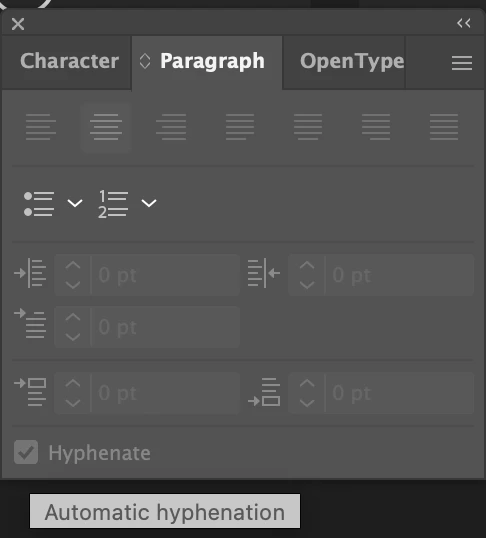
It's Labelled "Automatic" when you hover over it. How can we make that False? 

This topic has been closed for replies.
Correct answer Ton Frederiks

Which New Document interface are you using? I find the default one too complex and confusing and use the legacy one:

Preferences > General > Use legacy "File New" interface

2 replies

Ton Frederiks
Adobe Expert
January 17, 2023

To turn off Hyphenation by default you need to change the New Document Profile that you use to base your new documents on, like Print.ai, Art & Illustration.ai, Web.ai.

Open the profile you want to modify from:

Mac: (User)/Library/Application Support/Adobe/Adobe Illustrator version number/language folder/New Document Profiles

Win: C:\Users\....AppData\Roaming\Adobe\Adobe Illustrator version number Settings\language folder\x64\New Document Profiles


With the Type tool, drag a textbox or click to create point text. Keep it selected.

In the Window > Type > Paragraph panel, turn Off the Hyphenate checkbox.

In the Window > Type > Paragraph Styles panel select from the fly-out menu > Redefine Paragraph Style

This will modify your [Normal Paragraph Style] and turn Hyphenation off by default.

Delete all text items from your artboard and save the document.

(Maybe it is a bug, but I somehow could not turn it off by double clicking the  [Normal Paragraph Style] style and uncheck Hyphenate, it changed the checkmark to a dash, and I could get it to an empty checkbox, but the Redefine Paragraph Style way worked.)

Known Participant
January 18, 2023

Thanks Ton,

I did all your steps, I also tried replacing the Print.ai file that's here

/Applications/Adobe Illustrator 2023/Support Files/New Document Profiles/en_US


Same thing happening here as with trying to change the Default from Points to Inches. New Documents open as default. (points and hyphenation ON)


If open the Print.ai file from both those folders, They open as they should... they just don't effect the New Document Interface. 

Ton Frederiks
Ton FrederiksCorrect answer
Adobe Expert
January 18, 2023

Which New Document interface are you using? I find the default one too complex and confusing and use the legacy one:

Preferences > General > Use legacy "File New" interface

Monika Gause
Adobe Expert
January 17, 2023

Edit the Default Character Style and the Default Paragraph style in the New document Profile you want to use.