
Participating Frequently
September 18, 2019
Answered

How to use minus front on 3D Text?

  • September 18, 2019
  • 2 replies
  • 1155 views

I cant seem to minus the white from the letters behind it. I want to create the spaced feel on the logo however it doesnt work with this 3D text. I am trying to figure out a way to outline the 3D text and make it its own shape. 


What I have tried:


Tried to outline strokes on both then use pathfinder.


Tried to use clipping mask


Tried to use divide objects below 
    This topic has been closed for replies.
    Correct answer matthewn43692242

    2 replies

    matthewn43692242Correct answer
    Inspiring
    September 18, 2019

    Participating Frequently
    September 18, 2019
    You are a god 🙂
    Inspiring
    September 18, 2019

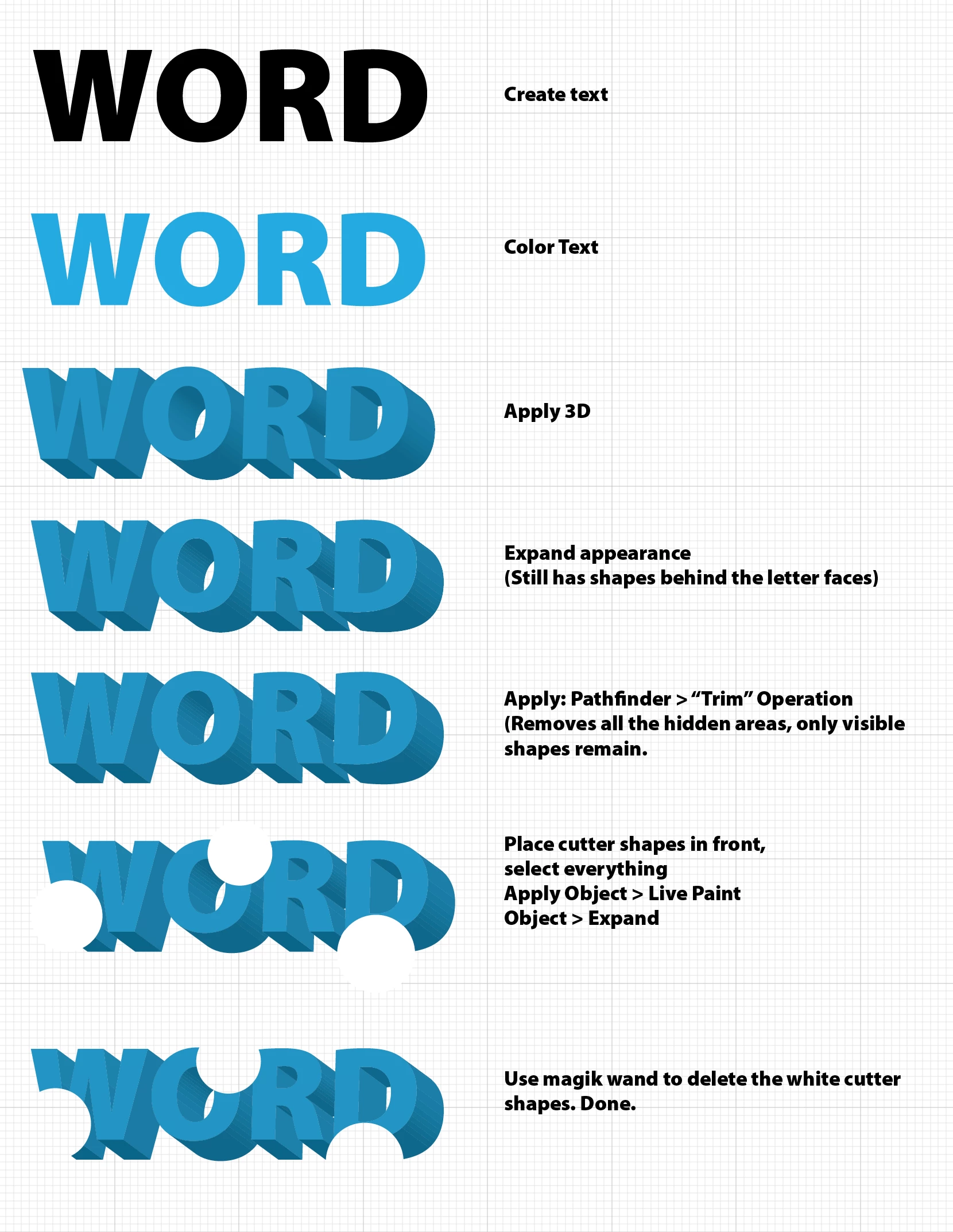
    Try using "Object > Expand" or "Object > Expand Appearance" on the 3D text before you try to cut it. Depending on how you created the 3D text it will likely have shapes behind the front-most shapes (face of the letters) which you might have to cut separately.


    Best path is probably : "Expand Appearance", then use pathfinder "trim" on the 3D text. Then use pathfinder "minus front" to cut out the shape.

    Participating Frequently
    September 18, 2019
    You are a life saver!