
Known Participant
December 16, 2018
解決済み

How to use the slice tool?

  • December 16, 2018
  • 返信数 3.
  • 1753 ビュー

Have been useing InDesign for trillions of years, and the first few steps with Illustrator are just so challencing

Like: how to cut a simple stroke?

I tried to use the slice tool but it makes all kinds of squares, etc...

Johnny
    このトピックへの返信は締め切られました。
    解決に役立った回答 Ray Yorkshire

    Try the scissors tool.

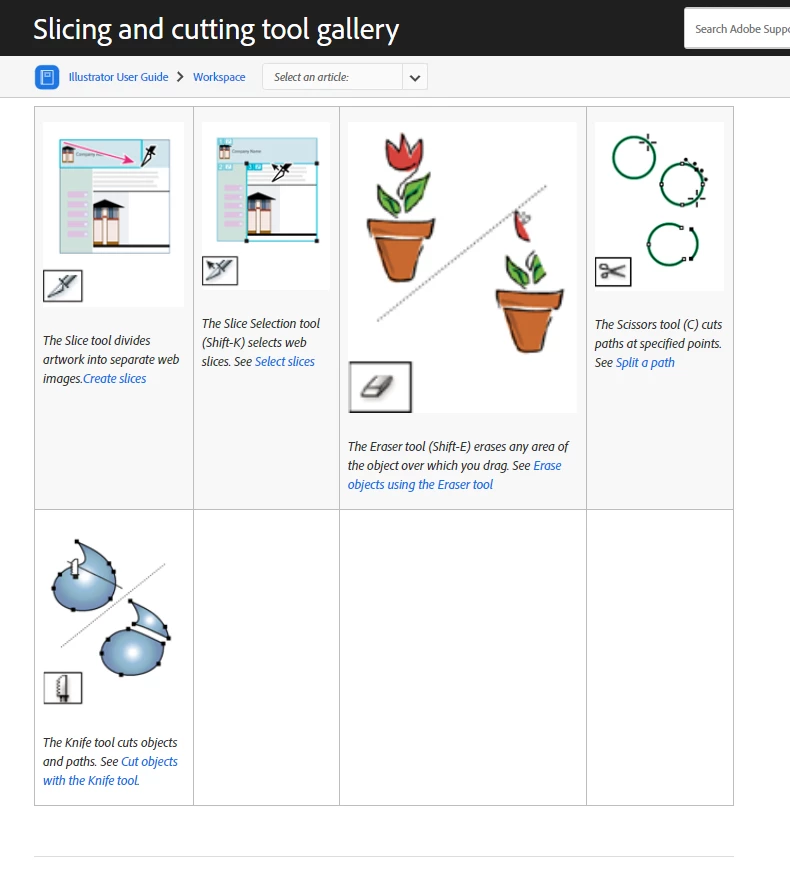
    Slicing and cutting tool gallery for Illustrator

    返信数 3

    jane-e
    Community Expert
    Community Expert
    December 16, 2018

    Joninen  wrote

    I tried to use the slice tool but it makes all kinds of squares, etc...

    Hi

    The Slice tool is for “slicing” one image into several when exporting for web graphics so that each can be optimized as needed, i.e., one area might be a jpeg, another a gif, and another a png. This is not the tool you are looking for.

    As Ray said, try Scissors “C”. Sharing space with it is the Knife and Eraser, which can also be useful.

    ~ Jane

    Joninen作成者
    Known Participant
    December 16, 2018

    Yep, scissors were the tool I was looking for.

    Thank's Monika, Ray and Jane-e!

    Johnny

    Ray Yorkshire
    Ray Yorkshire解決!
    Participating Frequently
    December 16, 2018
    Monika Gause
    Community Expert
    Community Expert
    December 16, 2018

    Please show a screenshot of what you want to cut and how.