

Question
How to use WidthMarkerFlags in sAIBeautifulStrokes->SetCenteredWidthAtDistance()
I'm having some trouble understanding the difference between the various WidthMarkerFlags for applying varied stroke widths with AIBeautifulStrokes. The different options all seem to produce the same results, but none of them are what I need. Here I've added a tinted blue line to show the 1-pt minimum stroke width I want, yet they all curve to make a narrower width of about .4 in the middle.
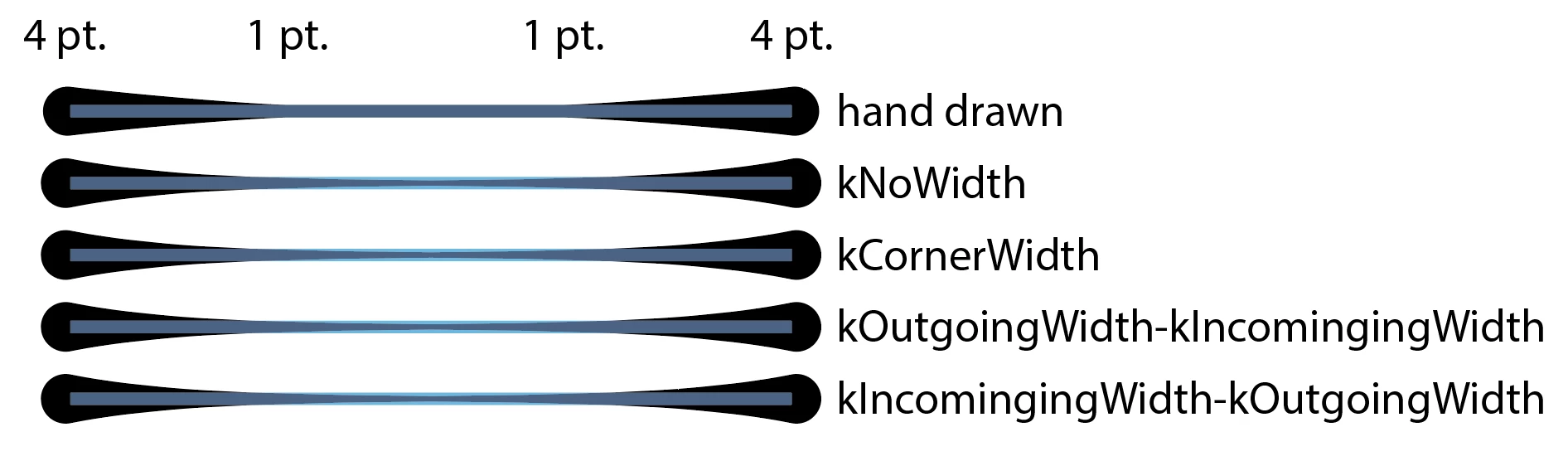
Here's a portion of the code:
sAIBeautifulStrokes->SetCenteredWidthAtDistance(aArt, 0, 4, kCornerWidthMarker);
sAIBeautifulStrokes->SetCenteredWidthAtDistance(aArt, 0.25, 1, kCornerWidthMarker);
sAIBeautifulStrokes->SetCenteredWidthAtDistance(aArt, 0.75, 1, kCornerWidthMarker);
sAIBeautifulStrokes->SetCenteredWidthAtDistance(aArt, 1, 4, kCornerWidthMarker);
I'd expected kCornerWidthMarker to make a linear taper between markers, but it doesn't. In fact, I converted all of these paths to outlines and stacked them to find that they're all exactly alike -- the WidthMarkerFlags made no difference whatsoever! Am I using them wrong, or is this a bug?
 AdChoices