
Participating Frequently
January 21, 2021
Question

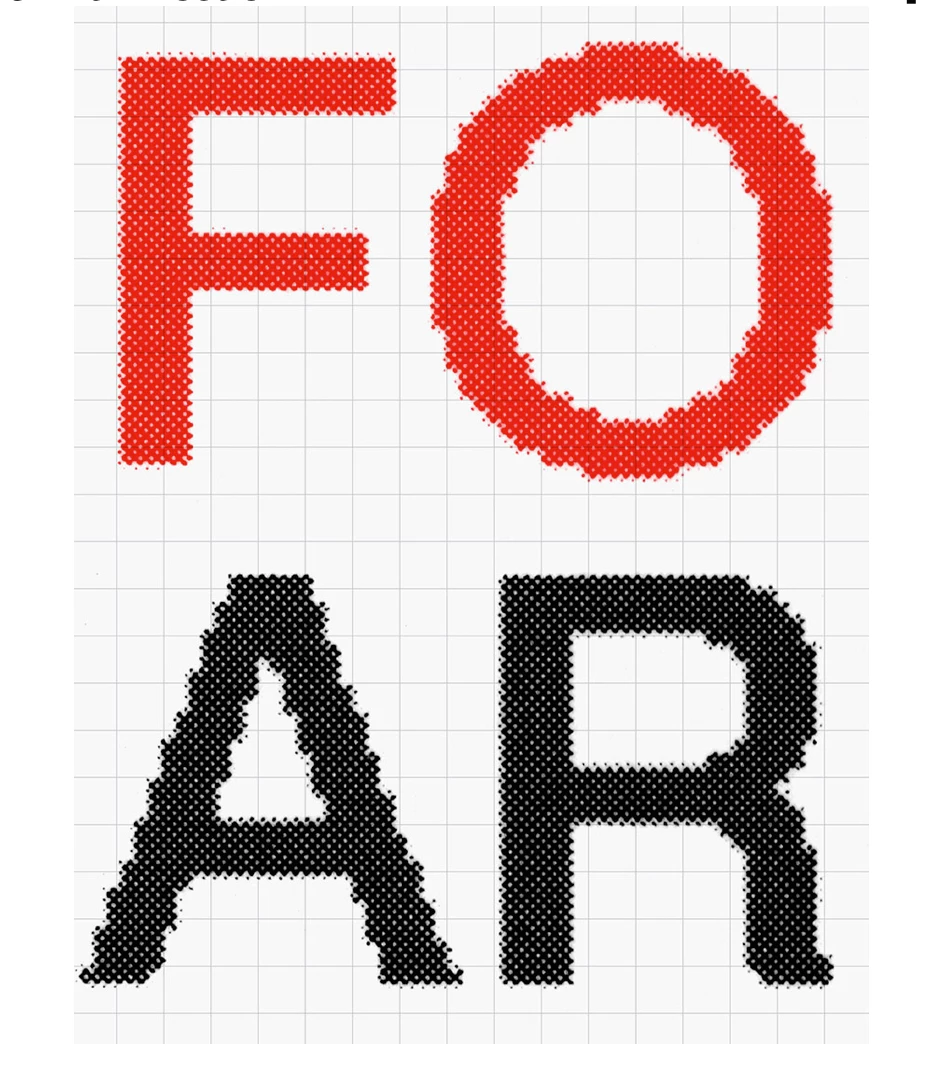
How would I achieve a consistent halftone effect inside a shape like this image?

  • January 21, 2021
  • 2 replies
  • 3151 views

I'm trying to replicate this typeface as closely as possible:

Ideally the result would be in a vector image. I also want to preserve the randomness you see on the edge of the glyphs. Should I be using Photoshop or Illustrator for this?
 

This topic has been closed for replies.

2 replies

Ton Frederiks
Community Expert
Community Expert
January 21, 2021
lolswagAuthor
Participating Frequently
January 21, 2021

Thanks for your reply. I understand how to create the jagged edges but I'm struggling to produce the same halftone effect as shown in the image. Any ideas on how I could replicate it?

Ton Frederiks
Community Expert
Community Expert
January 21, 2021

Text filled with a percentage of grey.

Rasterize Effect > Bitmap > low ppi

Vary the gray and the ppi to get the result you like.

Inspiring
January 21, 2021

Photoshop would be more appropriate and, perhaps, a little quicker.  You could start out in Illustrator by setting the type to the size you want ( in the end ) and applying a Black tint ( 85 - 90% ) and then Exporting the file as a .tiff @ 72(?)ppi.  Open the TIFF in Photoshop as a Grayscale image.  To get the stair stepping you want, you may have to reduce the resolution considerably.  For instance, something like 25ppi at your final size.  To blur the edges you can apply a Gaussian Blur ( select only the text and not the background ).  Once you see the blur you want, convert the Grayscale to 1-BIT Black and White ( apply a halftone screen in the conversion dialogs ).  The file size itself will be very small.  Back in Illustrator, you can apply whatever color to the file ( if necessary ).

lolswagAuthor
Participating Frequently
January 21, 2021

Thank you for your reply. 

I followed all your steps but the resulting bitmap image didn't come out how I wanted. What values should I input in the halftone screen dialogue option? This is currently what I'm getting. 


lolswagAuthor
Participating Frequently
January 21, 2021

I played around with the halftone screen options and went for a much higher resolution output (1400.)

It's closer but still not quite the look I'm after. Is there any way white dots can be smaller and spaced further apart. At the moment it seems the spacing is too even/ as even as the size. I'd also like it to seem more 'rounded' if that makes sense. In the example, some of the halftone dots seem to stick to eachother, as if they've been stamped on physically.