BenSCR
Inspiring
March 9, 2018
Answered

HUD

  • March 9, 2018
  • 3 replies
  • 2181 views

How can I create a HUD style/shape like this picture....

    Correct answer Mario Arizmendi

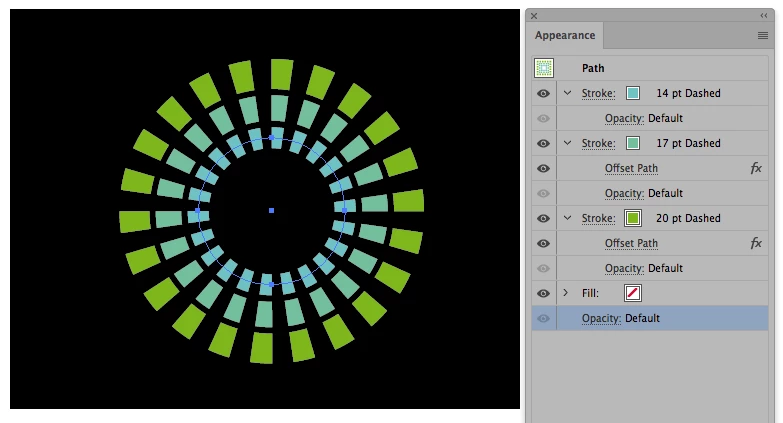
    Something like this

    3 replies

    Inspiring
    March 23, 2025

    I solve this problem with knockout group.

    Appearance palette:

    - delete dashed option on three strokes.

    - add new stroke (red color, but no meaning color, it's only for study), set big size and set dash and set opacity zero %.


    On layer "HUD icon Knockout" set Knockout group in Transparency palette.

    HUD icon for knockout<Ellipse> is nested with "HUD icon Knockout" layer.


    Uploaded new version of ai file (see link above|up|upward)

    Mario Arizmendi
    Mario ArizmendiCorrect answer
    Legend
    March 9, 2018

    Something like this

    BenSCR
    BenSCRAuthor
    Inspiring
    March 9, 2018

    Thanks for this screenshot, it works perfectly!

    What do I need to do to cut out elements to make it a 'Half-Moon' shape like the picture I posted.

    Mario Arizmendi
    Legend
    March 9, 2018

    So, you can Objetc/expand appearance and then erase the unwanted elements

    Monika Gause
    Community Expert
    Community Expert
    March 9, 2018

    Draw circles, cut parts out of them

    Apply thick strokes

    Apply dashes to strokes