
Exit
  • Global community
    • Language:
      • Deutsch
      • English
      • Español
      • Français
      • Português
  • 日本語コミュニティ
  • 한국 커뮤니티
0

i can't cut circle into 4 parts

Community Beginner ,
Nov 12, 2022 Nov 12, 2022

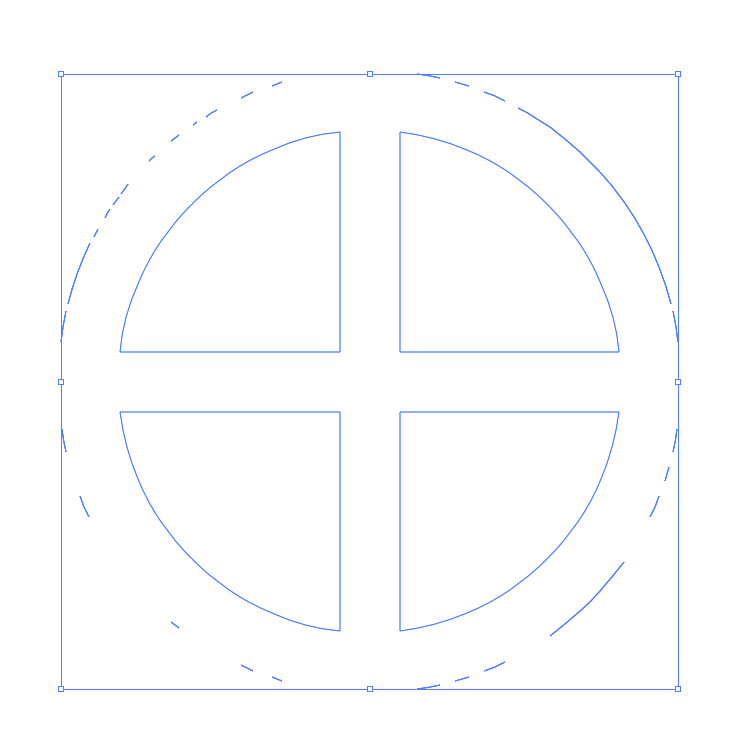
i've tried to do this lots of times but my end result is always different from the video tutorial shown

here


this is what i get, any idea whats happening here?
Illustrator_3vNqR5fhpP.png

TOPICS
Bug , Draw and design , Tools
612
Translate
Report
Community guidelines
Be kind and respectful, give credit to the original source of content, and search for duplicates before posting. Learn more
community guidelines

correct answers 1 Correct answer

Community Expert , Nov 12, 2022 Nov 12, 2022

I am afraid you have forgotten one of the first steps: Change the fill to NONE (your circle must not have a fill colour).

Translate
Adobe
Community Expert ,
Nov 12, 2022 Nov 12, 2022

Looks like you clicked Unite instead of Minus Front.

Translate
Report
Community guidelines
Be kind and respectful, give credit to the original source of content, and search for duplicates before posting. Learn more
community guidelines
Community Beginner ,
Nov 12, 2022 Nov 12, 2022

i'm clicking minus front

Translate
Report
Community guidelines
Be kind and respectful, give credit to the original source of content, and search for duplicates before posting. Learn more
community guidelines
Community Expert ,
Nov 12, 2022 Nov 12, 2022

Try again after restarting your machine. If that does not help try resetting the Preferences manually:

https://helpx.adobe.com/illustrator/using/setting-preferences.html


Translate
Report
Community guidelines
Be kind and respectful, give credit to the original source of content, and search for duplicates before posting. Learn more
community guidelines
Community Beginner ,
Nov 12, 2022 Nov 12, 2022

i already tried that as well, even re-installing the software, didn't fix

Translate
Report
Community guidelines
Be kind and respectful, give credit to the original source of content, and search for duplicates before posting. Learn more
community guidelines
Community Expert ,
Nov 12, 2022 Nov 12, 2022

Maybe show in a movie the exact steps you take?

Translate
Report
Community guidelines
Be kind and respectful, give credit to the original source of content, and search for duplicates before posting. Learn more
community guidelines
Community Beginner ,
Nov 12, 2022 Nov 12, 2022
Translate
Report
Community guidelines
Be kind and respectful, give credit to the original source of content, and search for duplicates before posting. Learn more
community guidelines
Community Expert ,
Nov 12, 2022 Nov 12, 2022

Please open the group with your circle in the layers panel (click on the small arrow). Please show a screenshot.


Or ungroup the group in which the circle is located. Is there really only the circle alone as a compound path?

Translate
Report
Community guidelines
Be kind and respectful, give credit to the original source of content, and search for duplicates before posting. Learn more
community guidelines
Community Expert ,
Nov 12, 2022 Nov 12, 2022

I am afraid you have forgotten one of the first steps: Change the fill to NONE (your circle must not have a fill colour).

Translate
Report
Community guidelines
Be kind and respectful, give credit to the original source of content, and search for duplicates before posting. Learn more
community guidelines
Community Beginner ,
Nov 13, 2022 Nov 13, 2022
LATEST

thank you its working perfectly now 🙂

Translate
Report
Community guidelines
Be kind and respectful, give credit to the original source of content, and search for duplicates before posting. Learn more
community guidelines

