
Participant
April 3, 2020
Answered

I can't use effects in Illustrator CC 2019

  • April 3, 2020
  • 2 replies
  • 8008 views

Hi, I have a problem with the effects panel in Illustrator, it doesn't apply any effects on any images/vectors/shapes, nothing. I have reinstalled several times, checked directories etc., but to no success. If anyone has any clue how to fix this it would be great.
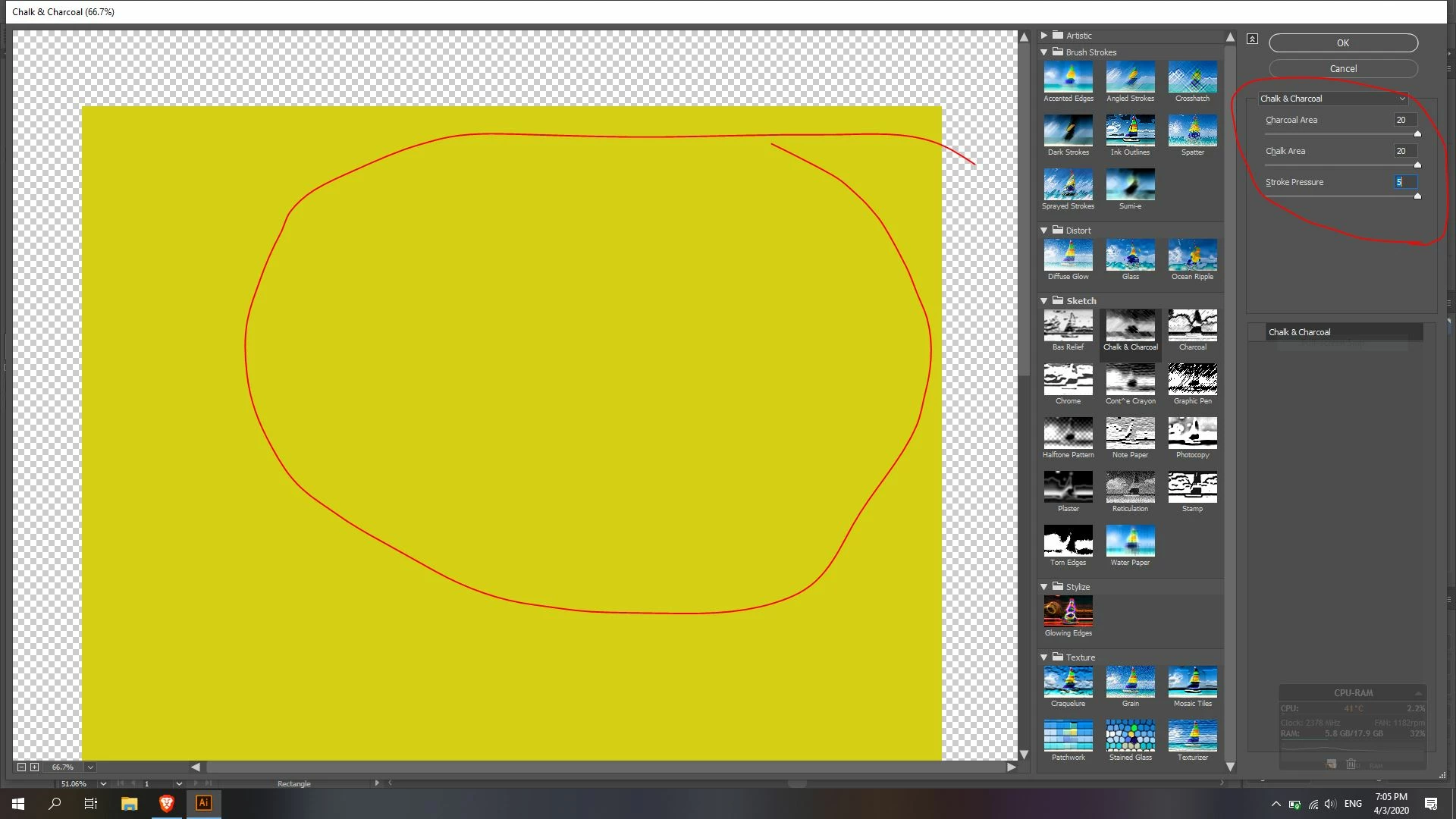
I'm uploading a screenshot so you can see exaxctly what I am talking about.

This topic has been closed for replies.
Correct answer Kurt Gold

Your screenshot shows that the preview for the Chalk & Charcoal effect is turned off.


Hence you don't see the effect in the Effect Gallery dialog.


Turn the preview on by clicking on the rectangle next (left) to the entry that says Chalk & Charcoal just below the effect settings in the right column of the dialog. An eye icon should appear then.

2 replies

Kurt Gold
Community Expert
Kurt GoldCommunity ExpertCorrect answer
Community Expert
April 3, 2020

Your screenshot shows that the preview for the Chalk & Charcoal effect is turned off.


Hence you don't see the effect in the Effect Gallery dialog.


Turn the preview on by clicking on the rectangle next (left) to the entry that says Chalk & Charcoal just below the effect settings in the right column of the dialog. An eye icon should appear then.

Participant
November 22, 2020

i have the same issue. i made sure the preview (eye) is on. but still effects arent applying. any update to this thread?

Monika Gause
Community Expert
Community Expert
April 3, 2020

What happens when you click OK?

The effect is listed in the bottom right, which shows that it has been applied.


If it still doesn't appear after clicking OK, try View > Preview on CPU.