
Participant
November 11, 2021
Answered

I don't recognize the workspace

  • November 11, 2021
  • 1 reply
  • 222 views

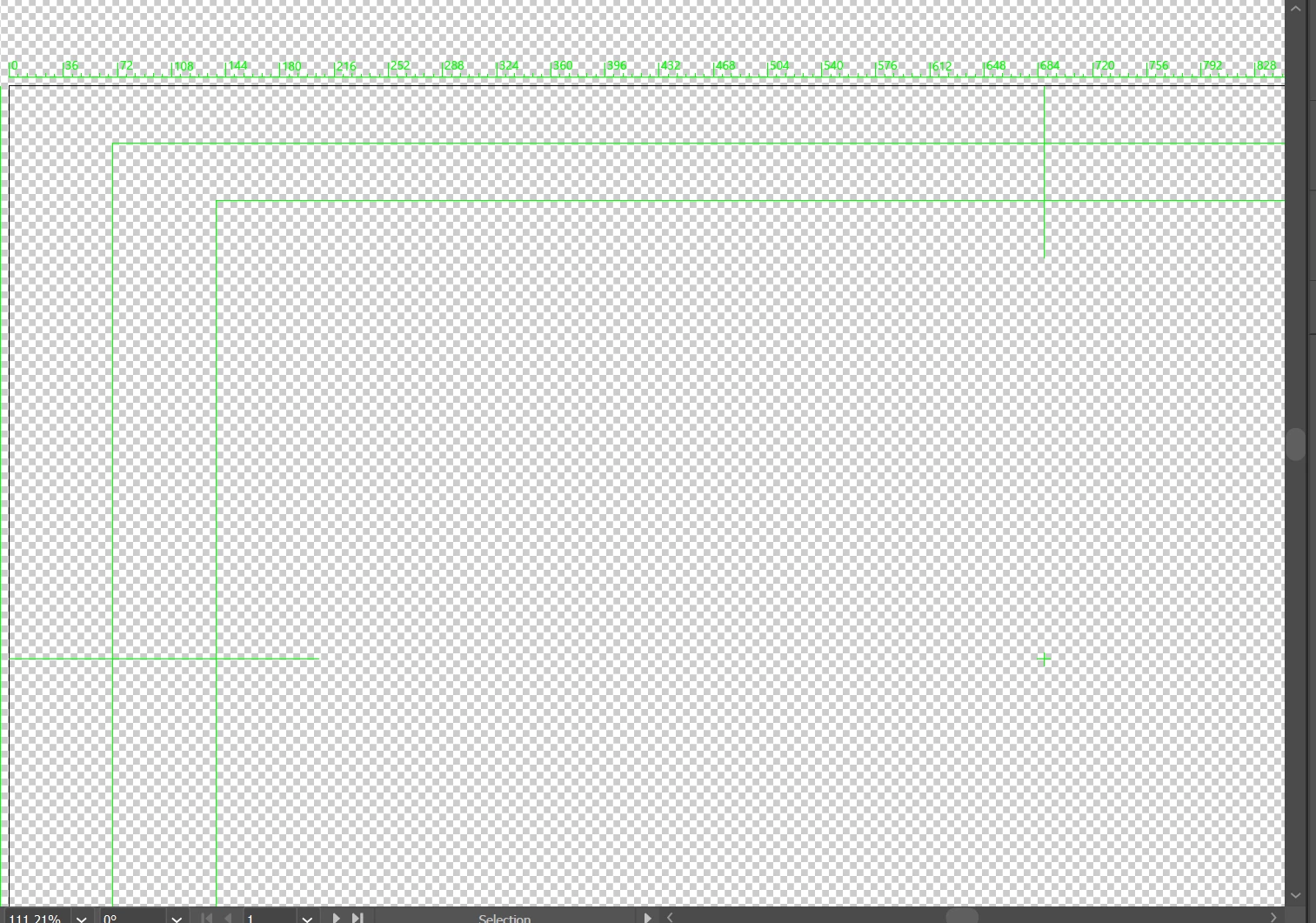
Just started a new job and when I create a new document in Illustrator, I have no idea what I'm looking at. There's gray grid with green lines and some type of green scale. Im sure all this is useful, but it ain't useful for me at the moment.  Can anybody tell me how to set this document to look like it used to so I see the area I'm supposed to be working in?  Your help would be very much appreciated.
 

This topic has been closed for replies.
Correct answer Larry G. Schneider

You have selected a New Document Profile from the Video category. The green lines denote video safe areas. If you don't need them just dump the file and use one from the Print or Art & Illustration categories.

1 reply

Larry G. Schneider
Community Expert
Larry G. SchneiderCommunity ExpertCorrect answer
Community Expert
November 11, 2021

You have selected a New Document Profile from the Video category. The green lines denote video safe areas. If you don't need them just dump the file and use one from the Print or Art & Illustration categories.

RaS51473Author
Participant
November 12, 2021

Thanks!  I was exploring and didn't realize I created a custom document while on the video tab.