Answered
I have a problem finding direction in Arabic and English. When writing

I have a problem finding direction in Arabic and English. When writing, tags are missing. How to solve the problem?

I have a problem finding direction in Arabic and English. When writing, tags are missing. How to solve the problem?
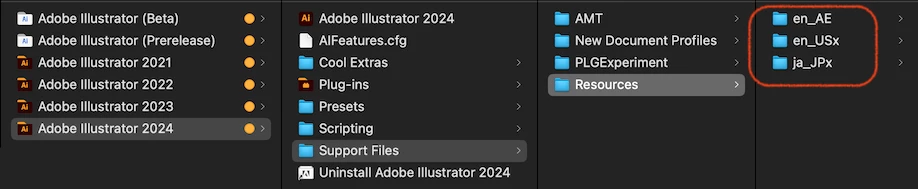
Look in the "/Applications/Adobe Illustrator 2024/Support Files/Resources" folder.
If multiple Languages are installed, disable the Languages you don't use by adding an "x" to them.
It should then start up in "en_AE". If you add an "x" to "en_AE" and remove the "x" from "en_US", it will start up in "en_US".
In the case of Illustrator, you can install multiple Languages without uninstalling the original Language, but the Language switching UI is not supported.
Already have an account? Login
Enter your E-mail address. We'll send you an e-mail with instructions to reset your password.
 AdChoices