Participant
September 1, 2024
Answered

I have a problem finding direction in Arabic and English. When writing

  • September 1, 2024
  • 2 replies
  • 1227 views

I have a problem finding direction in Arabic and English. When writing, tags are missing. How to solve the problem?

This topic has been closed for replies.
Correct answer silk-m

Look in the "/Applications/Adobe Illustrator 2024/Support Files/Resources" folder.
If multiple Languages ​​are installed, disable the Languages ​​you don't use by adding an "x" to them.
It should then start up in "en_AE". If you add an "x" to "en_AE" and remove the "x" from "en_US", it will start up in "en_US".
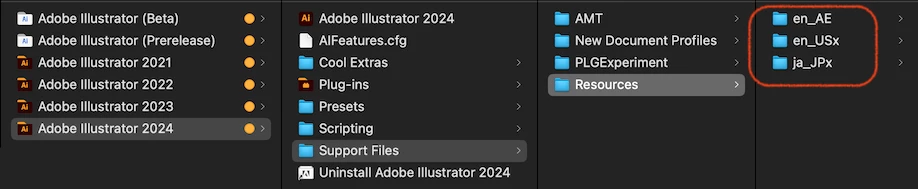
 

In the case of Illustrator, you can install multiple Languages ​​without uninstalling the original Language, but the Language switching UI is not supported.

2 replies

Mohammad.Harb
Community Expert
Community Expert
September 2, 2024

From the creative cloud app preferences, Make sure the default app langugae is set to English/arabic support as shown in the screenshot below. once you choose it you have to reinstall illustrator. 

Participant
September 2, 2024
  • I already did that and the problem still exists.
silk-m
Community Expert
silk-mCommunity ExpertCorrect answer
Community Expert
September 2, 2024

Look in the "/Applications/Adobe Illustrator 2024/Support Files/Resources" folder.
If multiple Languages ​​are installed, disable the Languages ​​you don't use by adding an "x" to them.
It should then start up in "en_AE". If you add an "x" to "en_AE" and remove the "x" from "en_US", it will start up in "en_US".


In the case of Illustrator, you can install multiple Languages ​​without uninstalling the original Language, but the Language switching UI is not supported.

--Susumu Iwasaki
Monika Gause
Community Expert
Community Expert
September 1, 2024

Did you already check out this help document: https://helpx.adobe.com/illustrator/using/arabic-hebrew.html 

Participant
September 2, 2024

Not found in options