Participant
March 24, 2021
Answered

I want o import Grouped objects in CorelDRAW 2020 as same in Adobe Illustrator

  • March 24, 2021
  • 2 replies
  • 3413 views

Previously it was properly working. Like the objects which are grouped in AI stays grouped while importing in Corel. But now it is importing in single layers, by which it get some harder to work. Does there is any option to group the on the time of saving the document?

Correct answer Bobby Henderson

Thank you Bobby,


Yes I do the same ...

However no matter what it imports as a pdf. 
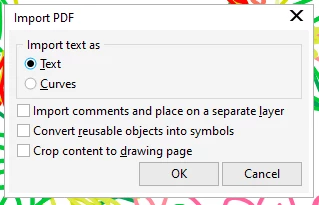
Usually I just accept this however for this project I really need to maintain the original layers.

If I am missing something its really hidden


I also have the same version of CorelDRAW



OK, I'm confused. I thought you were having problems trying to control whether Illustrator AI files would import into CorelDRAW on a single layer or multiple layers. That seemed to be the context of your response to my comment from March of 2021.


The problem is the Illustrator art importing as PDF content? That usually happens when CorelDRAW is trying to import Illustrator files in a format too new for it to support.


Whoever is giving you Illustrator AI files needs to take a couple steps more than just hitting the "save" button when creating/saving the AI files. That just saves them in the latest version format. They're probably giving you files saved in Illustrator CC 2023 format with PDF compatiblity turned on. CorelDRAW can't import the AI 2023 data, so it reverts to importing the PDF data instead. That's better than nothing actually. If they unchecked the "Create PDF Compatible File" option in the Save dialog box you would end up with an AI file that would not import at all.


They need to click on the Save As command and under "versions" in the dialog box they need to choose an older "legacy format." Out of habit I usually choose version CS6 when saving AI files to be imported into CorelDRAW. The "Legacy CC" format delivers some hit and miss results.

Even if they can give you proper CS6 version AI files you could encounter plenty of other issues.

2 replies

Community Expert
March 24, 2021

When you import an Illustrator document into CorelDRAW there is an option in the lower part of the dialog box that says "Maintain layers and pages" that can be checked or not. If it is not checked the Illustrator artwork will import on one layer.

Participating Frequently
September 14, 2023

Sorry but no there isn't.

Importing an AI file comes up as "Import PDF" (CorelDRAW 2023)


Participating Frequently
September 14, 2023

OK, I'm confused. I thought you were having problems trying to control whether Illustrator AI files would import into CorelDRAW on a single layer or multiple layers. That seemed to be the context of your response to my comment from March of 2021.


The problem is the Illustrator art importing as PDF content? That usually happens when CorelDRAW is trying to import Illustrator files in a format too new for it to support.


Whoever is giving you Illustrator AI files needs to take a couple steps more than just hitting the "save" button when creating/saving the AI files. That just saves them in the latest version format. They're probably giving you files saved in Illustrator CC 2023 format with PDF compatiblity turned on. CorelDRAW can't import the AI 2023 data, so it reverts to importing the PDF data instead. That's better than nothing actually. If they unchecked the "Create PDF Compatible File" option in the Save dialog box you would end up with an AI file that would not import at all.


They need to click on the Save As command and under "versions" in the dialog box they need to choose an older "legacy format." Out of habit I usually choose version CS6 when saving AI files to be imported into CorelDRAW. The "Legacy CC" format delivers some hit and miss results.

Even if they can give you proper CS6 version AI files you could encounter plenty of other issues.


Thank you Bobby, it seems that would be the problem, and also answers a question I had on why some ai files would not open because as you said "unchecked the "Create PDF Compatible File" option in the Save dialog box you would end up with an AI file that would not import at all.". BINGO!


These are curve drawings without any effects or fills but lots of curves in different colors. So perhaps your suggestion of saving as Legacy CC version CS6 would be no problem. I'll ask for that.


It is interesting to mention that if I export to ai from CorelDRAW all the layers are lost, however if I export to a pdf all the layers are preserved when opened by Illustrator.


Thank you again Bobby, you have the answers.


Cheers!


Monika Gause
Community Expert
Community Expert
March 24, 2021

You will probably have to contact Corel about it.


But what exactly are you saving? I haven't tested yet, but as far as Iknow Corel can only import up to version CC2019. So if you save as AI 2020, then maybe CorelDRAW imports the PDF part of the file and that's what you are seeing. So maybe try and save to alegacy CC version in Illustrator and then the import works better.

Rahul5DB9Author
Participant
April 3, 2021

My problem has been solved by switching to CC 2019. But still, I had to open the latest versioned file in CC 2020 then save that in the lower version & then use it in CC 2019.