JonathanArias
Legend
June 22, 2017
Answered

Ideas on how to make a metal stent

  • June 22, 2017
  • 3 replies
  • 1611 views

Hi,

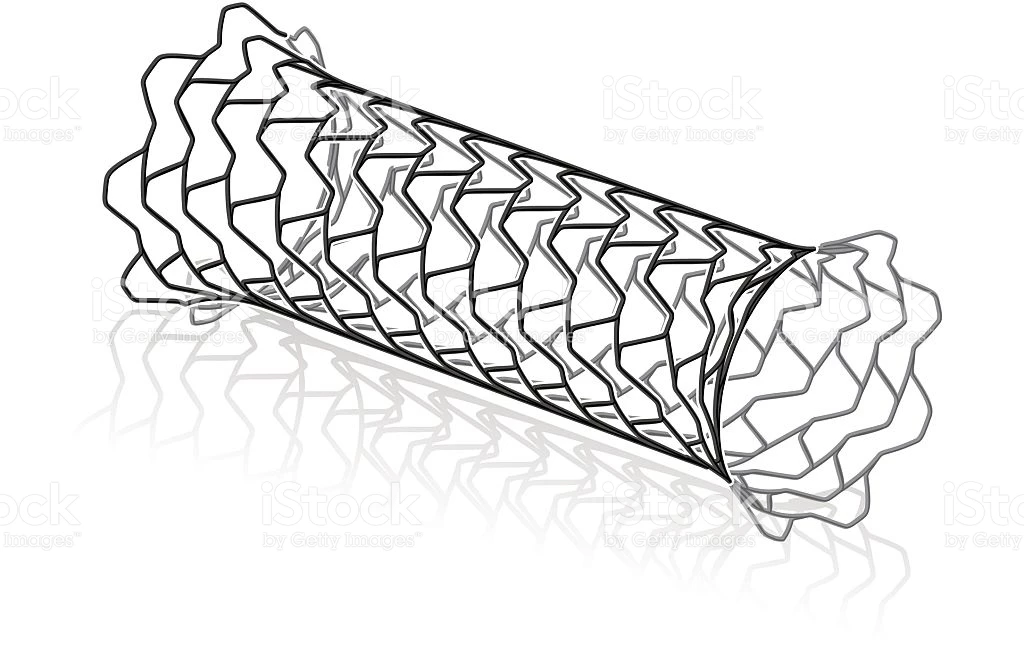
looking for ideas on how to go about making a metal stent that will be super editable in the future in illustrator. attached is an image of what they look like. I am positive the client will ask, " can you bend it this way, or can you tilt it that way or can you show it in this perspective".

What would be the best way to make this, so its friendly to the clients requests that might and will come in the future?

if you google metal stent you can see all the way this one item is used :
https://www.google.com/search?q=metal+stent&rlz=1C5CHFA_enUS739US740&source=lnms&tbm=isch&sa=X&ved=0ahUKEwjJmbGKgtLUAhWB…

    This topic has been closed for replies.
    Correct answer Mike_Gondek10189183

    Make a symbol of your flat pattern

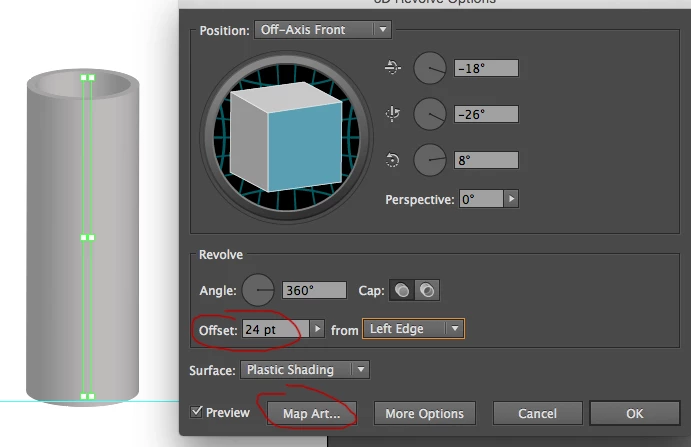
    Draw a thin rectangle

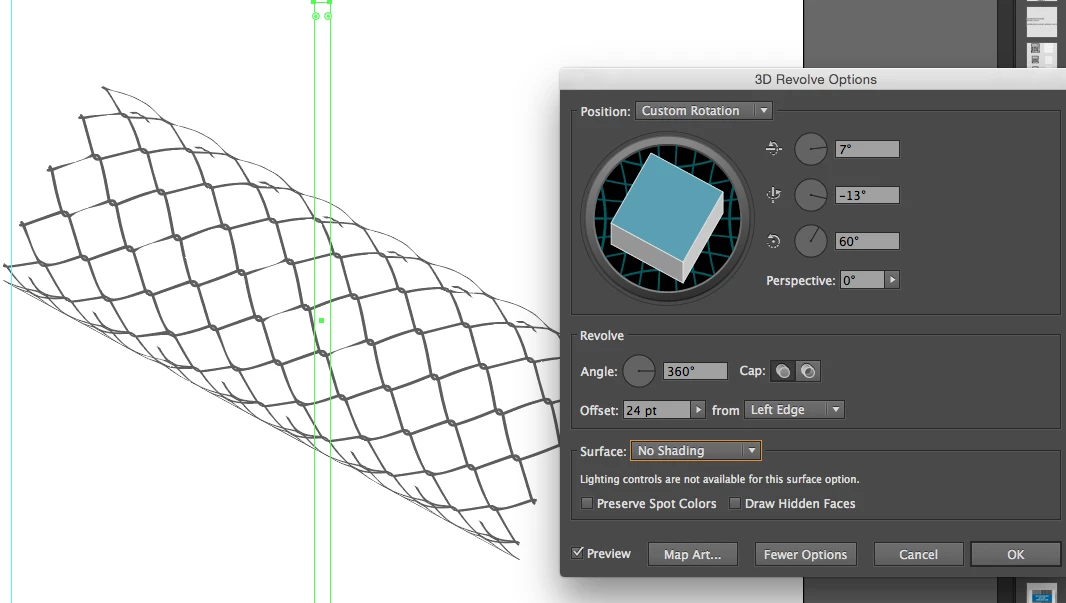
    effct >> 3D > Revole

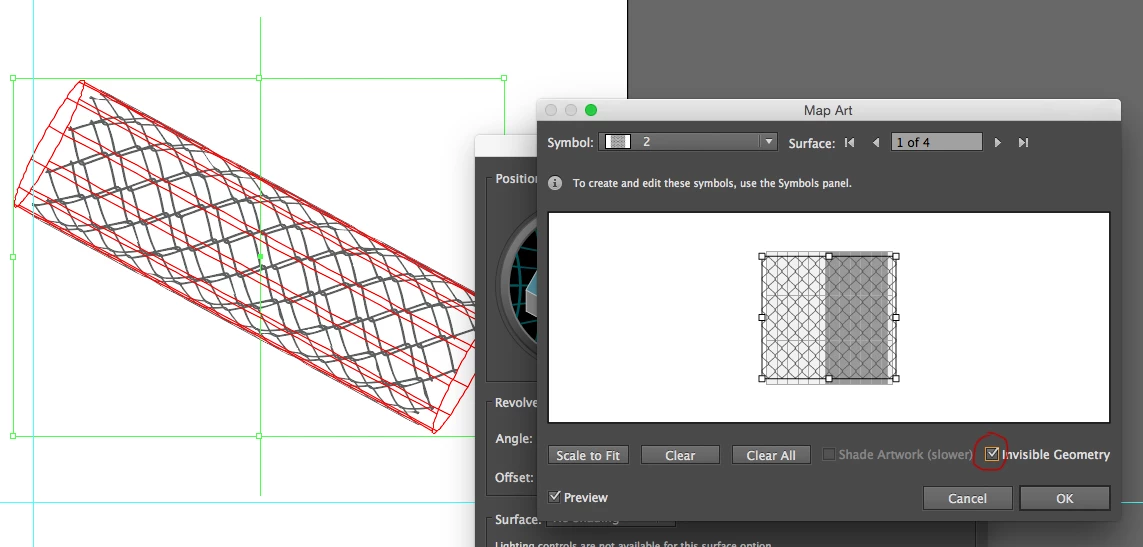
    Then click map art and apply the symbol pattern you made

    Actually make this a line, and click invisible geomoety.

    You can then rotate and make edits as requested.

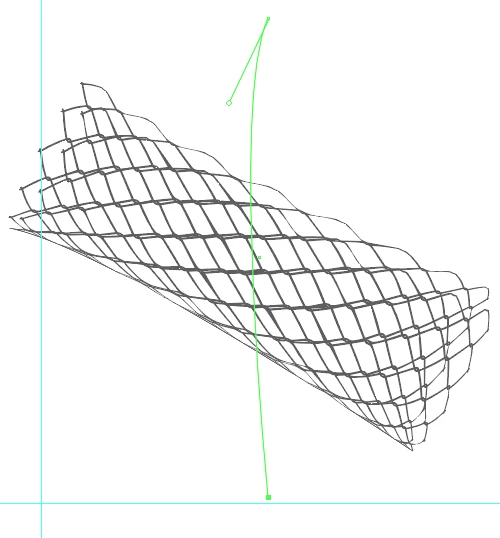
    You can pull a bezier end to flare, bit do not add more points as this gets out of control with too many surfaces, so stay simple.

    3 replies

    JonathanArias
    Legend
    June 23, 2017

    here is what it does when i try to map of a symbol made of dynamic effects.

    Mike_Gondek10189183
    Community Expert
    Community Expert
    June 23, 2017

    I got a little closer trying again today. Seems if you pull the handles out they reduce the amount of

    I circled in red though problem areas, and they exist after expanding. 3D extrusion in Illustrator often disappoint. There are some people out there whom have developed some amazing workarounds, so hope may exist, but Adobe really needs to work on this as the same problems over and over.

    KPT vector Effects 3D extrusion for Illustrator worked better and I used for final artwork on Frito-Lay and McDonalds. But Kai Krause sold his company and retired much too early, so did not have a chance to take their amazing suite of effects further. Whomever the developers along were at Metacreations, bravo you did some great work!

    Below is my CC2015 worker file incase anyone else has any ideas on this.

    http://files.kaleidoscopechicago.com/_iBCzRXjjrTnt4R

    stent.ai.zip

    691 KB

    The URL will expire on July 23.

    Monika Gause
    Community Expert
    Community Expert
    June 23, 2017

    The problem zones can be solved by pulling the handles longer. I'd rather eliminate those handles altogether, but then the pattern vanishes.

    JonathanArias
    Legend
    June 23, 2017

    Yes, its a medical device so i have to get 100% on target or they will point out to me it does not match. what you suggest is a gorgeous effect Mike. Let me play with it. Otherwise i am not sure illustrator can get us where they want to be and they might just have to buy the image from istock. i was trying to find a way to let illustrator do the work for me fast. But it has to be 100% accurate like the photo in every way since its medical/scientific publications...

    But you did answer the the problem. the issue is with illustrators capability, but let me play around with it. I tried to make the patter as one line, do effects and make that a symbol, but it did not want to map it till i expanded appearance and that breaks the dynamic capability. it only wants to map expanded objects, not symbols made of dynamic effects.

    Mike_Gondek10189183
    Community Expert
    Mike_Gondek10189183Community ExpertCorrect answer
    Community Expert
    June 22, 2017

    Make a symbol of your flat pattern

    Draw a thin rectangle

    effct >> 3D > Revole

    Then click map art and apply the symbol pattern you made

    Actually make this a line, and click invisible geomoety.

    You can then rotate and make edits as requested.

    You can pull a bezier end to flare, bit do not add more points as this gets out of control with too many surfaces, so stay simple.

    JonathanArias
    Legend
    June 23, 2017

    This is fantastic, and it gets me 90 percent there, but the outside edges are not matching the device, how would you tackle that?

    Mike_Gondek10189183
    Community Expert
    Community Expert
    June 23, 2017

    If you are struggling with the outside edges, you may want to try and use more than 2 vector points. Try 3 with one in the middle. I tried 4 points, but try that also as there might be a way to not get so many surfaces.

    Problem with that is I  I think you will get more than surfaces to have to apply the map to, but getting them to match seamlessly could be tough. In my line of work I do tho get to use 3D transform much, so if someone else has suggestions, we are getting into an effect that Adobe needs to work on to improve.

    Do you have something you can trace on top of to get the arc perfect? Are you trying to match the sample you posted exactly?