
Participant
April 21, 2025
Question

Illuatrator add "0000" to every units

  • April 21, 2025
  • 1 reply
  • 223 views

Hi, I have a problem, I'm using Illustrator 2025 and it's adding 0000 at the end of every units, if i select all and then enter the number i want it will automatically change it but will not scale my objet bigger than intended, if i dont select all and write the good number carefully it will be the insanely bigger scale due to the number being 2000 instead of 2, here are some pictures to show what i mean:
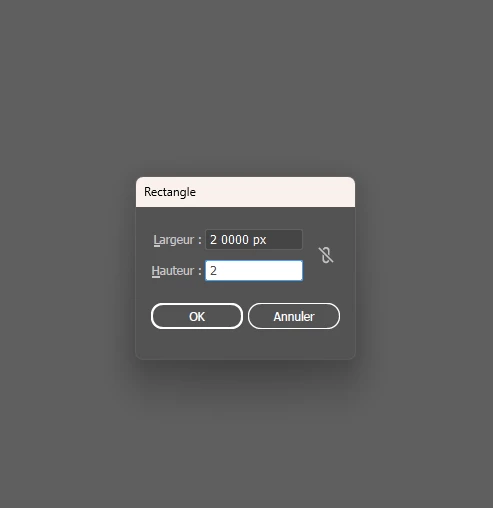
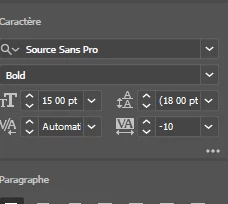


This is on everything and is quite bothersome, it is important to note that i'm a windows user, i do not have avast on my laptop but i do use autocad and revit for my work, i hope it's not link to those but is anyone have an answer please tell me


1 reply

Bill Silbert
Community Expert
Community Expert
April 22, 2025

Try resetting your Illustrator preferences. This will restore the program to its defaults. If the issue is the result of program corruption then trashing preferences should help.

To reset preferences on a PC:

You can try the quick way of resetting on a PC which is to hold down Ctrl + Alt + Shift when launching Illustrator and respond affirmatively when asked if you want to reset. There have been some recent reports that the window asking if you want to reset is not popping up but that the prefs are being reset anyway. If this works great but if it doesn’t you may have to manually delete them.

To do so: On Windows 7 and above the preference files are hidden. To find them go to the Control Panel and open Folder Options and then click the View tab. Then select “Show hidden files and folders” or “Show hidden files, folders or drive options” in Advanced Settings. Then delete (or rename) the folder at the end of this path: C:\Users\[User Name]\AppData\Roaming\Adobe\Adobe Illustrator [version number]\ Settings\<Language>. Make sure that Illustrator is closed when you do this. When you relaunch the program it will create new preference files and the program will be at its default settings.

The advantage of manually deleting preference files is that after you’ve reset up the program (make sure that no document window is open) to your liking, you can create copies of your personalized “mint” preference files (make sure that you quit the program before copying them—that finalizes your customization) and use them in the future to replace any corrupt versions you may need to delete.

Participant
April 22, 2025

Hi thanks for your answer, unfortunatly the problem is still there, do you have any other ideas?