
JCCGE
Participant
January 24, 2018
Question

Illustrator 2018 crash swatchlib.aip

  • January 24, 2018
  • 4 replies
  • 6844 views

Hello,

I upgraded to the latest build of Ai (as of 1/23/18) but upon launch this message came up
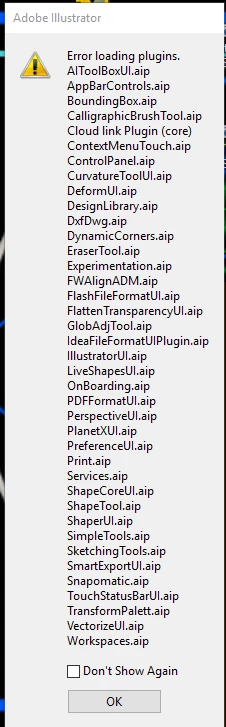
Then after pressing ok I got this:

Then this:
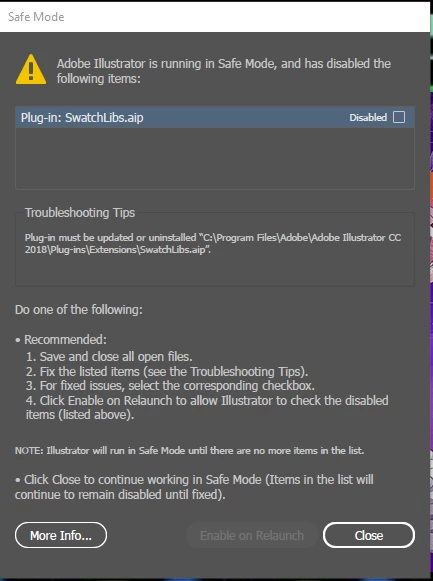
It let me enter the program but no tools appeared. I closed then restarted and it crashed completely. I can get back in but it does't give me any tools. I uninstalled and and downloaded the 2017 version- I still get a few errors...
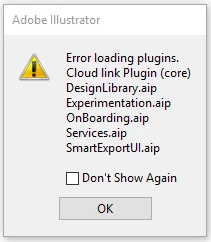
but I can at least open the program and use it.

I have Windows 10.

I've read a few other posts here and tried setting my printer to PDF by default. It doesn't help.

Thanks

This topic has been closed for replies.

4 replies

Participant
August 19, 2019

Hi,

I also experienced an issue like that, got the same "safe mode" message listing SwatchLibs.aip. After following all the possible instructions I had found online, I was totally stuck and contacted Adobe Support. I was online with one of their support masters for a while (sharing my screen), and after checking an extensive amount of settings and preferences, everything got solved after he VALIDATED FONTS.

Hope this helps. Good luck.

Andrea

JCCGE
JCCGEAuthor
Participant
February 17, 2018

Sorry- just getting back to this. I use AI everyday and don't have a lot of time to go through the process of rolling it back to a version that works. It also makes new errors when I roll it back and can't afford to have it totally go down.

So I followed the directions in the link...

I renamed the "Adobe Illustrator <version number> Settings" from 21 to 22.

I also went in and found the pref file and deleted it.

It gave a similarly long list of plugins that couldn't load.

I tried going back and renaming the version file back to 21 then loaded it again- it generated a new version 22 folder so I tried deleting the version 21 folder.

Still didn't work so I uninstalled and chose not to keep the preferences.

I deleted the "Adobe Illustrator" file in the Roaming>Abobe>Adobe Illustrator because it had 21.0 files in it.

I then reinstalled AI.

I still get the list of aip's that won't load.

It still doesn't work.

Srishti Bali
Community Manager
Community Manager
February 8, 2018

Hi jccge,

I would like to know if the steps suggested by Monika worked for you, or the issue still persists.

Kindly update the discussion if you need further assistance with it.

Thanks,

Srishti

JCCGE
JCCGEAuthor
Participant
February 17, 2018

Sorry- just getting back to this. I use AI everyday and don't have a lot of time to go through the process of rolling it back to a version that works. It also makes new errors when I roll it back and can't afford to have it totally go down.

So I followed the directions in the link...

I renamed the "Adobe Illustrator <version number> Settings" from 21 to 22.

I also went in and found the pref file and deleted it.

It gave a similarly long list of plugins that couldn't load.

I tried going back and renaming the version file back to 21 then loaded it again- it generated a new version 22 folder so I tried deleting the version 21 folder.

Still didn't work so I uninstalled and chose not to keep the preferences.

I deleted the "Adobe Illustrator" file in the Roaming>Abobe>Adobe Illustrator because it had 21.0 files in it.

I then reinstalled AI.

I still get the list of aip's that won't load.

It still doesn't work.

Monika Gause
Community Expert
Community Expert
February 17, 2018

Between uninstalling and reinstalling it's a good practice to run the Adobe Cleaner tool

Use the Creative Cloud Cleaner Tool to solve installation problems

But your setting seems so irritated that someone will need to actually look at it. That most probably won't happen on a weekend.

Please contact Adobe Customer Care: Contact Customer Care

Monika Gause
Community Expert
Community Expert
January 24, 2018

When upgrading did you migrate the preferences?

You might try if resetting them helps.

Try and rename the folder as described in here:

How to set preferences in Illustrator