


- Home
- Illustrator
- Discussions
- Illustrator 2020 24.1.2 Copy paste text don´t give...
- Illustrator 2020 24.1.2 Copy paste text don´t give...

Copy link to clipboard
Copied
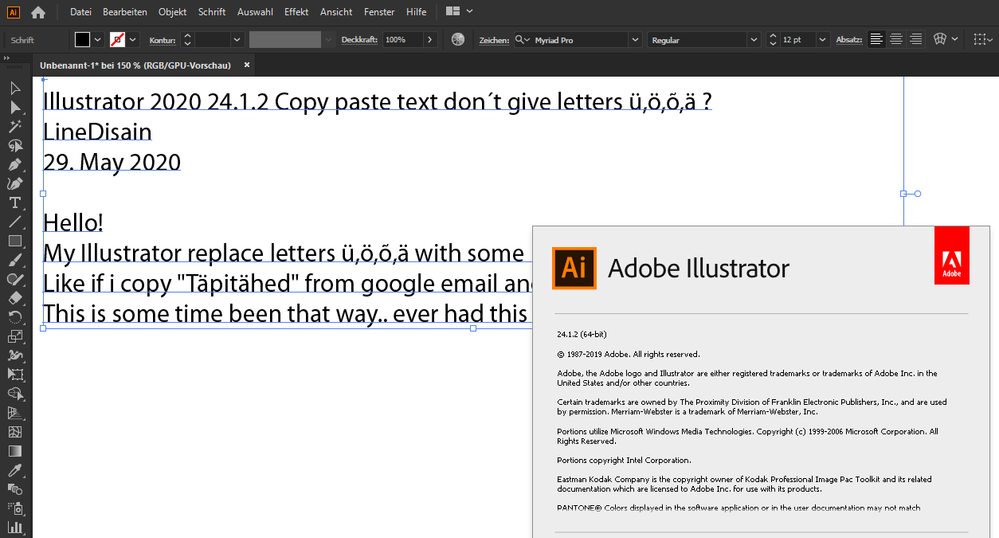
Hello!
My Illustrator replace letters ü,ö,õ,ä with some mess..
Like if i copy "Täpitähed" from google email and paste it AI.. then it comes like this:
This is some time been that way.. ever had this before..



 1 Correct answer


I saw that you reported the problem.
users with the same problem can vote here:


Explore related tutorials & articles
 10
Replies
10
10
Replies
10

Copy link to clipboard
Copied
Looks like a bug to me.
If I copy the text from this page into Illustrator, I can see the problem.
If I copy the text from this page into InDesign, it pastes without the problem.
If I drag the correct text from InDesign into a CC library and drag it into Illustrator, there is no problem.
You may want to report it here:
Copy link to clipboard
Copied
Thanks for thinking along. I reported a problem.

Copy link to clipboard
Copied
I see the same behavior copying from Apple Mail as well, but if I first paste it into the Mail header (e.g. the Subject line) then copy or cut, it pastes correctly into Illustrator. Is there a reason email body copy has different characteristics from header copy? Sorry, time for bed.
Peter
Copy link to clipboard
Copied
I just tried that, but it doesn't work for me either.
Copy link to clipboard
Copied
I did notice if i choose Type tool and click on artboard before and then paste.. then it gives correct paste. But if just paste..it gives mess..
Copy link to clipboard
Copied
Interesting, pasting with the Type tool in a type object is correct, pasting with the Selection tool is wrong.
Good to have a workaround.
Copy link to clipboard
Copied
But it pastes correctly in AI CC2019.
Looks like a 2020 problem
Copy link to clipboard
Copied
Yes it was ok with CC2019. I'm not quite sure, but I think it worked with the 2020 version at the beginning .. or I didn't copy any punctuation letters .. unlikely. Or still .. I don't remember anymore. But this has been the case for some time. annoying.. 😞
Copy link to clipboard
Copied
I saw that you reported the problem.
users with the same problem can vote here:

Copy link to clipboard
Copied
Looks like only a Mac problem with AI 2020
Works as expected under Win 10 with Illustrator CC2020 (24.1.2)


Get ready! An upgraded Adobe Community experience is coming in January.
Learn more
 AdChoices