

Tony Is Not a Unique Name
Inspiring
December 10, 2020
Answered

Illustrator 2020 Save as SVG Default Decimal Places

  • December 10, 2020
  • 2 replies
  • 13606 views

Hoping someone has run into this before and figured out a workaround — I'm almost ready to install an older version of Illustrator just to avoid these thorns in my workflow.


I've noticed (after totally destroying a couple of designs) that Illustrator 2020's SVG saving behavior does not respect prior settings upon first launch. Specifically, the SVG "Decimal Places" setting. In prior versions, as far back as I can recall, once the precision was set to, for example, 5 decimal places, that value was used by default, and it only required fixing if you had to save with a different value for one particular file.


The new behavior in Illustrator 2020 seems to be that it resets to a value of 1 each time the app is launched. If I open an existing SVG file that I created in Illustrator, I cannot just use the normal Save function, otherwise every element's decimal precision drops down to 1.
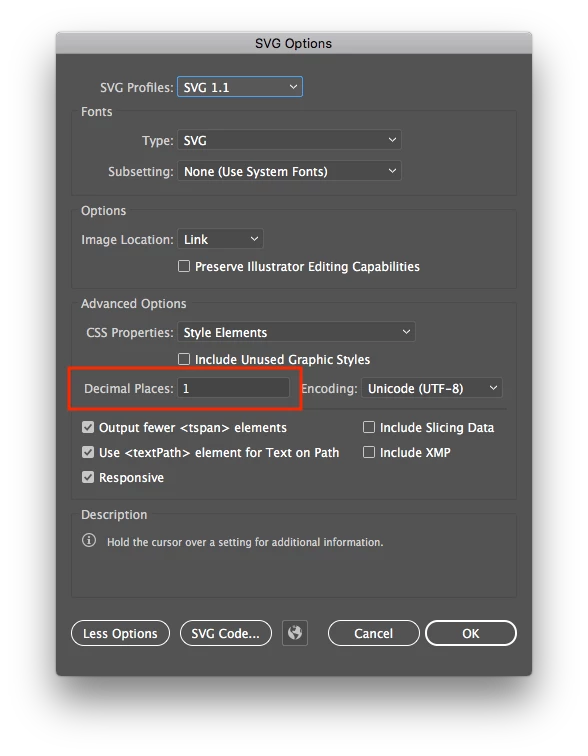
Once I change it, the new value remains for subsequent saves, as long as I don't quit Illustrator. Next time I reboot or relaunch Illustrator, the first save of an SVG file will be with 1-decimal precision again.


Actually, come to think of it, there are many settings that are no longer "sticky" — when using the Path Simplify tool, prior versions would retain whatever settings were last used within the current session (I only ever use it to convert to straight lines, so it's particularly frustrating to now have to click the checkbox every single time. So, maybe this is all intentional... really hoping not, though.


Is there some default setting I can change that will make this stick? Maybe a plist setting or something in a dictionary file I can edit? So far, I haven't been able to find anyone online mentioning this behavior, but I'm guessing most people don't edit native SVGs. Luckily I'm pretty good with version control, but it's still really unsettling, kinda like using a loose razorblade to break down cardboard boxes. Both run the risk of inadvertently reducing the length of digits. 😉 
 

Correct answer Tony Is Not a Unique Name

Actually, I stopped encountering the bug after removing my User Preferences file (under Library/Application Support/Adobe on macOS) — not exactly sure what the problem was, because I was able to restore the User Preferences file and the bug didn't return, so my guess is there's some other support file or something cached that is preventing your changed value from sticking. I haven't run into this bug in the past few years.

2 replies

Inspiring
January 31, 2025

It looks like I'm late to the party, but I've just come across this issue myself and I'm flabbergasted that Adobe hasn't done something about this. I don't care if the default precision is set to 1 decimal place AS LONG AS I can permanently change that precision value so it sticks on every launch of the program.

As of right now, it's extremely easy to corrupt existing SVG files if you don't forget to first set the precision manually by using "Save As..." first, and then changing the precision to a higher decimal point value.

I am terrified to think of how many SVG files and icons that I've corrupted by making small changes and then resaving without realizing that the precision was reset to its default value of 1.

I've posted about this issue in detail on the forums here:
https://community.adobe.com/t5/illustrator-discussions/opening-a-svg-and-then-re-saving-it-causes-severe-distortions-in-the-resulting-file/td-p/15123107

And I've also posted a feature request on Uservoice here:
https://illustrator.uservoice.com/forums/601447-illustrator-desktop-bugs/suggestions/49398668-svg-precision-and-options-are-reset-on-every-launc

I would really appreciate it if you or anyone else reading this takes a second to vote on the issue so that it gains some traction and visibility. It's really a shame that this behavior continues to exist in the current version of IL.

Tony Is Not a Unique Name
Tony Is Not a Unique NameAuthorCorrect answer
Inspiring
February 5, 2025

Actually, I stopped encountering the bug after removing my User Preferences file (under Library/Application Support/Adobe on macOS) — not exactly sure what the problem was, because I was able to restore the User Preferences file and the bug didn't return, so my guess is there's some other support file or something cached that is preventing your changed value from sticking. I haven't run into this bug in the past few years.

Participant
February 7, 2025

This worked for me as well. After removing all illustrator settings files just now from %appdata%/Adobe/ the last chosen number is now the default when using Save As -> SVG

Monika Gause
Community Expert
Community Expert
December 10, 2020

The preferences file should be reset on every update, so no, you can't make this sticky.

But then: SVG should never be your work file. It's not meant for that in Illustrator. There is only one application that has SVG as its native file format, and that is Inkscape. For every other application, SVG is not suitable for roundtripping.

Tony Is Not a Unique Name
Inspiring
December 17, 2020

Monika,


Thanks for the reply. Not sure I agree, unless what you're describing is specific to Illustrator CC 2020. The general rule is that, if you can save a file after opening it (not "save as"), the application natively supports that format. Sure, .ai files have more features and capabilities than a simple SVG format, but if you're editing SVG files, you're already working within the confines of what's possible in SVG format. Every now and then, it'll warn that transforms are expanded, which is kind of expected in those situations anyway. Plus, once I work around the horribly destructive "who needs more than one decimal place" bug, everything behaves as expected, so I kinda suspect something else may be the culprit here.


If that is the case though, they really need to remove those other file formats from the Save dialog — after all, historically that is the differentiation between "save" and "export". Having said that, I've edited SVG and PDF files natively in Illustrator for nearly three decades (crap, I feel old) without running into any real issues. If this was literally any other application, I would totally buy that explanation and chalk it up to mindless developers not paying attention. But, the Adobe suite has been a rock solid powerhouse that I've used regularly since the 1990s (I switched from Photostyler to Photoshop when version 3 introduced the concept of layers, and never looked back), so I have to believe Adobe would, at a minimum, display a message along the lines of "Warning: saving with current settings will result in lower precision". I mean, incompetence knows no bounds, so it's definitely *possible* that Adobe's development team made a bunch of really dumb decisions, but that just seems really out of character, based on my past experience.


I would definitely consider using Inkscape, except for, ya know, all the features it doesn't have. 🙂 I think it would take at least 4 or 5 bad Illustrator releases in a row before I started exploring alternatives, and even then, Illustrator CC 2019 still runs fine. Maybe I still have a copy of CorelDRAW on floppies somewhere... 🙂


I'll go ahead and open a support ticket with Adobe, and update this thread with whatever I find out, hopefully anyone else who runs into this issue will be able to find this thread. I'm thinking/hoping maybe it's a bug, seeing as how I couldn't find any references to this behavior otherwise. Surely I'm not the only one who uses Illustrator to work with non-AI sources.


For what it's worth, my preferences file isn't reset on every update, but on each launch of the application. Assuming, that is, that the preferences file keeps track of things like if you used horizontal or vertical flip last, what settings you used in a Save dialog, etc -- my generic settings like units/rulers, workspace layout, scratch disk are all preserved, so I had assumed they just stopped keeping track of these other settings. Maybe I've got a corrupt config file somewhere or something. (Fingers crossed.)

Tony Is Not a Unique Name
Inspiring
December 17, 2020

Heh, I just re-read my post, and realized I totally misspoke. I should've said I've been using Illustrator since the 90s, and have been editing SVG files natively for years. Clearly I would not be a good copyeditor. Pretty sure I didn't edit SVG files in Illustrator until around 2015, though, it has worked just fine until this recent update.