

Shlomit Heymann
Inspiring
December 13, 2020
Answered

Illustrator 2021 - "Apple Symbols" font - unable to insert glyphs via glyphs panel

  • December 13, 2020
  • 1 reply
  • 3529 views

Good Morning,

While I can insert all "Apple Symbols" glyphs on InDesign, (via glyph pannel) I'm unable to do so in Illustrator. Some of the glyphs are getting a question marks in a black diamond shape (view screenshot). Can't figure it out.
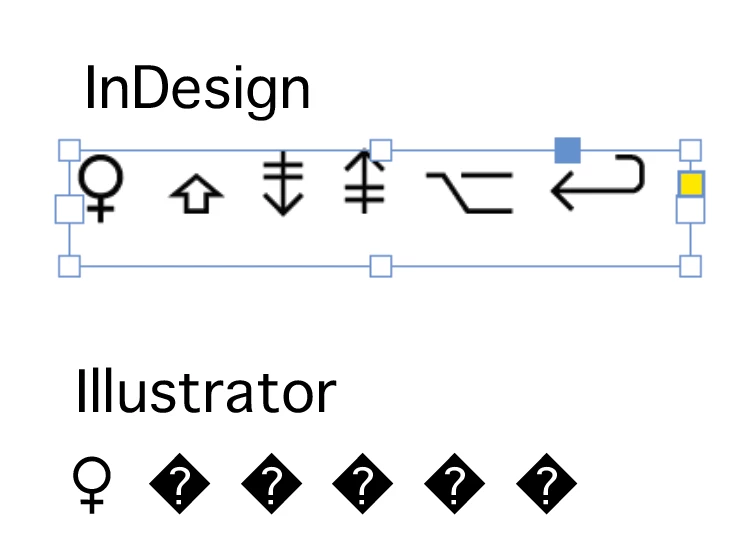
Mac OS 10.14.6

Illustrator 2021


Please Help 🙂

Shlomit


This topic has been closed for replies.
Correct answer Shlomit Heymann

Thank you!

I'm sorry, it's my fault, I meant insert and not type. I fixed it my main post title.


Shlomit


OK, I thing I figured it out.

It's because I'm using the Middle Eastern version, and although I was sure I selected Adobe Par. Single Line Composer, I now see that it was on Adobe World Ready Single Line Composer. Once I change that, it works OK. 


Do you think it should have worked in both composers?


Thank you everybody 🙂

1 reply

Ton Frederiks
Community Expert
Community Expert
December 13, 2020

Inserting them by double clicking the glyphs in the Glyph panel works for me.

Illustrator 25.01 same Mac OS.

Shlomit Heymann
Inspiring
December 13, 2020

Thank you, but as you see in my screenshot, it didn't work for me, at list not with the ones I tried accept from the first glyph... Did you try similar glyphs or jsut any glyph? It does work with some of them, but not all of them...

The second one from left (shift icon) for instance is GID 997

Thank you

Shlmoit


Ton Frederiks
Community Expert
Community Expert
December 13, 2020

I did try similar glyphs, but the ones you are missing don't have a unicode in the panel.

I tried with Preferences > Type > Enable Missing Glyphs Protection on and off but that did not make a difference.