

jong11720670
Participating Frequently
October 27, 2021
Answered

Illustrator 2022 Keeps Shutting Down on macOS

  • October 27, 2021
  • 11 replies
  • 15741 views

This is the 4th-6th time Illustrator has shut down onnthe past 30min-1hr.. On 2 difftent project files that had had no saving and versions issues all week.     Just moving elements around.  Is there a latest update issue?
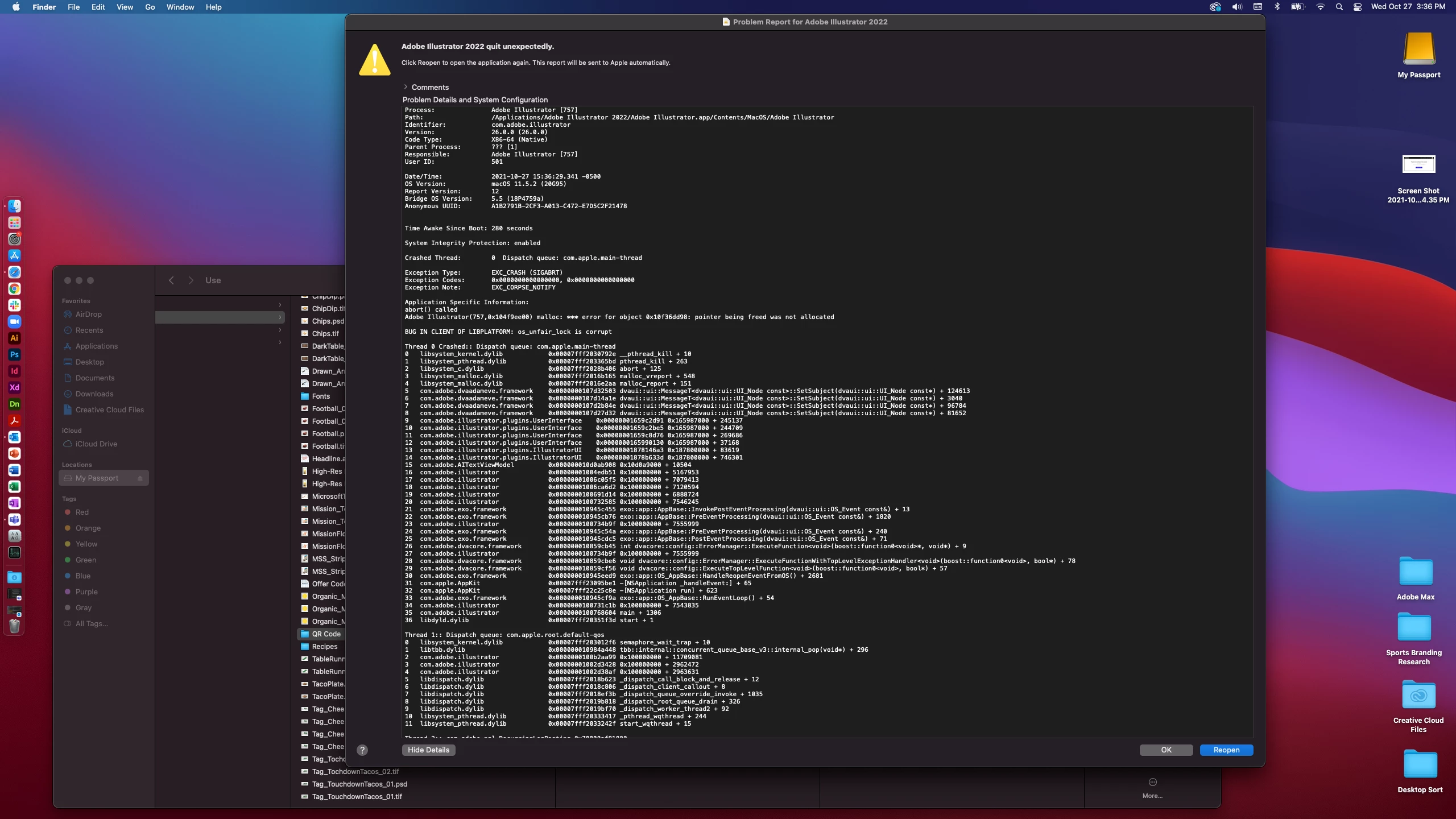
This topic has been closed for replies.
Correct answer Anshul_Saini

Hi All,


Sorry to hear about your experiences. I request you all to update the Adobe Illustrator to the latest version (26.0.1) released recently and let us know if that helps resolve your issues. You may follow this help article (https://helpx.adobe.com/creative-cloud/help/creative-cloud-updates.html) to do that.


Multiple users have confirmed that Illustrator is not crashing after updating to this version.

Please reach out if you are still facing crashes after updating to this version.


Regards,

Anshul Saini

11 replies

New Participant
August 8, 2022

Same issue only I have this version of 

ILLUSTRATOR = 26.4.1

MAC - 10.15.7 (19H2026)

It opens, goes to half screen adn then as soon as I roll over the screen to open a file, it shuts down.  

Anshul_Saini
Community Manager
Community Manager
September 10, 2022

Hi @Paycheck,


We are sorry to hear about that & delayed response. I hope the issue has been resolved by now. If it hasn't, would you mind updating the app to version 26.5 and checking if that helps or not?


Also, if your Mac has any pending macOS updates, please try to update it to the latest.


Kindly update the discussion if you still need assistance with it. We'd be happy to help.

Thanks & Regards,


Anshul Saini

New Participant
November 2, 2022

Ive been using Illustrator since 1999 and have NEVER had to work so hard to just get the d•mn thing to open. I have not been able to use AI since the 2022 update.  It's bad business to make your user struggle to use your product. I shouldnt have to jump through hoops- just click and open!!!!

Anshul_Saini
Community Manager
Anshul_SainiCommunity ManagerCorrect answer
Community Manager
November 4, 2021

Hi All,


Sorry to hear about your experiences. I request you all to update the Adobe Illustrator to the latest version (26.0.1) released recently and let us know if that helps resolve your issues. You may follow this help article (https://helpx.adobe.com/creative-cloud/help/creative-cloud-updates.html) to do that.


Multiple users have confirmed that Illustrator is not crashing after updating to this version.

Please reach out if you are still facing crashes after updating to this version.


Regards,

Anshul Saini

New Participant
November 11, 2021

Hello Anshul,

my AI 2022 Same version does not open at all when I try to click files or even try opening the app. Help please. Thanks.

Anshul_Saini
Community Manager
Community Manager
November 11, 2021

Hi @default9muad2lamy8g


Sorry to hear about this trouble. This is has been reported by a few other users as well, and it was found due to the conflict with Antivirus (Trend Micro).

Do you have this Anti-Virus installed on your machine? If yes, please make sure that Illustrator is added as an exception in the app settings. I hope it helps!


Regards,

Anshul Saini

New Participant
November 4, 2021

I post this again, because this is still working and it was making me mad. Maybe someone could transpose the temporary workaround for Mac users until Adobe is providing a fixing update. So for Windows 10 I found a way to open a file without a crash. If you open Illustrator, open the task manager and from the instances shown for Illustrator in the pull down, try to throw out (end task) any item that is not the main process (HTML-Engine, AIRobin, Edge things). This is my task manager view when I open Illustrator 2022.  Reducing the tasks, I am able to work. The prerelease installation did not help, neither did switching the CPU-GPU view, nor downgrading.


Monika Gause
Adobe Expert
November 4, 2021

In case this is Mac OS Monterey - it has general issues with memory

https://www.macrumors.com/2021/11/01/macos-monterey-memory-leak-user-reports/

Participating Frequently
November 3, 2021

Am absolutely fed up. Every illustrator file I open crashes and doesn't allow me to save my changes. Have lost so much work over the last 3 days. 

rama_ai11751598
Community Manager
Community Manager
October 30, 2021

@jong11720670 We fixed an undelying problem that triggered these crashes, we believe many of the crashes reported are addressed. The fix is currently available in CCD Prerelease section, we need your help in validating whether the issues are fixed. If there is any crash that is still not addressed in this build then we would like to meet and gather more information.


Please follow the instructions below to get CCD Prerelease build.

  1.  If you are not already part of Illustrator Prerelease program then please click this link to join the prerelease - https://www.adobeprerelease.com/beta/85A6F544-2705-49BD-8314-DD549C6A1713
  2.  Accept Prerelease Agreement
  3.  Go to Creative Cloud Desktop and look for Prerelease in the Apps section.
  4.  Install/Update to Illustrator Prerelease 26.0.1 (This will not replace the existing installation of Release build of Illustrator)


-Rama

Illustrator Team

jong11720670
Participating Frequently
November 1, 2021

Thank you for the share and update.


I would like to try and test but that may be diffciult to not get in the way of current business workflows.


Also note: illustrator  '22 DOES NOT have a "save as" to previous Ai option.

Ton Frederiks
Adobe Expert
November 1, 2021

"Also note: illustrator  '22 DOES NOT have a "save as" to previous Ai option."

If you save as Illustrator you do have a version menu in the Illustrator options

New Participant
October 30, 2021

- move the oject which will preview "pixal" appearance during working 
- very slow performan 
- the whole AI softare will be jumped out 

I donno Is Is there not enough memory?

My config: iMac2020 , 32G Ram

jong11720670
Participating Frequently
October 30, 2021

21.20.29 Update:

-I submitted ai crash reoort as requested

-2 days of adobe support testing my computer and files and seeing crashes first hand


Conclusions/Recommendations:

1. To open/create a new file and art board and copy over artwork.

My response:

A. Eaiser said than done when it was 6 projects with multiple art board spread and inside each other.

B. I had created, versioned, and save out over a week and the issue happened the day of the update.


2. Do not work off local external harddrive and only create and and work on desktop. Adobe does not support external disk.

My respose:

A. I have worked off the specific harddrive since 2018/2019 being subscribe to adobe and that has never been an issue.

B. For programs to work I have to move 7G of data just to keep the project together?? And only use extral for storage?

C. Was shown article dated May 2021. 17 months before the 2022 update. Why didn't I have crashes then?

D. I did move full project over to desktop and still had crashes that has my coworkes taking my same project files and finalizing them after 10pm on a friday. Using 2021


I very apprreciative of adobe products. They are truly amazing but I am saying as a subscribe customer, Ai 2022 has a deeper bug..  or maybe this is the software update to move users to adobe's cloud.

jong11720670
Participating Frequently
October 30, 2021

Correction: *6 months before Oct 2022 update

jong11720670
Participating Frequently
October 28, 2021

Sorry to hear that. Yeah including yesterday and today, I am now at the 12th-13th crash.

It has me at a complete stoping point with current work.

I have uninstalled, and re-installed 2022, reinstalled previous 2021 version, restarted computer, reset settings but now my files will not open or recover correctly in older Ai version so I am not opening any files now so they don't get converted to 2022.


I saw one other post comment, so I feel better knowing that this isn't a "just my file"issue but also now concerned on the timeline/next steps to fix because Adobe Max is going on and 2022 just launched.

New Participant
November 2, 2021

facing the same problem too! x_X


sarahp84926232
New Participant
October 28, 2021

I am so frustrated, it crashes randomly, and on saving, I updated this morning to the newest version. I am so frustrated!!!! I have done nearly no work today!

Ashutosh_Mishra
Inspiring
October 28, 2021

Hi Sarah,


Sorry to hear about your experience. Do you see this behavior while working on a specific file? We also thank you for sharing the crash report.

While we review it, please try the suggested steps shared on this community post. Hope it helps.


Regards,

Ashutosh

sarahp84926232
New Participant
October 28, 2021
Hi Ashutosh,

It has been happening with all my Illustrator files today, so it
doesn't seem to be a specific one. I do hope you can help, I tried
uninstalling and reinstalling the programme, but it didn't help.

Regards
Sarah
Anshul_Saini
Community Manager
Community Manager
October 27, 2021

Hi there,


Sorry about the crashing! I know that's really frustrating. I would request you to share a few more details like:

    • Screenshot of "About This Mac." (both Overview and Displays tab)
    • Does it seem to crash after performing a particular action other than moving elements around?
    • Where are you placing the images (Network Drive/ System HDD/ Shared Folder on System/ External HDD)?
    • Submit the crash report by following the steps suggested here (https://helpx.adobe.com/illustrator/kb/crash-next-steps.html).
      While submitting the crash report, please use the same email address with which you are signed in on this community. This will help us find the crash report and help accordingly.
    • Does resetting Illustrator Preferences ( https://helpx.adobe.com/illustrator/using/setting-preferences.html) help to resolve the crash issue?
      Disclaimer: Please note that resetting preferences will remove all the custom settings, and Illustrator will launch with default settings. You can also take a backup of the folders in case you want to. Location is mentioned in the article.


Also, You may try the steps shared on this page (https://community.adobe.com/t5/indesign/advanced-troubleshooting-for-launch-issues/td-p/11394034?page=1) and share your observations with us.


We will be looking forward to your response.


Thanks & Regards,

Anshul Saini

jong11720670
Participating Frequently
October 27, 2021

Screenshot of:

-about this mac
-Display
-Storage (at home external hard drive where images are linking from in Ai)
 
-It has crashed on multiple files, small and large
-Relinking a tif or eps, Adjusting a tif or eps image placement/size
-Crashes within minutes of opening
-Crashes/errors also happening when trying to reopen/restart Ai
-Was able to package files
-Have restarted, have uninstalled and reinstalled and have restarted again