
Participant
March 22, 2022
Answered

Illustrator 2022 Save For Web Window Is Broken

  • March 22, 2022
  • 3 replies
  • 2367 views

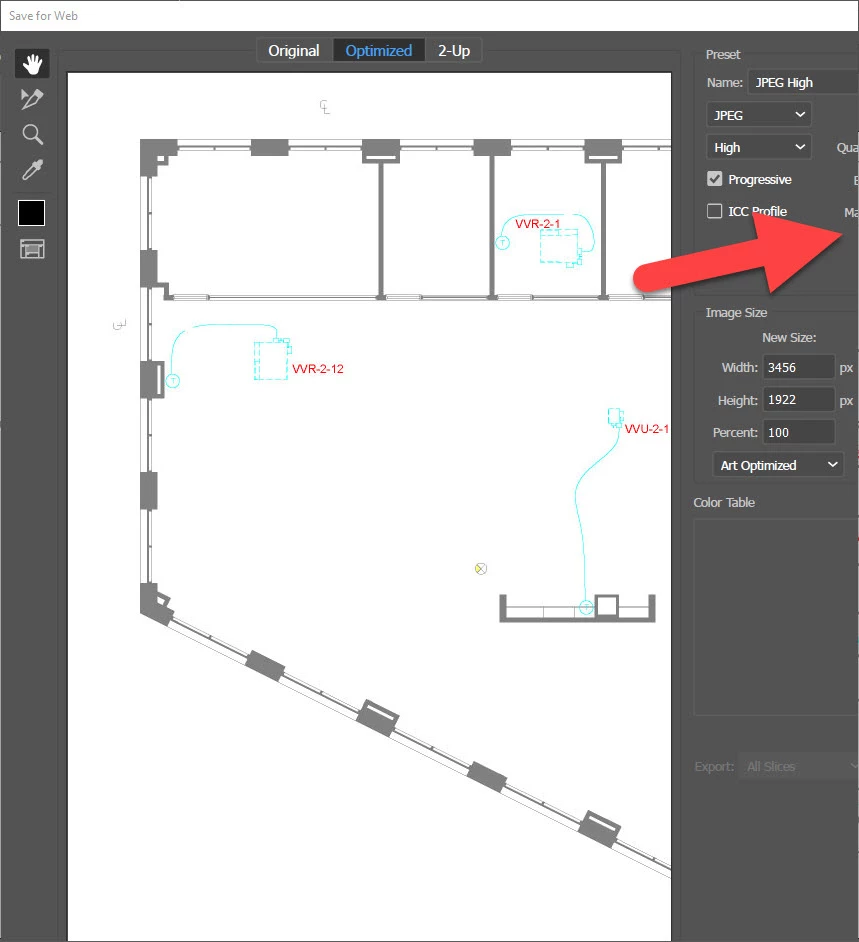
Just recently when I try to save for Web the windows opens up at maximum size with nothing showing on the right hand side. I shrink the window and the settings show up partially. I cannot get it to show all of the settings.


Any ideas what may be causing this?


Thanks
 

This topic has been closed for replies.
Correct answer Graham29239749bqk1

I was experiencing the same problem. I work with 2 monitors and a laptop, when I opened the save for web it opened on my right hand monitor and I couldn't see the tools on the right hand side. When I contracted the window the tools would appear but not enough. I moved the window to the left hand monitor which fixed the problem.

3 replies

Graham29239749bqk1
Graham29239749bqk1Correct answer
Participant
April 5, 2023

I was experiencing the same problem. I work with 2 monitors and a laptop, when I opened the save for web it opened on my right hand monitor and I couldn't see the tools on the right hand side. When I contracted the window the tools would appear but not enough. I moved the window to the left hand monitor which fixed the problem.

MintFishMediaStudios
Participant
April 14, 2023

I am using the exact same setup - and had the same experience as you. My laptop is in the center, with a larger screen on each side. As soon as I move the window to another monitor, it was as it should be. Thanks for the tip!

Anshul_Saini
Community Manager
Community Manager
March 24, 2022

Hi @SOE-TAMPA_Joh23699215n649,


Sorry for the trouble. In addition to @marliton suggestion, you may try the following steps:

  • Change the UI scaling from Illustrator preferences to small.
  • For MAC
    • Close all Adobe applications.
    • Go to the following locations
    • ~/Library/Caches
    • ~/Library/Application Support/Adobe
    • ~/Library/Preferences
    • Rename Adobe Illustrator, com.adobe.illustrator and Adobe Illustrator 24 Settings folders to Adobe Illustrator.old, com.adobe.illustrator.old and Adobe Illustrator 24 Settings.old
    • Launch Illustrator from the Creative Cloud.
  • Rename the CEP folder to CEP.old from the following location:
    /Library/Application Support/Adobe
  • If that doesn't help, rename the UXP folder to UXP.old from the following locations:
    /Library/Application Support/Adobe
    ~/Library/Application Support/Adobe
  • If that doesn't help either, uninstall the application using the CC Cleaner tool and reinstall from the Creative Cloud Desktop app if not done previously.

    Note: Location starting with this "~" sign indicates the User Library, which is hidden. So, you need to copy & paste the exact path in spotlight search or from Finder Menu > Go > Go to Folder > Paste the location in the dialog box like this:


  • For Windows
    - Close all Adobe applications.

    - Go to Location C:\Users\user\AppData\Roaming\Adobe
    - Rename Adobe Illustrator and Adobe Illustrator 25 Settings folders to Adobe Illustrator.old and Adobe Illustrator - 24 Settings.old

    Disclaimer: Please note that renaming preferences folders will remove all the custom settings, and Illustrator will
    launch with default settings. You can also take a backup of the folders in case you want to. The location is mentioned above.

  • Rename the CEP folder to CEP.old from the following location:
    C:\Program Files (x86)\Common Files\Adobe
  • If that doesn't help, rename the UXP folder to UXP.old from the following locations:
    C:\Program Files\Common Files\Adobe\
    C:\Program Files (x86)\Common Files\Adobe
  • If that doesn't help either, uninstall the application using the CC Cleaner tool and reinstall from the Creative Cloud Desktop app if not done previously.


Kindly update the discussion if you still need assistance with it. We'd be happy to help.


Thanks & Regards,

Anshul Saini

Participant
March 30, 2022

Clearing out Illustrator and reinstalling it worked. I am now able to see the whole panel.


Thanks for your help!

Anshul_Saini
Community Manager
Community Manager
April 4, 2022

Glad to hear that. Please feel free to reach out if you run into any other questions or issues in the future. We'd be happy to help.


Regards,

Anshul Saini


marliton
Community Expert
Community Expert
March 22, 2022

Hi. Please try:

  1.  Window > Workspace > Reset.
  2. Resetting the preferences: https://helpx.adobe.com/illustrator/user-guide.html/no/illustrator/using/setting-preferences.ug.html


Marlon Ceballos
Participant
March 22, 2022

Gave it a try. Still having an issue with it. Thanks for the suggestion!