
Participant
November 21, 2024
Question

Illustrator 2025 printer profiles and color space options have disappeared

  • November 21, 2024
  • 6 replies
  • 5036 views

1. Illustrator 2025 updated five days ago - all working fine.

2. Opened this evening to edit a document but was unable to print because all the printer specific custom profiles were missing.
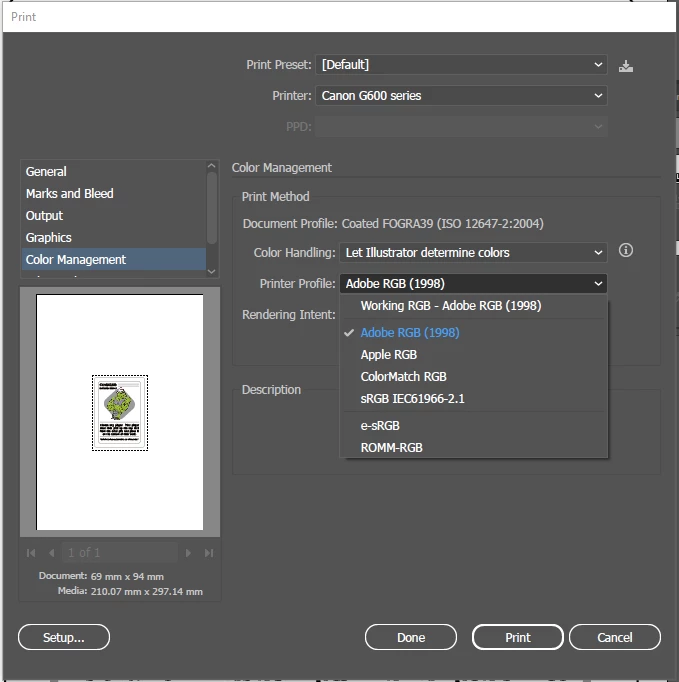
3. Checked the Windows folder containing the ICC profiles - all present and correct.

4. Opened Photoshop 2024 and verified that the required printer profiles were all accessible and printing was working.

5. Uninstalled Illustrator, keeping settings, rebooted and reinstalled. Printer profiles still missing as above.

6. Uninstalled Illustrator, removing all settings and reinstalled. Printer profiles still missing and now almost all colour space options have also vanished. Only SWOPV2 remains (we use FOGRA39).
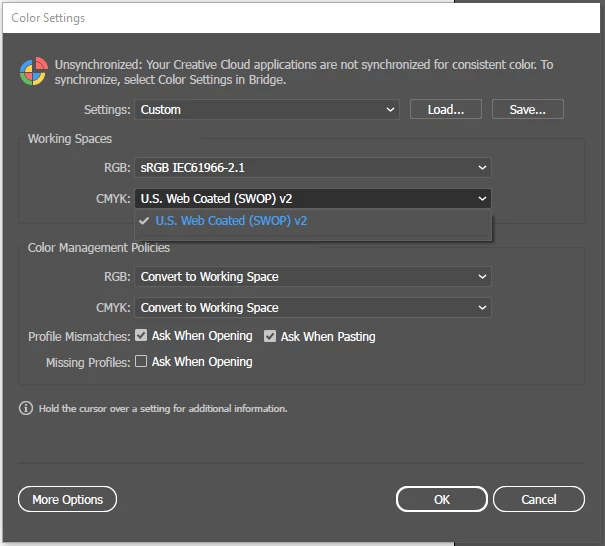
 

7. Contacted Adobe chat - agent came online and as soon as I described the problem he terminated the chat.

8. All other color management systems on the PC are working as expected and printing is otherwise working perfectly.

9. Could be a registry issue I guess but a clean reinstall should have cleared this and it would not explain why all the CMYK color space options vanished after a reinstall. These were native Adobe and not a plugin of any kind.


Desperately needing help here because as it stands Illustrator is bricked!


Illustrator version is 25.0.58.0.0

OS is Windows 10.0.19045


6 replies

Anshul_Saini
Community Manager
Community Manager
January 13, 2025

Hello everyone,


It seems you all are encountering issues with missing printer profiles and color settings in Illustrator 2025, particularly on Windows.

To help address this:

1. Verify Profile Locations:

Please ensure that your color profiles are present in the following directories on your system:

• C:\Program Files (x86)\Common Files\Adobe\Color\Settings\

• C:\Program Files (x86)\Common Files\Adobe\Color\Settings\Recommended

• C:\Program Files (x86)\Common Files\Adobe\Color\Settings\ExtraSettings

• /Library/Application Support/Adobe/Color/Settings/
• /Library/Application Support/Adobe/Color/Settings/Recommended
• /Library/Application Support/Adobe/Color/Settings/ExtraSettings

2. Upvote the UserVoice Report:

You can help speed up the fix by upvoting the bug report using this UserVoice link.


3. Sync Color Settings in Bridge:

One user has mentioned syncing color settings through Adobe Bridge, which seems to resolve the issue:

• Open Bridge and go to Edit > Color Settings to sync your settings.


Thank you for your patience while we work to resolve this. Please keep us posted on your progress or if you need further assistance!


Best,
Anshul Saini

Ton Frederiks
Community Expert
Community Expert
December 22, 2024

Can you check if in your Color Settings there is a button for More Options?

This will give you more profiles to choose from.

Participant
January 11, 2025

Same here (Win11 23H2). All the CMYK color profiles keep disappearing. 


Here's my bug report:


https://illustrator.uservoice.com/forums/601447-illustrator-desktop-bugs/suggestions/49313867--win11-23h2-illustrator-29-1-doesn-t-see-installe

dejaliyah
Participating Frequently
December 19, 2024

I have the same issue. just installed Ai 2025 and all the color profiles are missing. My client uses a very specific color profile (Display P3) She printed a bunch of color profiles and this is the one they use now it's gone. Like tons of them are gone. How do I add it back?!

bethp42242047
Participant
December 22, 2024

I had the exact same issue and was pulling my hair out.  My "fix" was to install Ai 2024 (v 28.7.3) using the Creative Cloud, assuming you have a subscription.  I now have BOTH Ai 2024 and Ai 2025 on my desktop.  Ai 2024 works fine and all color profiles are there.  Ai 2025 only shows a handful and none of the profiles I installed.  Until this is fixed I will just continue to use Ai 2024.  I verified this by running both versions simultaneously and indeed, Ai 2025 won't show the profiles, but the older Ai 2024 shows them all.  Hope this helps.

kgkraeer
Participant
January 4, 2025

I'm not the OP but thank you for posting this workaround because it definitely helped me.

Participant
November 26, 2024

I am having the same issue on my MacBookPro Illustrator 2025. The color profile list is just gone. 

Participant
November 27, 2024

You need to go into bridge and sync your CC Color Settings. Saw this note at the top of the color settings window in Illustrator. I followed directions and it seemed to resolve it. 🙂

Anubhav M
Community Manager
Community Manager
November 27, 2024

Hello @Marianne23974252jy2h, @chrism29626303,

Would you mind trying the suggestions shared by defaultxnyevtv0250b to Sync your color settings using Bridge to see if it helps?

Looking forward to hearing from you.


Anubhav

Participant
November 26, 2024

Same issue here!

Participant
November 26, 2024

Same issue with both Illustrator 29.1 and Illustrator Beta 29.3

kglad
Community Expert
Community Expert
November 21, 2024

in the future, to find the best place to post your message, use the list here, https://community.adobe.com/

p.s. i don't think the adobe website, and forums in particular, are easy to navigate, so don't spend a lot of time searching that forum list. do your best and we'll move the post (like this one has already been moved) if it helps you get responses.


<"moved from cc desktop bugs">
Inspiring
November 22, 2024

Hello @Frazer Monks,

I'm sorry to hear about your experience. Would you mind trying to run Illustrator under a different administrator account (Windows) and checking if it helps?

Also, try installing an earlier version of Illustrator (https://adobe.ly/3Z0BzGc) and share your observations.

Looking forward to hearing from you.


Anubhav

chrism29626303
Participating Frequently
November 26, 2024

I am experiencing the exact same problem the original poster is experiencing. I also tried uninstalling and reinstalling the current version of Illustrator but it did not solve my problem either. I am not inclined to install an earlier version, because past experience with doing that to troubleshoot a different problem resulted in even more problems with my CC Windows applications and having to uninstall and reinstall everything, which I don't want to deal with again. I'm following this discussion to see if an actual fix is found for this very serious and crippling problem.