
Participating Frequently
January 5, 2025
Answered

Illustrator 2025 stops to resize objects

  • January 5, 2025
  • 2 replies
  • 3590 views

Hello

I don't know how to explain better the issue - but for some reason, Illustrator  stopped allowing us to click on an object and resize. Text or form or any object - appears now:
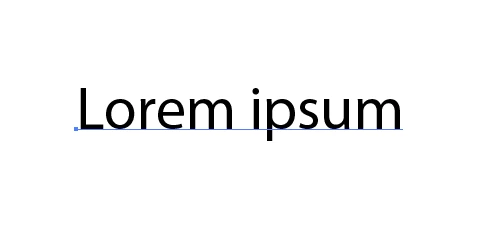
without the "resize" box around the objetct. The only way to resize now is on "Transform Pannel"

normally when selecting the object the "resize box" should appear:
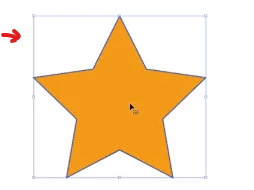


I restart the software. Open new project. Open old project. Nothing restore this.

It's very annoying and frustrating.


Correct answer Ton Frederiks

The Bounding Box is probably hidden.

View menu > Show Bounding Box.

2 replies

Participant
March 19, 2025

I have the same frustration.  The bounding box is NOT hidden.  As much as you charge, you should not remove any functions in your new versions.  Very disappointed and upset. 

Monika Gause
Community Expert
Community Expert
March 19, 2025

Nobody took away the bounding box.


PLease show screenshots.

Ton Frederiks
Community Expert
Ton FrederiksCommunity ExpertCorrect answer
Community Expert
January 5, 2025

The Bounding Box is probably hidden.

View menu > Show Bounding Box.

Participant
June 6, 2025

Nope. It's a change in Illustrator 2025. Very annoying. Going to use my 2024 version for as long as I can. 

Dave Creamer of IDEAS
Community Expert
Community Expert
June 6, 2025

2025 resizing is working perfectly on my system. Can you show a screen capture of an object (without selecting it or hovering over it; and your view menu)?

David Creamer: Community Expert (ACI and ACE 1995-2023)