


Inspiring
January 24, 2026
Question

Illustrator 2026 / 30.1 color management and/or display bug

  • January 24, 2026
  • 3 replies
  • 73 views

Illustrator 2026 displays the colors of a placed PSD file differently than Photoshop.

I checked the software settings in the screenshots below: both files use the Adobe RGB (1998) color profile, and the color management settings have been synchronized via Adobe Bridge. I’ve also attached a minimal reproduction file (psd only; I could not attach Adobe Illustrator file with error so I converted to Illustrator editable PDF). I hope this issue can be fixed soon.
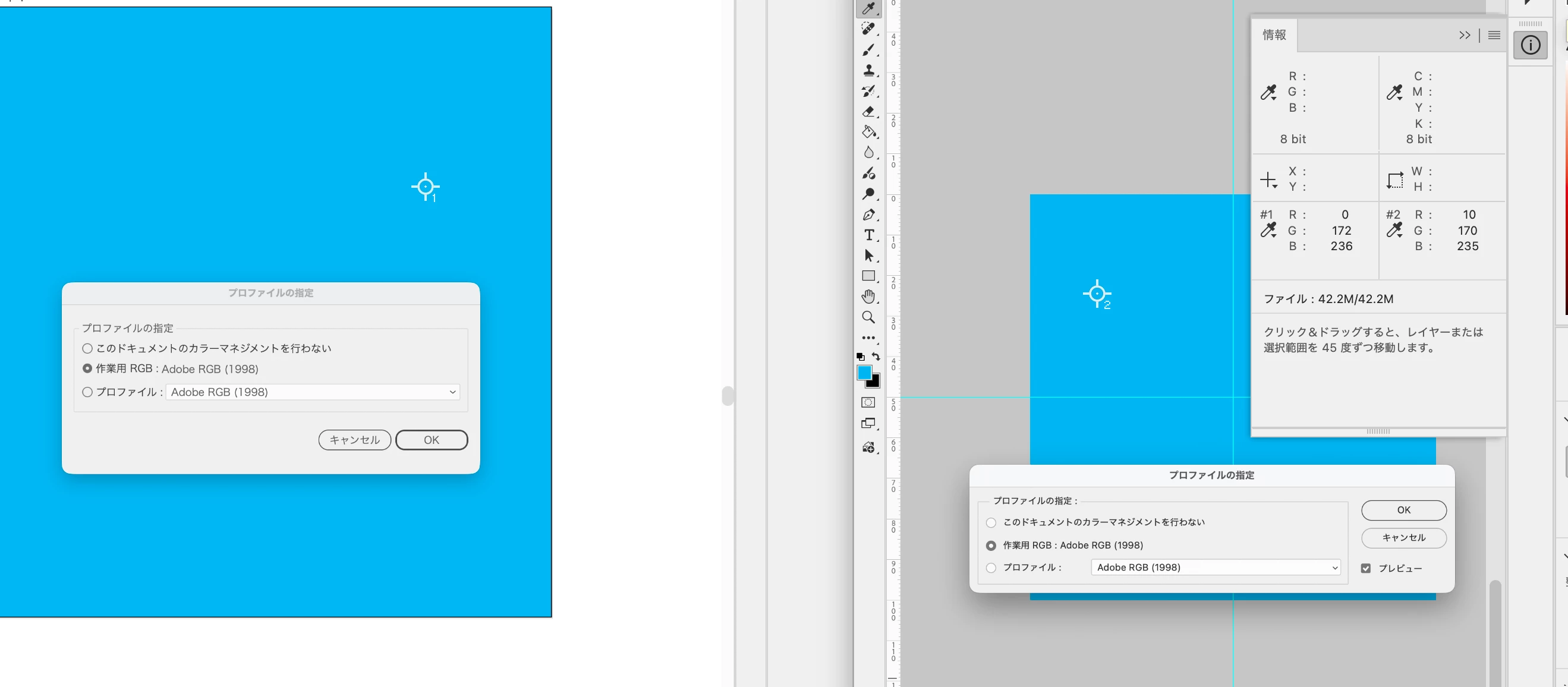
KaoruYamaoka_0-1769266803779.png

KaoruYamaoka_0-1769267467042.png


3 replies

Ton Frederiks
Community Expert
Community Expert
January 25, 2026

@Kaoru Yamaoka I believe that an old problem is causing this.

When you use the Eyedropper in Illustrator to sample the color of a linked file, it will sample colors in the preview. To get the real values of the image, embed the file.

Ton Frederiks
Community Expert
Community Expert
January 24, 2026

I cannot reproduce your problem. I opened both files in Illustrator and Photoshop, compared them side by side, made a screendump,  but when I check the colors they are virtually the same.

Can you check what happens if you change the monitor profile to sRGB? It should not make a difference, but in the past it has solved display problems.