


- Home
- Illustrator
- Discussions
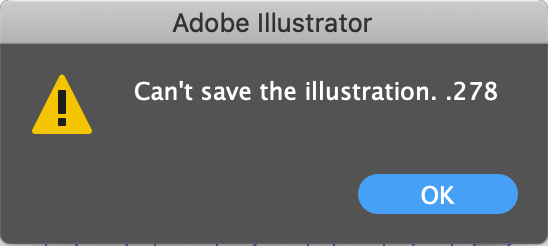
- Illustrator 24.1 - Issue "Can't save the illustrat...
- Illustrator 24.1 - Issue "Can't save the illustrat...

Copy link to clipboard
Copied
Hey everyone,
I've updated my version of illustrator earlier this week to 24.1 on Mac OS 10.15.4 and I'm having an issue that I can't manage to find a solution for. Basically, whenever I try to save any files on my main hard drive I get a pop-up saying "Can't save the illustration. .278". I've managed to find a work-around where I can just save my file to my external hard drive and copy it after on my main drive, but it's still really annoying to have to do every time I have to save my file.


 1 Correct answer


Can you try and uncheck all those settings that improve saving files in the preferences?
Also: do you have iCloud set up? It might interfere with Illustrator.
Are you saving into a synchronized folder? Again: might interfere with Illustrator.
You could try and have Customer Care take a look. Please contact Customer Care: http://helpx.adobe.com/contact.html


Explore related tutorials & articles
 13
Replies
13
13
Replies
13

Copy link to clipboard
Copied

Copy link to clipboard
Copied
I solved this by cleaning out my hard drive, which was almost full. And I also uninstalled old versions of illustrator. Somehow, one of those things worked.
Copy link to clipboard
Copied
And this only happens with one particular drive? Or one particular file?
Copy link to clipboard
Copied
This only happens when I try saving to my main drive. I tried importing my artwork in a new document and the same error pops up. No matter what file I try to save it just doesn't want to save it to my main drive. It only works if I save it to my external ssd which never happened before.
Copy link to clipboard
Copied
Looks like this error can have different reasons.
Sometimes it's because of an external disk, sometimes because of a missing printer.
Sometimes because of the cmputer having some hiccup (not rebooted for days etc.)
Might be other reasons.
So when was your last reboot?
Do you have a printer attached? If not, set up a PDF printer
Are all disks checked, privileges set correctly?
Is Illustrator allowed to write to the disk?
Copy link to clipboard
Copied
So this morning I had a new mac update which I thought could have fixed the issue but didn't. I've tried rebooting my computer but the same issue occurs. I have a printer that I use over wifi which has been the case for over a year and never had any problems with. As of the disk access, I verified in my system preferences that illustrator had full disk access.
I'm really not sure what's wrong... I've been using illustrator for over 3 years and never had any problems with it...
Copy link to clipboard
Copied
Printer over Wifi might the cause of issues with Illustrator.
Please set up a PDF printer.
Copy link to clipboard
Copied
How should I proceed with Mac Os to create the PDF printer? I've never had to do that...
Copy link to clipboard
Copied
Me neither, but I have networked printer that just works.
You could also try and fix the installation of your current printer.
Turn it on (important)
Make it the default printer
Update the driver if possible.
Make sure it's accessible when Illustrator pings it.
Copy link to clipboard
Copied
I tried to re-install my printer and updating the drivers but it still has the same issue...
Copy link to clipboard
Copied
Can you try and uncheck all those settings that improve saving files in the preferences?
Also: do you have iCloud set up? It might interfere with Illustrator.
Are you saving into a synchronized folder? Again: might interfere with Illustrator.
You could try and have Customer Care take a look. Please contact Customer Care: http://helpx.adobe.com/contact.html

Copy link to clipboard
Copied
Hey there,
I know this is a late reply, but I recently had the same issue where I was trying to save an SVG from an Ai file onto my portable hard drive. I found succes by moving the larger folder on my portable hard drive (containing smaller folders) onto my Desktop, then deleted the (smaller) folder in which I was specifically trying to save to. I am now able to save as SVG as per usual. I have no idea why this problem arose, or why this was the solution, but here I am.

Copy link to clipboard
Copied
In my circumstance, a setting had been set up by a former employee.
1. Right mouse click on the file
2. Click 'Get Info'
3. Go to the Sharing & permissions section
4. Check to make sure that the permissions can "Read & Write"


Get ready! An upgraded Adobe Community experience is coming in January.
Learn more
 AdChoices
