
New Participant
July 29, 2024
Question

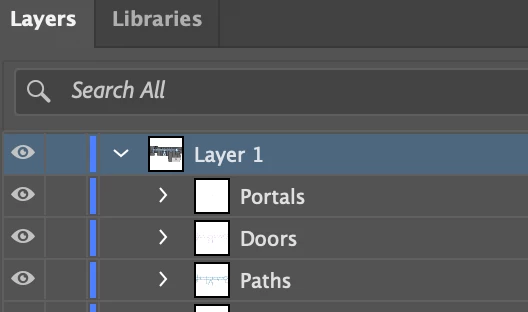
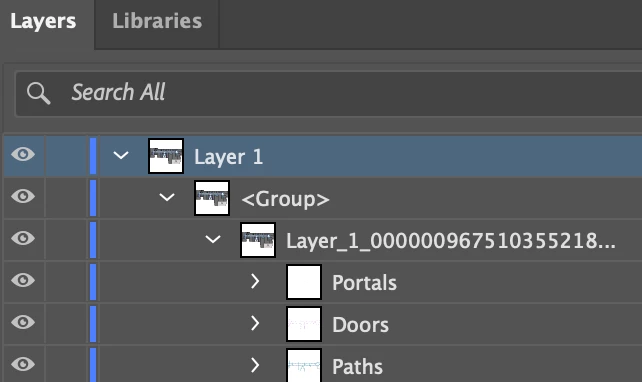
Illustrator 28.6 after saving the file (SVG) creates an additional group and layer.

  • July 29, 2024
  • 1 reply
  • 950 views

I don't know if this is related to the latest update or not, but this didn't happen before.

After saving the SVG file, Illustrator adds its own groups and layers. How can I disable this?


before saving (layer > groups):
 

same file after saving (layer > group > layer > groups):
  

This topic has been closed for replies.

1 reply

Monika Gause
Community Expert
Community Expert
July 29, 2024

So you save an SVG and then you reopen it?


Just incase you are doing this for editing: that's not a good idea. SVG is a one-way street in Illustrator. You can lose too much if you make it your work file format.

New Participant
July 29, 2024

Hi @Monika Gause , 

yes, i save an SVG and then you reopen it and see something like on second screen.As I said, this didn't happen before, and I feel comfortable working with SVG in Illustrator. I'm looking to fix this "feature."

Monika Gause
Community Expert
Community Expert
July 29, 2024

SVG is not a native file format for Illustrator. It has to be interpreted and translated.

SVG doesn't support layers at all. So it creates groups instead. When translating that back, then probably this happens.

The import/export module for SVG is a WIP. You might want to post this on Uservoice and perhaps it can be rolled back to what you experienced before.


But the safer workflow is to export SVG only when you're done and then get the file into production, but not open it back.