Participant
January 6, 2025
Answered

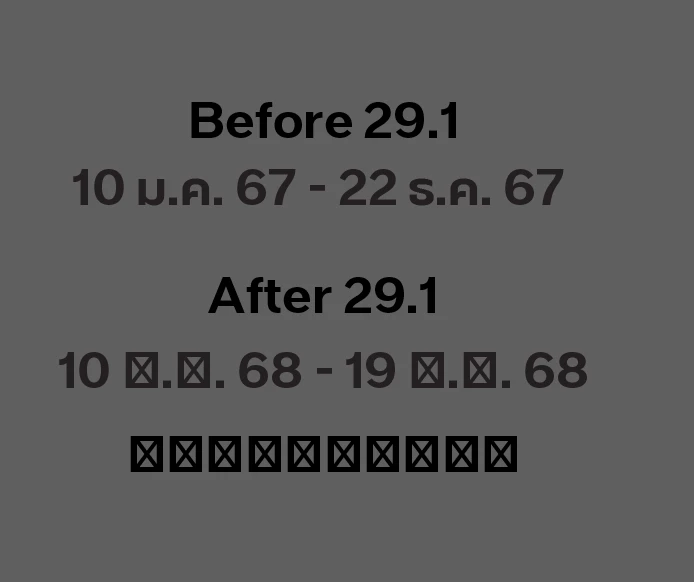
illustrator 29.1 | Foreign Language font appear to be square

  • January 6, 2025
  • 1 reply
  • 865 views

Hi,

I am having an issue with Adobe Illustrator after the latest update. Normally, I work with text in two languages (Thai and English), using different fonts for each language. Before the update, I could use the Eyedropper tool to match the font style as I had set it. However, after the update, when I use the Eyedropper tool to pick up the font settings (for example, English font is Times New Roman and Thai font is Angsana New), the Thai font turns into squares instead.


When I type in another language using a font that doesn't support that language, it also shows up as squares. Before the update, it would randomly select a font that supported that language, but now everything appears as squares.


This is making my work much harder. Is there a solution for this?

Correct answer Brad @ Roaring Mouse

This might be related to the Enable Missing Glyph Protection setting in your Preferences > Type.

Its purpose is to make sure you keep glyphs used from a font that has them when you change to a font that doesn't, in which case it will substitute a font that does.

1 reply

Brad @ Roaring Mouse
Community Expert
Brad @ Roaring MouseCommunity ExpertCorrect answer
Community Expert
January 6, 2025

This might be related to the Enable Missing Glyph Protection setting in your Preferences > Type.

Its purpose is to make sure you keep glyphs used from a font that has them when you change to a font that doesn't, in which case it will substitute a font that does.

Participant
January 6, 2025

Thank you! It works! 

Very big thanksss

Brad @ Roaring Mouse
Community Expert
Community Expert
January 6, 2025

Glad to help!