Exit
  • Global community
    • Language:
      • Deutsch
      • English
      • Español
      • Français
      • Português
  • 日本語コミュニティ
  • 한국 커뮤니티
0

Illustrator adding extra digits to file.

Engaged ,
Mar 17, 2022 Mar 17, 2022

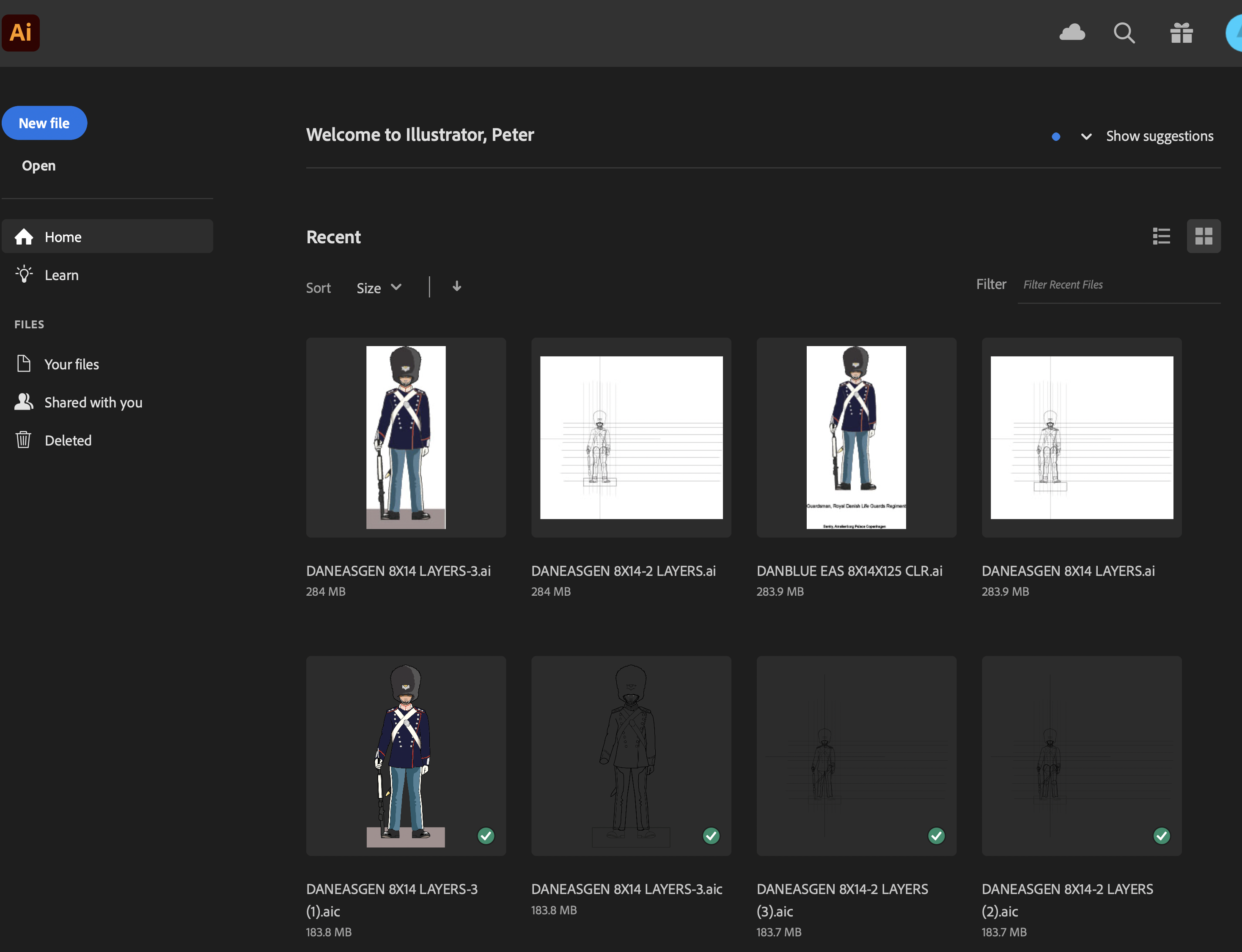
Can anyone advise how to prevent Adobe Illustrator 2022 on Mac adding extra numbers at the end of my file names? For me this is a disaster, as it totally messes up my filing system. I have only recently noticied it.

Grateful for any help.

TOPICS
Bug , Performance
932
Translate
Report
Community guidelines
Be kind and respectful, give credit to the original source of content, and search for duplicates before posting. Learn more
community guidelines
Adobe
Community Expert ,
Mar 17, 2022 Mar 17, 2022

Can you be a bit more precise?

Where do you save your files?

What exactly does get added?

Translate
Report
Community guidelines
Be kind and respectful, give credit to the original source of content, and search for duplicates before posting. Learn more
community guidelines
Engaged ,
Mar 17, 2022 Mar 17, 2022

Thanks for your response.

I have attached a screenshot of the Ilustrator Welcome page. It shows (1), (2) and (3) has been added at the end of some of my files. I did not create those numbers. The just appeared the next time I opened those files. I do not know how to stop this happening.

Grateful for any advice about this problem.

Translate
Report
Community guidelines
Be kind and respectful, give credit to the original source of content, and search for duplicates before posting. Learn more
community guidelines
Community Expert ,
Mar 17, 2022 Mar 17, 2022

Looks like the files have been copied. Sometimes Creative Cloud seems to just do that when it can't read the files or has some other hiccup.


Do you perhaps also encounter issues with opening your files?

Translate
Report
Community guidelines
Be kind and respectful, give credit to the original source of content, and search for duplicates before posting. Learn more
community guidelines
Engaged ,
Mar 18, 2022 Mar 18, 2022

Thanks for your response.

When I open the files, everything is fine except that I have these copies, with the extra numbers on the end. I udually save to  computer, and also to the cloud. Perhaps that is the cause of the problem. Perhaps if I only save to my computer it would prevent the numbered cdopies?

Translate
Report
Community guidelines
Be kind and respectful, give credit to the original source of content, and search for duplicates before posting. Learn more
community guidelines
Community Expert ,
Mar 18, 2022 Mar 18, 2022
LATEST

I don't know how Creative Cloud handles copies.


Maybe you can also ask in the Cloud section of the community: https://community.adobe.com/t5/creative-cloud-services/ct-p/ct-cc-services?page=1&sort=latest_replie...

Translate
Report
Community guidelines
Be kind and respectful, give credit to the original source of content, and search for duplicates before posting. Learn more
community guidelines