
funzioneGrafica
Participant
November 11, 2022
Answered

Illustrator .ai don't upload on Google Drive Desktop, create .tmp files instead

  • November 11, 2022
  • 6 replies
  • 4927 views

Hello,


We are using three different macOS Ventura (13.0.1) devices and from a couple of weeks we have an issue with Illustrator (v27.0) files (.ai) and desktop version of Google Drive. We have tried with Photoshop (.psd) as well, but there is no problem and everything work as intended.


The problem is as follow: when opening an ai file from finder drive folders, we work normally and from the finder drive desktop everything looks ok, but in reality every time we save in illustrator, drive desktop upload online not the actual ai file, but a tmp file, leaving the online ai file in the older version. So from another user of drive, the ai file looks outdated.


To solve this we have tried some classic workaround for google drive: drive logout, drive clean uninstall, drive cache and all local files removed, drive reinstall.

From Illustrator preferences, no changes have been made and these are the current settings for "File handling":
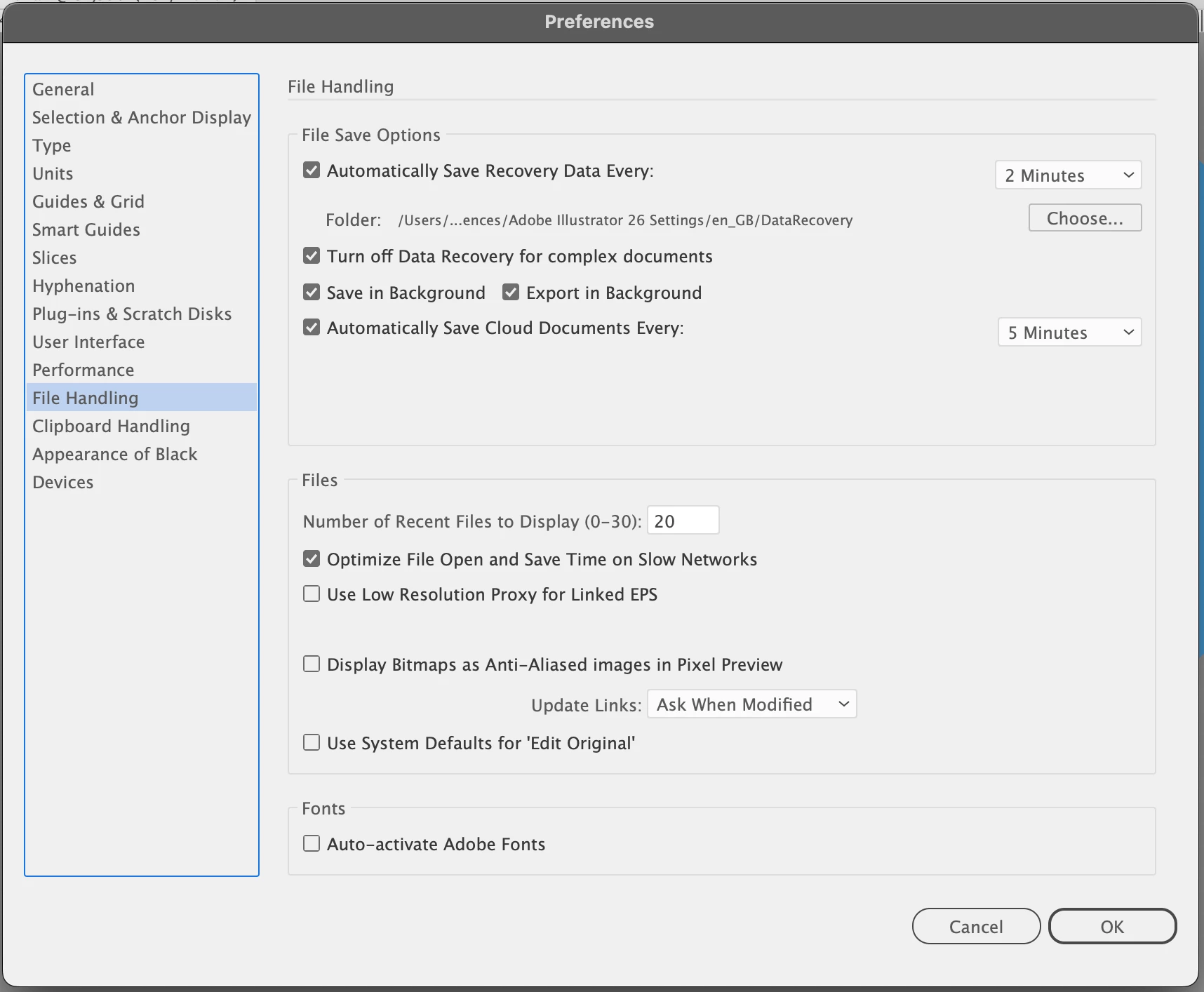
But the problem might be with Illustrator, because every other file versioning seems to work fine.

The only other issue is with some file moving in google drive, that are duplicated instead of moved.


Do someone else have the same issue? Can someone from Adobe help us?


Thank you

This topic has been closed for replies.
Correct answer Anubhav M

Hello @funzioneGrafica,


Sorry to hear about this experience. Illustrator's performance can be affected due to various factors when you save and open files from a network/removable drive or a cloud-synced folder. You may learn more about this here: (https://helpx.adobe.com/in/illustrator/kb/illustrator-support-networks-removable-media.html).


Kindly try saving your files on a local drive and then copy them manually to the Google Drive folder as suggested by Ton to avoid problems in the future.


Feel free to reach out if you need further assistance. We'd be happy to help.


Thanks,

Anubhav

6 replies

Mickey Houlder
Participant
April 28, 2023

Also having the same problem with files I save and my remote team mates. Weirdly they are able to access the file if they use Google drive for mac there end. This was never a problem in the last version of illustrator so is a new, fairly major bug in my opinion. How would I raise this as a bug to be investigated?


Met1
Legend
April 28, 2023
Anubhav M
Community Manager
Anubhav MCommunity ManagerCorrect answer
Community Manager
November 11, 2022

Hello @funzioneGrafica,


Sorry to hear about this experience. Illustrator's performance can be affected due to various factors when you save and open files from a network/removable drive or a cloud-synced folder. You may learn more about this here: (https://helpx.adobe.com/in/illustrator/kb/illustrator-support-networks-removable-media.html).


Kindly try saving your files on a local drive and then copy them manually to the Google Drive folder as suggested by Ton to avoid problems in the future.


Feel free to reach out if you need further assistance. We'd be happy to help.


Thanks,

Anubhav

Participant
February 13, 2023

it is cearly wrong answer. because i have 2 account for google drive, one is working well (overwrite file) another is not working 

Ton Frederiks
Community Expert
Community Expert
November 11, 2022

I would try to uncheck Save in Background. Or save on the desktop and copy manually to the synch folders.

Participant
March 2, 2023

Thank you so much for this. Unchecking save in the background completely solved this problem for me!

Met1
Legend
November 11, 2022

"from the finder drive desktop everything looks ok, but in reality every time we save in illustrator, drive desktop upload online not the actual ai file"

Sounds like two different things to me.

Are you working (i.e. making a change to the doc and saving) entirely on your computer, or are you doing this on the "online" doc. If the latter, I would not recommend that as a ideal working practice..

If you mean you are copying the ai file to the drive, are you sure it's closed out in Illy? Strictly speaking it shouldn't matter unless you are using auto back up and/or auto save? But if you made a change and didn't do a save and you copy the file those "temporary" edits have to be logged somewhere... spooky entanglements causing havoc...

Monika Gause
Community Expert
Community Expert
November 11, 2022

Synchronizing services such as Google, Dropbox and iCloud can and have caused issues for people in the past.

lambiloon
Community Expert
Community Expert
November 11, 2022

Hi, try on 2021 illustrator if it works fine on that then it is a bug wait for the next update all issues are in the notice of the adobe team...regards

Ali Sajjad / Graphic Design Trainer / Freelancer / Adobe Certified Professional