
HeatherB1337
Participant
April 11, 2017
Answered

Illustrator Asking to Select File Format When Opening

  • April 11, 2017
  • 1 reply
  • 5323 views

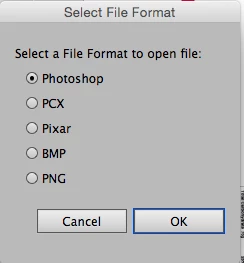
I have an Illustrator document with placed Photoshop (psd) images in it. Each time I open it, I am asked to "select a file format to open file" and then I have an option to choose Photoshop, PCX, Pixar, BMP, or PNG. What really confuses me is that I only have 5 links, but I have to go through this window 15 times before the document will open. I can see it doing it once for each link, but this seems a little excessive.  Does anyone have any idea why it does this or how to fix it?
This topic has been closed for replies.
Correct answer beeham126

Hi HeatherB1337, I have been having the same issue and have many links inside my document, so I had to fix this.

I opened my .Tiff in Photoshop and resaved it, a panel comes up but I made no changes. Over-wrote my existing .Tiff and all seems fine now.

illustrator is not asking for the file format anymore. Let me know if this was helpful.

1 reply

Monika Gause
Community Expert
Community Expert
April 11, 2017

I have never seen that dialog box.

Can you open the placed images in Photoshop and save them again?

What's in these images? Are there spot colors or duotone or something special?

Which version of Illustrator?

Which operating system?

Maybe CS4 on El Capitan/Sierra or something?

HeatherB1337
Participant
April 11, 2017

I am currently running Creative Cloud 2015 on Yosemite 10.10.5. I have tried re-saving but that doesn't seem to do anything. They are just flattened grayscale images so nothing really complicated.

beeham126Correct answer
Participant
July 20, 2017

Hi HeatherB1337, I have been having the same issue and have many links inside my document, so I had to fix this.

I opened my .Tiff in Photoshop and resaved it, a panel comes up but I made no changes. Over-wrote my existing .Tiff and all seems fine now.

illustrator is not asking for the file format anymore. Let me know if this was helpful.