
March 13, 2023
Answered

Illustrator background issue

  • March 13, 2023
  • 2 replies
  • 618 views

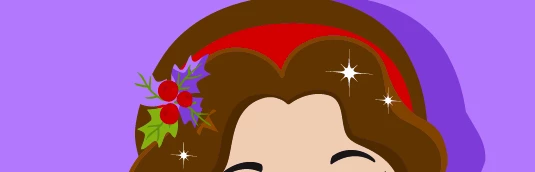
I have downloaded a vector of a doll figure and I want to replace her hair accessory with a different one. However, when I remove the current hair accessory, the shape of the accessory seems to have been cut out from her hair (so when i remove the green berry leaves, it reveals the purple background instead of brown hair). How do I revert the hair to how it was before it had the shape cut out of it? 
This topic has been closed for replies.
Correct answer Monika Gause

Move the anchor posints to where you need them to be.

https://helpx.adobe.com/illustrator/using/editing-paths.html

2 replies

Brad @ Roaring Mouse
Community Expert
Community Expert
March 14, 2023

It appears the original creator did not overlay objects, instead dividing them into separate objects, making it like a jigsaw puzzle. So, there's nothing to "revert to" as the damage is done. If you go to Outline mode, you will see this. Your only recourse is to redraw/fix the shape of the hair to fix the cut out area.

Monika Gause
Community Expert
Community Expert
March 13, 2023

Take the direct selection tool and edit the paths.

March 13, 2023

Edit them in what way?

Monika Gause
Community Expert
Monika GauseCommunity ExpertCorrect answer
Community Expert
March 14, 2023

Move the anchor posints to where you need them to be.

https://helpx.adobe.com/illustrator/using/editing-paths.html