
Participant
October 21, 2025
Answered

Illustrator breaking links and removing last letter of file extension

  • October 21, 2025
  • 1 reply
  • 190 views

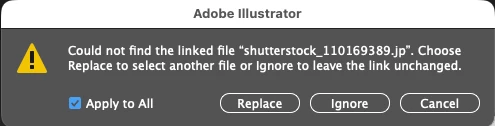
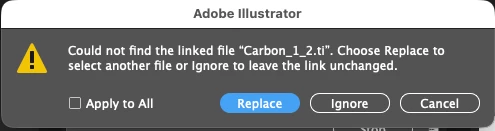
As seen in the screenshots below, when I re-opening a  file the links are broken with a missing letter in the file extension. e.g. "jp" instead of "jpg" and "ti" instead of "tif". When re-linked the assets display at 100% scale instead of retaining their scaled down size in the document. Has anyone else experience this issue and know how to resolve it?
 

Correct answer Joe5C3F

The issue has been resolved by removing the emoji from the OneDrive site name/synced OneDrive folder.

1 reply

Abhishek Rao
Community Manager
Community Manager
October 21, 2025

Hi @Joe5C3F,


Sorry to hear about the trouble. Could you please share which version of Illustrator and macOS you're currently using? Try saving a copy of the file in a different location and see if the links still break after reopening it. 

If possible, please share a sample affected file for testing after packaging it. You can refer to this guide: Package files in Illustrator. If the file contains confidential content, feel free to share it privately via DM using a link from Drive, Dropbox, or WeTransfer.


Let me know how it goes or if the issue continues so I can review it further.

Abhishek

Joe5C3FAuthor
Participant
October 22, 2025

Update 2: I tried linking to a file on a different OneDrive site and this bug does not occur. I suspect that this is due to an emoji being in the name of the synced OneDrive site. I am going to see if we can remove the emoji in the OneDrive site name to see if that resolves the malfunction.

Joe5C3FAuthorCorrect answer
Participant
October 29, 2025

The issue has been resolved by removing the emoji from the OneDrive site name/synced OneDrive folder.