


- Inicio
- Illustrator
- Hilos de conversación
- Illustrator CC 2014 running EXTREMELY slow on bran...
- Illustrator CC 2014 running EXTREMELY slow on bran...

Copiar vínculo al Portapapeles
Copiado
Hi,
I've just picked up a brand new 6 core Mac Pro and I am having some serious lag issues with Illustrator CC 2014. I am just trying to select relatively simple objects (an illustration of the side of a coin) and there is a massive delay between when I click on an object and when it actually becomes selected.
Someone please tell me they know how to fix this? Please 


 1 respuesta correcta

My company recently "upgraded" my OS to Windows 8.1. (from a pre-Windows 8 OS) and I am now experiencing terrible performance when using Illustrator CC 2014. (2014.1.0 release - 18.1.0 (64 bit)). Most problematic is that every 5-10 seconds the entire screen goes black (not responding) for 3 seconds. I had a similar problem with Illustrator CS a year or so ago - I solved that problem by turning off auto-updating linked files. So, I'm suspicious that this problem also has something to do with
...

Examinar y buscar tutoriales y artículos relacionados
 88
réplicas
88
88
réplicas
88


Copiar vínculo al Portapapeles
Copiado
I'm getting the same thing, especially with multiple objects on the artboard (there seems to be a relationship between number of control points/objects and lag). Never had this problem on previous versions.
Ver 2014.1.0 Release
18.1.0
OSX 10.9.5
2.4 GHz intel core i7
8 GB 1600 MHz
Macbook Pro 15"


Copiar vínculo al Portapapeles
Copiado
Please email your contact details on sharewithai@adobe.om . We would like to investigate the issue. Are you also using any third party plug-ins?

Copiar vínculo al Portapapeles
Copiado
I'm experiencing this too on a similar machine to HamishMash above. Lots of delay and rainbow wheel spinning...
Has anyone resolved this?
Thanks.

Copiar vínculo al Portapapeles
Copiado
Has this issue been researched/resolved yet? I recently updated Illustrator and I am experiencing a similar issue.

Copiar vínculo al Portapapeles
Copiado
Nothing yet. REEEEALLLY frustrating..
<http://www.proctorproductions.com>
Cody Day | Designer
p - 303.572.1149
proctorproductions.com
Please consider the environment before printing this email.
<http://www.facebook.com/pages/Proctor-Productions/336380906591?sk=wall>
<http://www.flickr.com/photos/proctordenver/>
On Tue, Jan 27, 2015 at 1:02 PM, Typogiraffic <forums_noreply@adobe.com>
Copiar vínculo al Portapapeles
Copiado
That sucks, because I just watched my computer rainbow wheel for five minutes just to drag a group of vector objects across the artboard. Everything else runs just fine, but this last update just killed the functionality of Illustrator on my machine.
Copiar vínculo al Portapapeles
Copiado
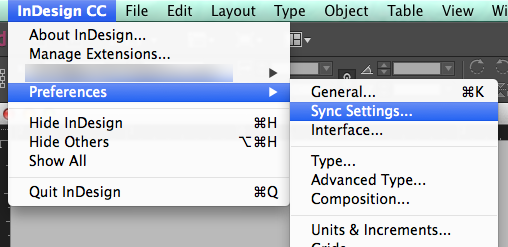
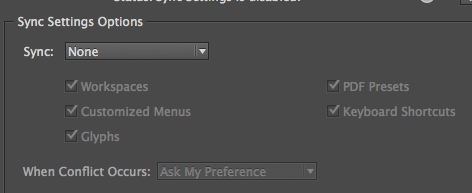
Try disabling CC settings Syncing... IF you have that on
<http://www.proctorproductions.com>
Cody Day | Designer
p - 303.572.1149
proctorproductions.com
Please consider the environment before printing this email.
<http://www.facebook.com/pages/Proctor-Productions/336380906591?sk=wall>
<http://www.flickr.com/photos/proctordenver/>
On Tue, Jan 27, 2015 at 1:52 PM, Typogiraffic <forums_noreply@adobe.com>


Copiar vínculo al Portapapeles
Copiado
Are you running with the Navigator panel open? Try turning it off.
Copiar vínculo al Portapapeles
Copiado
I do not have the navigator panel open. I turned turn off the CC settings sync and it seemed to make a little difference.
Copiar vínculo al Portapapeles
Copiado
Good to know. Thanks for reporting back.
Copiar vínculo al Portapapeles
Copiado
I had the same experience. Syncing sped it up a little bit, but still
nowhere near CS6.
<http://www.proctorproductions.com>
Cody Day | Designer
p - 303.572.1149
proctorproductions.com
Please consider the environment before printing this email.
<http://www.facebook.com/pages/Proctor-Productions/336380906591?sk=wall>
<http://www.flickr.com/photos/proctordenver/>
On Tue, Jan 27, 2015 at 3:42 PM, Larry G. Schneider <
Copiar vínculo al Portapapeles
Copiado
What monitors do you have?

Copiar vínculo al Portapapeles
Copiado
Disabling the Sync Settings in InDesign worked for me.

Copiar vínculo al Portapapeles
Copiado
Sorry, wrong thread. I have an Indesign speed issue ..
But - disabling GPU
in Illustrator helped me with the speed issue.

Copiar vínculo al Portapapeles
Copiado
I'm having the same issue, extremely slow performance zoom lag is about 3 sec, on Illustrator CC 2014 and Indesign CC 2014,
My Hardware Specs: Imac Retina with i7, 16GB Ram and AMD Radeon R9 M295X 4GB
Funny part also I have an old i3 Cpu Laptop with integrated graphics card and it is working flawlessly with CS5.5
Please help

Copiar vínculo al Portapapeles
Copiado
yes i got a similar experience
CS works flawlessly
illustrator went crazy in all CC version

Copiar vínculo al Portapapeles
Copiado
I have the same problem - was this resolved?

Copiar vínculo al Portapapeles
Copiado
Hi we have a Core i5, 8GB RAM, 120GB SSD, AMD Radeon HD 8490 with 1GB on board RAM, have been through the Adobe trouble shooting guide and still Illustrator CC2014.1 is painfully slow, this to me is unusable. Adobe will not respond to phone calls. Can anyone help?
Copiar vínculo al Portapapeles
Copiado
Hi there,
Sorry, I’ve had nothing back from Adobe either. If I’m honest my issues were present in one particular file and haven’t been replicated in others so far. I think it was related to effects and drop shadow in particular. I haven’t worked on that job for a while but will be going back to it soon so I’ll let everyone know what happens.
I’ve no idea if this reply is going to appear on the forum or not as when I checked back in there recently I couldn’t reply to posts but may not have been logged in.
Cheers,
Damian
Copiar vínculo al Portapapeles
Copiado
My company recently "upgraded" my OS to Windows 8.1. (from a pre-Windows 8 OS) and I am now experiencing terrible performance when using Illustrator CC 2014. (2014.1.0 release - 18.1.0 (64 bit)). Most problematic is that every 5-10 seconds the entire screen goes black (not responding) for 3 seconds. I had a similar problem with Illustrator CS a year or so ago - I solved that problem by turning off auto-updating linked files. So, I'm suspicious that this problem also has something to do with Illustrator accessing the server but in this case I don't know what is initiating the server access.
Another colleague of mine using Windows 8 downgraded from "Illustrator CC 2014" to "Illustrator CC" and no longer has the (not responding) hic-up problem.
Copiar vínculo al Portapapeles
Copiado
I've tried installing Illustrator CC and this did not solve my problem.
PROBLEM: Every 5-10 seconds Illustrator pauses for 3 seconds - "not responding" and sometimes the screen even goes black.

Copiar vínculo al Portapapeles
Copiado
Hi everyone, please checkout my post concerning lagging issues.
I've also provided a link to a video I've recorded showing the Illustrator behavior on my iMac 27"
Adobe Illustrator Cs6 Lagging Extremely Slow on Yosemite 27" iMac i7 late 2013
Copiar vínculo al Portapapeles
Copiado
I have the exact same issue as Original Poster. On the exact same machine.
Illustrator freezes on most saves, and may times fully crashes. When there is a successful save it takes eons longer than ever before.
Even very small simple files behave as though they have gigs of embedded images.
About every third command results in the spinning wheel of death..

Copiar vínculo al Portapapeles
Copiado
I agree - running at the pace of a dead snail! In fact I think it died twice!
Extremely frustrating!


Encuentra más inspiración, eventos y recursos en la nueva comunidad de Adobe
Explorar ahora
 AdChoices