Hi All,
Please check how applications work on Root Account?
How to enable the root user on your Mac or change your root password - Apple Support
If that works fine, please follow these steps and share results:
Go to Location ~/Library/Preferences
• CTRL-click preferences folder and click get info
• Click the lock icon to unlock it
• Click plus symbol
• Change permissions to read and write.
• Click the Action pop-up menu, then choose “Apply to enclosed items.”
• If you do not see your account there click on plus symbol on the bottom left corner and add account and follow same steps
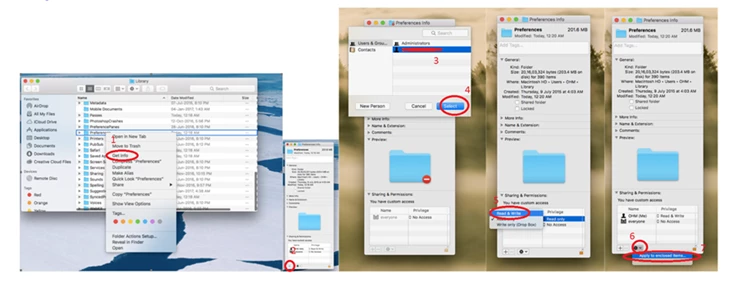
Follow same steps for
~/Library/Caches
~/Library/Application support
/Library/Preferences
/Library/Caches
/Library/Application support
Note: If you are on office system, these (/Library/Application Support and/Library/Preferences) folders may or may not allow you to add the user, that is completely fine.
Restart the system into your account and check how it works.
If that does not help, please try uninstalling using Cleaner Tool: Use the Creative Cloud Cleaner Tool to solve installation problems
Remove all the associated files from above-mentioned locations
Reinstall Illustrator/ InDesign from Creative Cloud Desktop App: Learn how to download your Adobe Creative Cloud apps
Regards,
Srishti
I had the same problem and I found the solution.
1. uninstall all application versions from the Adobe Creative Cloud.
2. When it says do you want to remove all app preferences, chose Yes.
3. install the application again and it will work without any issues.
Regards,



 AdChoices