
Inspiring
January 12, 2017
Answered

Illustrator CC crashes on every start after 2017.0.1 update

  • January 12, 2017
  • 10 replies
  • 6117 views

Crashes on boot when initializing illustrator.exe.
Diagnostics don't finish (currently at "Diagnostic Test 44"), startup screen disappears and the next time I try to launch I get this box:
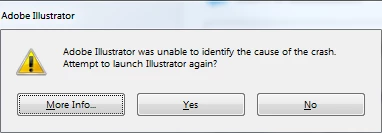

Only change was I installed the Illustrator update first thing this morning from Creative Cloud.

I have tried deleting and reinstalling and rebooting.

Windows 7 Enterprise, Service Pack 1, 64-bit
Illustrator CC 2017 2017.0.1

This topic has been closed for replies.
Correct answer TDoughty

After a VERY thorough delete and reinstall (uninstalled ALL 3rd party plugins, deleted AI, removed all traces/mentions of both AI and plugins from Regedit, reboot and clean reinstall) I got it to launch. Only 5:41 of my 8 hour day gone. This is the last time I go in blind on an update, i.e.: "oh, look, an update, let's install it immediately". From now on I'll let it sit for awhile and see what happens on the forums. I'll start re-installing my plugins one at a time and see if I can find the culprit and will update here. Also, wasn't Wacom related.

10 replies

Participant
January 18, 2017

Well, my issue is not plugin based.  TS had me delete and reinstall Illustrator to no effect, create a new user and install clean, and even enable the OS X root user and install that way.  Nothing they wanted to try in the almost 4 hour phone call did any good. Finally they accepted the crash report and escalated the ticket.  That's been several days now and still no call back.

applejail
Participant
January 17, 2017

Just confirming that uninstalling astute graphics plugins fixed my problem too. Glad i found this thread as i was up to diagnostic test 55 after reinstalling AI twice and having lost my preferences.

Participating Frequently
January 17, 2017

Yep. Uninstalling my Astute bundle totally fixed the problem, too yesterday, letting me free from the "diagnostic test" loop.

That's a hateful fix though, since those plugins are so addictive

Participating Frequently
January 17, 2017

AdorableAndray, at least for me the Stylism plugin seemed to be the problem. I also have Vectorscribe and Inkscribe, which have been reinstalled with no problems.

Participating Frequently
January 16, 2017

Same story here. And it DOES look like it is 100% connected with Astute plugins bundle.

kylemsxone
Participant
January 13, 2017

Simply removing the Astute Graphics plugin folders seemed to get things working again for me.  I sent an email to Astute Graphics about the issue.  They are usually pretty quick on updating their plug-ins after an Illustrator update, so I'd expect that soon.

TDoughtyAuthor
Inspiring
January 13, 2017

I initially removed the Stylism plugin and it made no difference. Now that I am back up, I have reinstalled all my Astute Graphic plugins and everything is working. In fact, my setup is exactly the same now as it was before. The only change being I completely removed everything (Astute and Illustrator), then reinstalled each one at a time. But, yes, Astute Graphics is always very responsive, so if it's their issue, I bet it's fixed quickly.

Participating Frequently
January 13, 2017

I spent a couple of hours this morning with Adobe Support via chat and phone. Support took over my computer to test and check. In my case the problem was the Astute Graphics Stylism plug in. The support tech moved the Stylism folder out of the extensions folder and Illustrator started normally. Other plugins have caused the startup problem too (see Fara10 message in this thread).

Participant
January 13, 2017

I had a similar issue, problem was caused by Mimaki Finecut plugin which is not compatible with latest Illustrator version:

Illustrator CC crashes on every start. Diagnostics loop.

Participating Frequently
January 13, 2017

The same for me. I installed the new update today and Illustrator has crashed about 5 seconds into each attempt to start it.

Win 64, PC.

I updated Wacom, uninstalled Illustrator, reinstalled illustrator, restarted a couple of times, etc..

Plugins: Astute Graphics Vectorscribe and Inkscribe, Fontself

Please help.

TDoughtyAuthorCorrect answer
Inspiring
January 12, 2017

After a VERY thorough delete and reinstall (uninstalled ALL 3rd party plugins, deleted AI, removed all traces/mentions of both AI and plugins from Regedit, reboot and clean reinstall) I got it to launch. Only 5:41 of my 8 hour day gone. This is the last time I go in blind on an update, i.e.: "oh, look, an update, let's install it immediately". From now on I'll let it sit for awhile and see what happens on the forums. I'll start re-installing my plugins one at a time and see if I can find the culprit and will update here. Also, wasn't Wacom related.

TDoughtyAuthor
Inspiring
January 12, 2017

Well, that was thoroughly unhelpful. I reinstalled each third-party plugin individually and made sure it launched after each one. It did so each time and now I have the same configuration as before and it's running fine. Now to set up all my preferences and workspaces again...

Participant
January 12, 2017

I'm on diagnostic Test 55 and counting..... Also have reinstalled and rebooted.  On Windows 10 SurfaceBook

Participant
January 12, 2017

The exact same thing is happening to me on OS X.

I have uninstalled with removing preferences, then reinstalled with no luck.

Diags will finish and reports no errors.

Stuck under a deadline and not really happy right now, however this is the first CC issue I've run into like this.

Need a quick solution. 

Monika Gause
Community Expert
Community Expert
January 12, 2017

It looks like this might be related to Wacom frameworks.

This thread focuses on the older version, but the issue might be the same: Illustrator CC 2017 crashing on launch