
Participating Frequently
January 26, 2020
Answered

Illustrator connecting two lines of different color

  • January 26, 2020
  • 4 replies
  • 2066 views

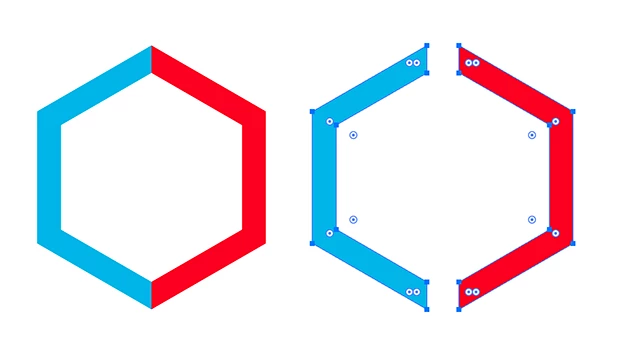
I'm trying to create a hexagon outiline in Ai with the left half black and the right half red.  I cannot manage to make the point at which they connect mitre, the red overlaps the black.  I haven't found a tutorial on how to do this.  I appreciate any and all help on this one.  Thanks. CR
This topic has been closed for replies.
Correct answer Ton Frederiks

If I understand it right and unless someone comes up with something smarter, I am afraid that you have to convert your strokes to outlines.

Delete the right part witht the direct selection tool. 

Join the open end points

Use the reflect tool to mirror the object and give it a different color.

(you can also use the Appearance panel to create a new filled copy).

4 replies

Ton Frederiks
Community Expert
Ton FrederiksCommunity ExpertCorrect answer
Community Expert
January 27, 2020

If I understand it right and unless someone comes up with something smarter, I am afraid that you have to convert your strokes to outlines.

Delete the right part witht the direct selection tool. 

Join the open end points

Use the reflect tool to mirror the object and give it a different color.

(you can also use the Appearance panel to create a new filled copy).

Chris.CRAuthor
Participating Frequently
January 27, 2020

I had to step away for awhile but that is

Exactly what I've been trying to do.

Thank you so much for helping me!!

Ton Frederiks
Community Expert
Community Expert
January 27, 2020

Good to hear that helped.

January 26, 2020

Draw a hexagon with the polygon Tool,

You can click as soon as with the polygon tool to specify the range of sides (6)


then use the scissors tool, click at the pinnacle and the lowest anchor points of best embroidery machine, then change the cap from the stroke panel ( window -> stroke ) to Extend , then alternate the stroke color for each element

Chris.CRAuthor
Participating Frequently
January 26, 2020

I'm sorry, I must be a hard case and believe me it is getting the best of me.

I don't have an extend option in the stroke panel.


Mohammad.Harb
Community Expert
Community Expert
January 26, 2020

Draw a hexagon with the polygon Tool,

You can click once with the polygon tool to specify the number of sides (6)


then use the scissors tool, click on the top and the bottom anchor points, then change the cap from the stroke panel ( window -> stroke ) to Extend , then change the stroke color for each part

Chris.CRAuthor
Participating Frequently
January 26, 2020

What do you mean by change cap?

In (Window->stroke) it opens the stroke panel and I don't see an extend option.

I was able to use the Polygon tool and then scissors to change the color of one half but the joint between

black and red is still not clean.

thank you for helping me!

Chris.CRAuthor
Participating Frequently
January 26, 2020

I found the cap option and none of the choices give the result I'm looking for.

Monika Gause
Community Expert
Community Expert
January 26, 2020

Please show.

Chris.CRAuthor
Participating Frequently
January 26, 2020

How do I show you what I mean?