
Participant
September 16, 2024
Question

Illustrator converted my image to text- can't convert back

  • September 16, 2024
  • 1 reply
  • 750 views

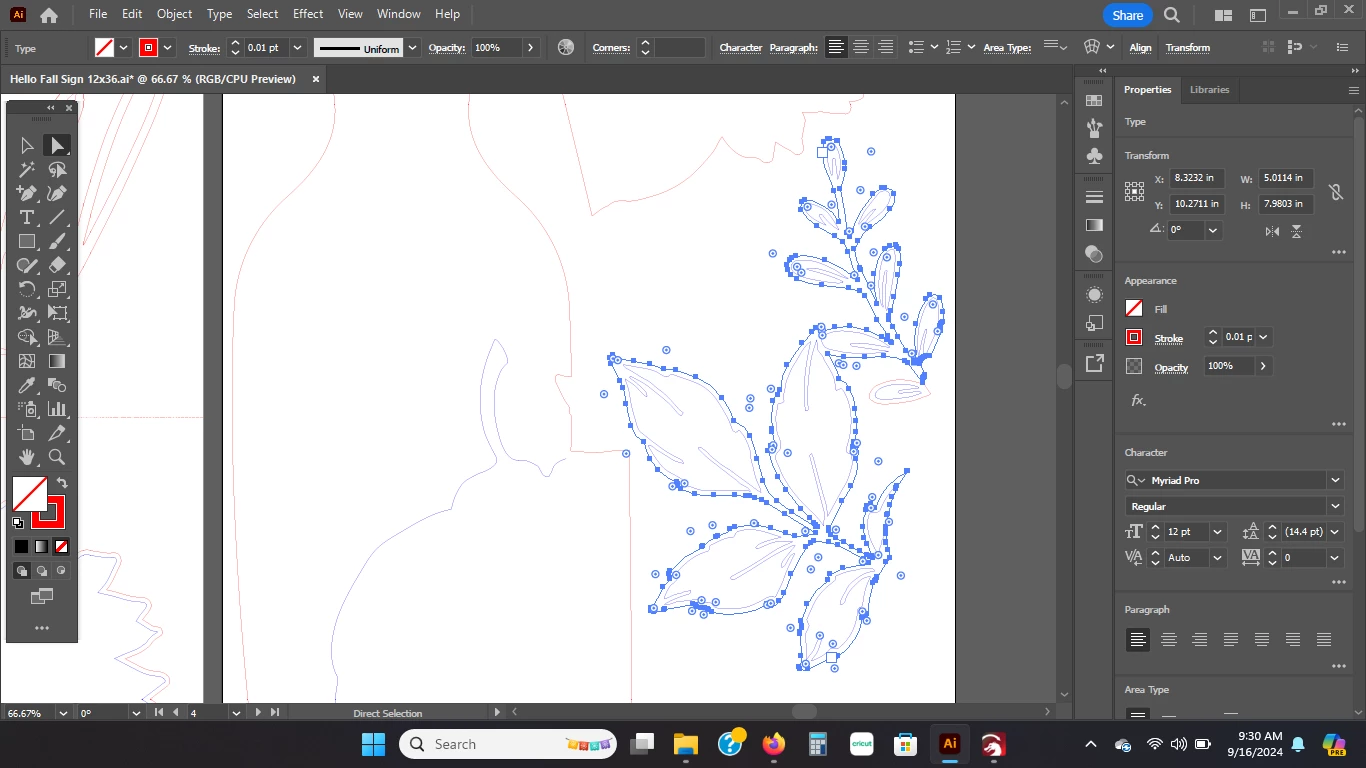
Finished my project last night.  Exported as SVG.  Pulled up the SVG today to convert into other file types.  Illustrator somehow converted my image into text, or thinks it's text, rather.  What's really strange, is that the nodes are still there, and still editable.  But when you export, it assumes it's text and it is ignored by all of my cutting programs.  The lines are completely gone when you import the SVG into another app, such as lightburn.  No matter what I do, I cannot get my image to convert back to an image.  Create outlines and expand both just make the image disappear completely.  Please tell me there is a way to fix this!  I have no idea what went wrong.  I've already used the SVG just fine before, I pulled up the source file to make changes in another part of the design and didn't even touch this image.  Some sort of MAJOR glitch.
This topic has been closed for replies.

1 reply

Monika Gause
Community Expert
Community Expert
September 16, 2024

What do you mean it converted your image to text?


WHat's most important: never use SVG as your work file format. SVG in Illustrator is a one way street: export it and then never open it again. Illustrator is famous for not being able to read its own SVGs.

Participant
September 16, 2024

The source file is .ai and it's the one with the issue.  I noticed it on the .svg so looked back to see what was going on. I'm aware it makes zero sense.  It somehow thinks the image (in the picture I uploaded) is text.  I can't do anything with it to make it realize it's an image.  It shows the nodes, too, which is so weird.  In the bar on the right of my image you can see how it's treating it like text.  I can change the text,  create outlines, etc. just as if it were text.  You can't export text as svg format, so it just disappears completely upon exporting it.  I have NO CLUE what the heck happened.  

Anshul_Saini
Community Manager
Community Manager
September 16, 2024

Hi @Karen22897286sg8t,


I’m really sorry to hear you’re having this issue with your Illustrator file! I understand how frustrating it must be, especially since it was working fine before. If possible, could you upload the Illustrator file to Google Drive or a similar service and share the link with us? That way, we can take a closer look and help resolve the problem. Thanks for your patience!


Best,

Anshul Saini