
Participating Frequently
November 26, 2016
Answered

illustrator cs2 - change the focus for type text

  • November 26, 2016
  • 2 replies
  • 1243 views

so, when editing a text in type tool, i can type ESC and 'out' for edit the frame, size, etc.

but and the inverse way?

i want anything similar to windows F2. you type a key and can imediatelly edit the text, without need click twice with mouse
    This topic has been closed for replies.
    Correct answer Jacob Bugge

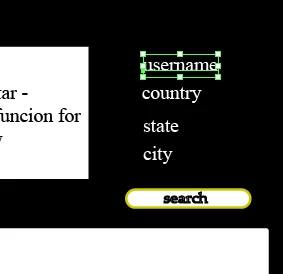
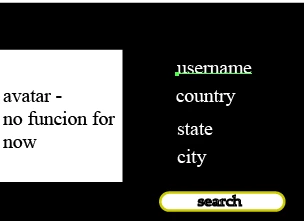
    before press T, in Cs2:

    after press T, in Cs2

    but when I type any test, don't edit the label username. starts a function related to key at screen or tool box. Ex: if I type F, maximize the screen. don't write F in field


    olhosa,

    I believe I see what you mean now: after pressing T on the keyboard (or clicking the Type Tool), you need to click within the Type object to go on in it, which makes the second operation you wish to avoid.

    Sorry, no way round it, I am afraid.

    2 replies

    Jeff Witchel, ACI
    Community Expert
    Community Expert
    November 29, 2016

    If you're on a Mac: Command + Shift + A.

    On Windows: Control = Shift + A

    It's the Command for "Deselect All."

    Jacob Bugge
    Community Expert
    Community Expert
    November 26, 2016

    olhosa,

    How about pressing the T key?

    Participating Frequently
    November 28, 2016

    don't work. the T key change the focus for insert a new block of text, not editing the old.

    Jacob Bugge
    Community Expert
    Jacob BuggeCommunity ExpertCorrect answer
    Community Expert
    November 29, 2016

    before press T, in Cs2:

    after press T, in Cs2

    but when I type any test, don't edit the label username. starts a function related to key at screen or tool box. Ex: if I type F, maximize the screen. don't write F in field


    olhosa,

    I believe I see what you mean now: after pressing T on the keyboard (or clicking the Type Tool), you need to click within the Type object to go on in it, which makes the second operation you wish to avoid.

    Sorry, no way round it, I am afraid.