Participant
September 15, 2009
Answered

Illustrator CS4 Text Rotation not working as it has in the past

  • September 15, 2009
  • 1 reply
  • 48571 views

When I attempt to rotate a text element, the text does not rotate along with the textbox that it was created inside. Instead, it always stays at the top of the text box and moves left/right (I hope that is an accurate description). Anyone know what is going on with this?
    This topic has been closed for replies.
    Correct answer Mario Arizmendi

    I will post up my file later this afternoon, I'm at work right now. It's basically a new file with just the one text element. I just installed CS4 yesterday (I've used it many times prior) but this behavior that I'm getting is just bizarre.


    I think I know what it is happening in this case.... I have time and was trying to reproduce the issue..

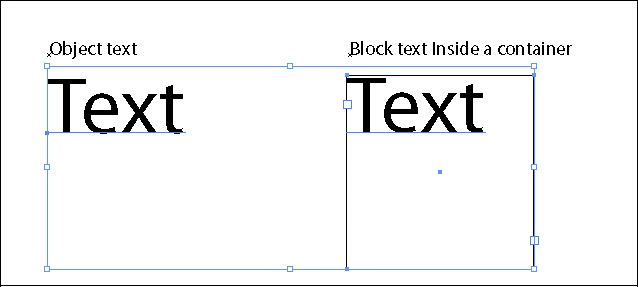
    1. Here I have a text  and a text inside a container (Block text)

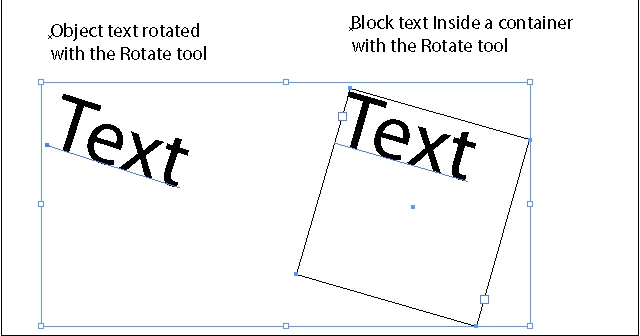
    2. Here I use the rotate tool, every thing goes as expected

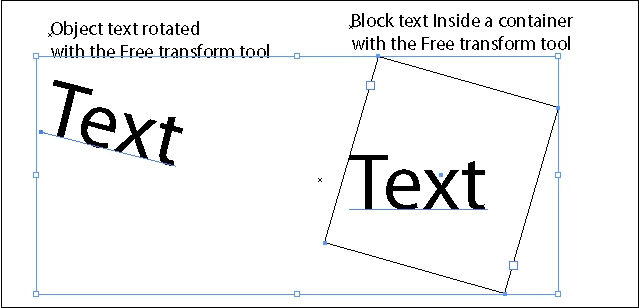
    3. Here I used the free Transform tool. and as you can see, that tool rotates the container but not the text itself,  so that's the "problem"...

    use the rotate tool instead the transfor tool...

    1 reply

    Participating Frequently
    September 15, 2009

    Make sure you are selecting the container and the text, and not just the container.

    jamied99Author
    Participant
    September 15, 2009

    here's a video of what is happening:

    http://www.flickr.com/photos/thisisdarby/3924383276/?processed=1&cb=1253051167707

    Participant
    April 7, 2020

    I agree 100% with you. I don't understand why i need to Open Transform and the Rotate which is a very slow process instead of just moving freely my text around. This feature and the Clipping Mask on an image instead of just moving the anchor points to fit the right composition are the two things that really bothers me of Illustrator.

    I hope some smart person might have develop a script or tool to override this very unfriendly commands.

    Cheers,


    I know this is an old issue, but wanted to add a solution I just discovered because this was the first answer that popped up when I searched this problem. 

    - Click on the text box

    - Double click on the round anchor handle to convert to Point Type

    Now you can rotate it by hand.