

Illustrator cs6 Measurement Inaccuracies, Glitch?
Hi Guys,
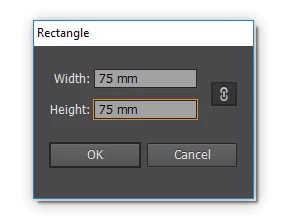
I have been working on a new project with some fine detailing and whilst creating a border to create a clipping mask the sizing is never exact numbers. I work in millimetres and for example if I go to the rectangle tool and enter a size of W-75mm x H75mm it creates a shape but the sizing is actually W-74.789mm x H-74.789mm OR if I enter another one with the same 75mm square i will get one that is 75.142 x 75.142mm.
This is what i type in:
This is what it produces which makes no sense: ?!?!

This inconsistency is driving me crazy as i cannot produce detailed repeat backgrounds for my job without them becoming all skewed because one shape will not want to play ball!! It is even now started doing it for artboards so now my boards are never exact dimensions which throws off everything else!
I have been using Illustrator for 5 years now and i have never had this issue ever but now all of a sudden it is doing it on every shape i produce and i have checked in my preferences and my preview bounds is turned off as i know that can skew dimensions. I am feeling pretty lost on any solutions now so if someone can help that would be great as my work has hindered now as i cannot seem to fix this issue.
Any ideas will be appreciated,
Thanks
 AdChoices