
November 26, 2012
Answered

Illustrator CS6 - opens in window too small

  • November 26, 2012
  • 8 replies
  • 41331 views

Anytime I double-click on an Illustrator file to open it, the Illustrator CS6 window opens up too small to view the file. It comes up with an error message that says "Can't open the illustration. There is not enough room for the window; increase document area and try again."
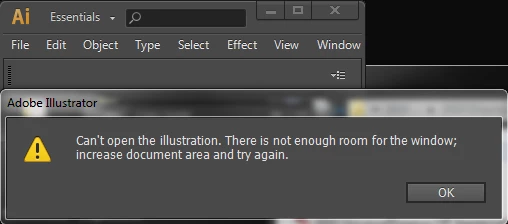
If I then click on the box to expand the Illustrator window to full-size, then I can open the file. It's just frustrating that everytime I try to open an AI file by double-clicking on it, I get this error message.

Correct answer emil emil

I am also having this problem in Windows 7.  I tried the fix (unchecking "open in tabs"), but that did not work.  Anytime I try to open Illustrator CS6, it opens in a tiny window.  Really annoying to have to max it every single time I open it.  This is whether or not I click on a file to open it or click on my desktop shortcut to open it.  Surely after a year, Adobe has released a fix to this problem.  Anybody know where I can find it? 

I'm also getting constant messages when I save saying Illustrator is not responding.  Over and over...  I know this isn't the spot for that, but my CS6 seems to be very buggy.


Try and let me know if this helps, right click on your desktop shortcut and choose Properties. In the Shortcut tab choose Maximized from the menu next to Run.

8 replies

SeanRiddolls
New Participant
January 12, 2023

I was having this same issue, but I found a workaround.

When I double-clicked to open an Ai file, the window would suddenly resize-down to the smallest possible window – then give me that there was not enough room in the window to open the file 😐

I noticed however, that I only got this bug when Illustrator was maximized.  When Illustrator didn't occupy the full desktop, then this error did not occur.  

New Participant
February 25, 2025

Yep! That was the resolve. Just resized the AI bar to be smaller that the width of my screen and the file opened. Thank you!

alperxx
New Participant
August 25, 2020

@emil not worked for me; only illustrator starts maximized but when i double click to file then illustrator window is smalling to top left and gets an error Can't open the illustration. There is not enough room for the window; ..

New Participant
August 19, 2020

genius fix!!! thanks 

New Participant
December 18, 2015

@emil emil it worked!! thanks a lot!!

New Participant
November 20, 2015

Ran into the same problem just recently using Win 10. I think I found a solution. With AI running maximized I pulled down the title bar to bring it to windowed mode. Then I resized the window manually to a comfortable working size. That's it.

Everytime I open and AI file by double clicking on explorer AI launches on windowed mode at the size I set.

msyndicate
New Participant
October 29, 2015

I sort of ran into this problem and found the answers helpful but none solved my problem. The problem I had was not with the application window but the files I was opening. I'm on a laptop running Win 8.1 and CC2015. I have 2 or 3 monitors hooked up (including the LT) depending on my location and it happened in both instances. I have my application window on my left monitor with palettes attached together floating on top. I always open/move my file windows to the right monitor to maximize my work area. I hadn't had a problem with this ever. A few days ago I tried docking my attached group of palettes to the right side of the app window. That was the culprit. The moment I detached them, the windows started opening normally. I guess it was trying to fit it into the remaining space which wasn't much, not even the width of a palette.

New Participant
September 5, 2014

Like many I'm experiencing the same problem.  'Can't open the illustration.  There is not enough room for the window; increase document area and try again.'  Running Windows 7 - dual monitors although I don't believe that's the problem.  Tried the suggestion in preferences uncheck 'open documents as tabs' didn't work.  Tried Properties shortcut tab choose 'Maximized' didn't work.  This is what I find, when I right click to open a PDF in Illustrator - I can open the first  illustration (if it was closed using Exit), but I get this error on the second illustration I try to open in the same way.  If I close an illustration using the X than when I try to open the illustration the next time I get the error message.  If I chose Close or Ctrl W - the next time I open the application I get the error - HOWEVER, if I close the application by hitting Exit it will open properly the next time.  Even if the first illustration opens properly I still have a problem with the second one.  Can anyone help as this is a pain.  Been using CS6 for sometime but this just started happening ~ 3 months ago so it didn't start with the upgrade. 

Inspiring
December 16, 2014

I'm having the same issue with CC on Win 7.

Larry G. Schneider
Inspiring
November 26, 2012

Turn off the Application Frame from the Window menu if you can.

November 26, 2012

I cannot find an option under Window/ to turn off the Application Frame (in Windows 7 version).

Larry G. Schneider
Inspiring
November 26, 2012

The OS in your first post wopuld have been helpful. The Application Frame cannot be turned off in Windows.