
Participant
July 29, 2022
Answered

Illustrator cuts edges on 3D objects

  • July 29, 2022
  • 5 replies
  • 4597 views

Hi guys, I've been having an issue with illustrator. While I'm creating 3D objects everything is fine with circles or big objects. Meanwhile, with smaller elements, rounded edges are being cut when I'm using "inflate" option:

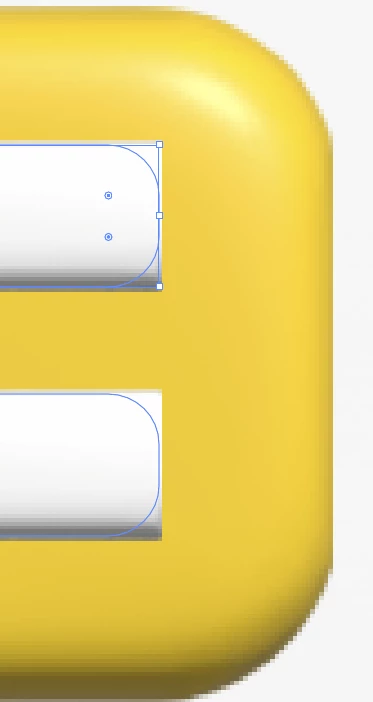
Did you have similar problems? What can I do to change it?

Correct answer Elin_SE

I had a similar problem with an object using the extrude 3D type. Marking the checkbox "Render as vector" and then the button "Render" worked for me. Maybe it does for you too? Borrowed this image from Adobes help pages.

5 replies

Participant
June 18, 2023

Change the Raster Setting to 500 ppi.

Participating Frequently
September 5, 2023

This worked for me

Elin_SECorrect answer
Participant
February 6, 2023

I had a similar problem with an object using the extrude 3D type. Marking the checkbox "Render as vector" and then the button "Render" worked for me. Maybe it does for you too? Borrowed this image from Adobes help pages.

Participant
August 12, 2022

I have this same problem. Did you find a fix?

caseym67414055
Inspiring
January 26, 2023

Same issue here.

Ton Frederiks
Community Expert
Community Expert
July 30, 2022

How small is small? What is your zoom percentage in your example?

I can reproduce it, but the object is almost invisible at 100%.

Monika Gause
Community Expert
Community Expert
July 29, 2022

Could you perhaps upload an AI file that contains just the yellow and white objects so one could have a look at it?


Use Creative Cloud or Dropbox or the like and share the link.