
williamp39038283
Participant
December 18, 2024
Question

Illustrator Does Not Save Proper File Size

  • December 18, 2024
  • 2 replies
  • 1103 views

Hi,


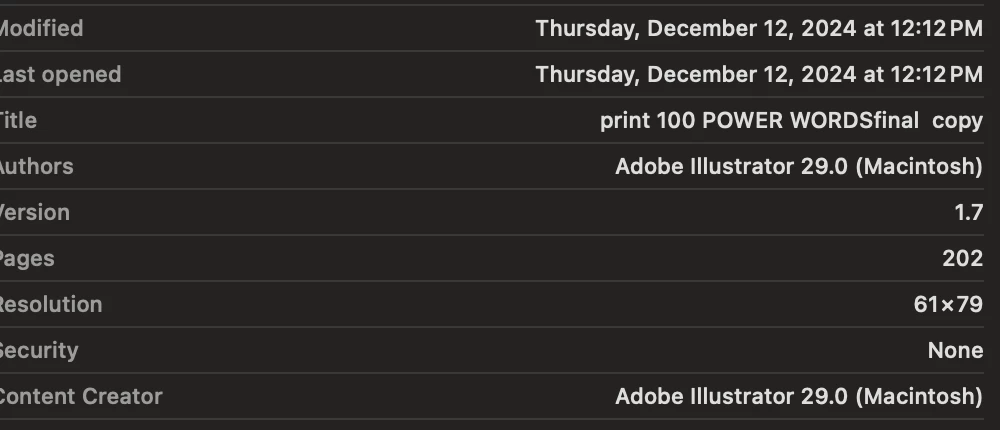
I am trying to produce an 8.5 x 11 coloring book with .125 bleed, however, when I save it as a high-quality print file it compresses the resolution to 61 x 79. I have tried EVERYTHING and it always just produces a tiny file. 


When I save it as a PDF ,and I uncheck all the boxes, I lose my bleed and i have to make each page bigger manually. 


Why cant it just save properly the first time? 


My Artboards are 8.5  x  11 inches, but this is the resolution it shoots out. Super tiny file. 
This topic has been closed for replies.

2 replies

Brad @ Roaring Mouse
Community Expert
Community Expert
December 18, 2024

First of all, creating a 200 page book in Illustrator isn't a good workflow.

Putting that aside, in order for this to even happen, your canvas had to be converted to Large Canvas. This in itself isn't the issue, but how you save the PDF is. Large Canvas REQUIRES PDF v1.6 or later to view properly. Since you selected the High Quality Print preset, that by default is v1.4 Compatibility (quite old). It should have warned you that doing so would result in a file 1/10 the dimensions. If you must use that preset, make sure you select a new compatibility setting of at least v1.6.

williamp39038283
Participant
December 20, 2024

I use the current updated version 1.7, and it still doesn't work. I am open to using any setting that doesn't compress my work to 1/10 

Monika Gause
Community Expert
Community Expert
December 20, 2024

When you export a Large Canvas document to PDF, the resulting PDF can only be opened properly by Acrobat. Only it can read the scaling factor properly.

_scott__
Legend
December 18, 2024

Are you exporting to PDF or Saving As PDF??

williamp39038283
Participant
December 20, 2024

yes and yes but still does not work.