
Participant
September 4, 2023
Question

Illustrator dulls colours, even on imported images

  • September 4, 2023
  • 2 replies
  • 506 views

I am trying to create a logo in a certain colour but Illustrator dulls the colours.

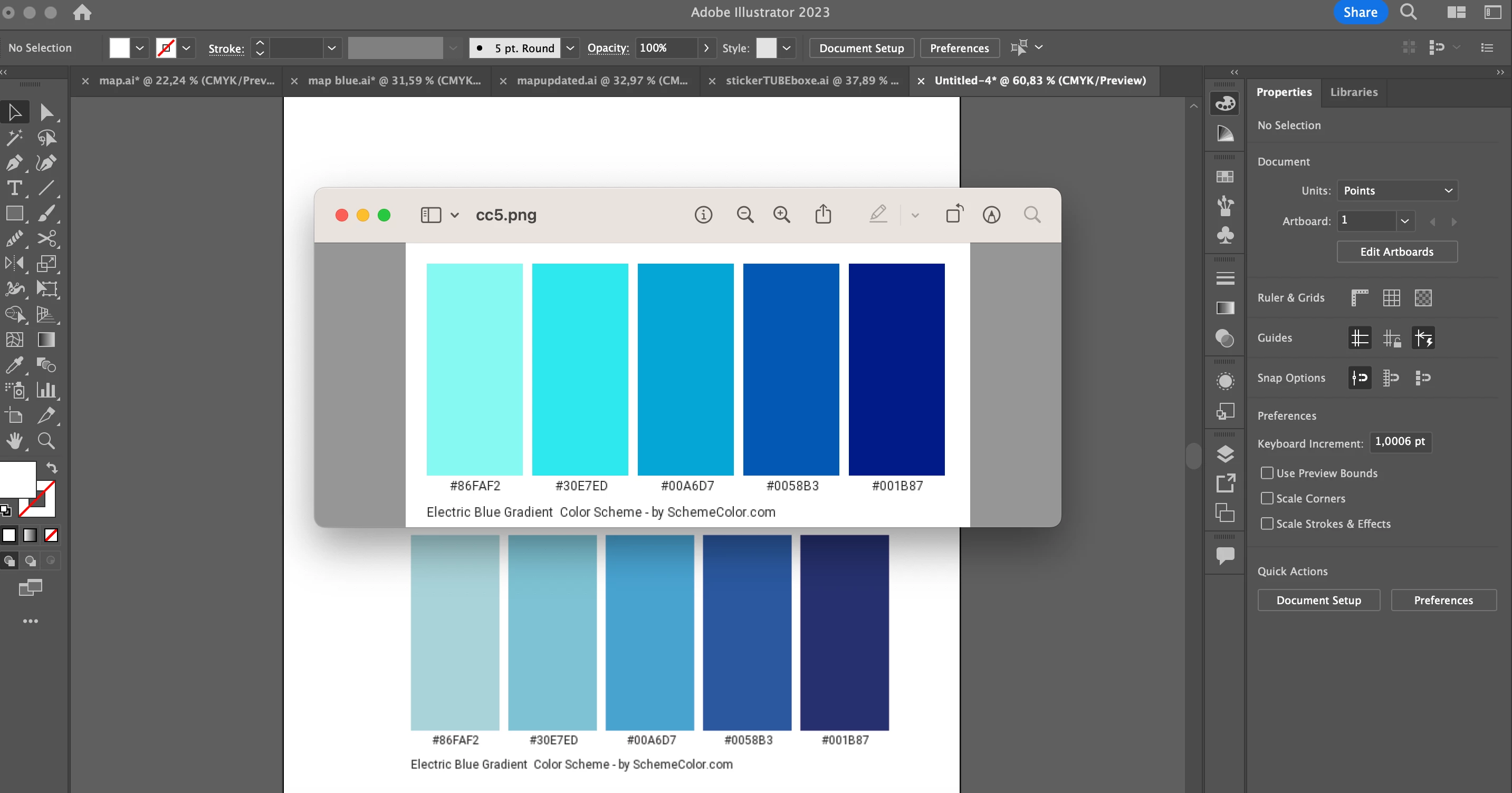
I am importing images to colour colour match with the eydropper, but the colours are dulled once on illustrator.

I am also finding the CMYK code of the colour I want, but it shows up different on Illustrator.

How can I fix this?

Especially for images I put on my Illustrator files that show up in a different colour.

Thank you!
This topic has been closed for replies.

2 replies

Ton Frederiks
Community Expert
Community Expert
September 4, 2023

The website may give you a certain RGB color value (probably sRGB) but does not use color management while the Adobe apps do. Their conversion to CMYK values has nothing to do with CMYK inks in the real world.

Rely on the  conversion Illustrator gives you.

Participant
September 4, 2023

I am not super great at Illustrator so there is still a bunch I need to learn. But I just don't understand why when I import an image the colours are totally different than they should be. What is the best colour setting I can set on Illustrator?

For example, like in the image below, the blue square on the illustrator page is supposed to be the same as the one next to it that I opened on my computer. However once on the illustrator page it looks more grey.

Ton Frederiks
Community Expert
Community Expert
September 4, 2023

The first thing I would do is to learn about colormanagement.

This is just the start and may explain the difference between RGB colors and CMYK print colors:

https://helpx.adobe.com/illustrator/using/color.html

https://helpx.adobe.com/acrobat/using/keeping-colors-consistent.html

Monika Gause
Community Expert
Community Expert
September 4, 2023

Those color samples in the PNG are your colors?

A PNG is always in RGB. The majority of those colors simply cannot work in CMYK and that's why they are dull.

Participant
September 4, 2023

Is there a way to change the settings so that colours are not modified once I put images in Illustrator?

For example the blue square on the illustrator page is supposed to be the same as the one next to it that I opened on my computer.

Monika Gause
Community Expert
Community Expert
September 4, 2023

@Helia24457872v5wh  schrieb:


For example the blue square on the illustrator page is supposed to be the same as the one next to it that I opened on my computer.


It's not possible if you want to print that blue. Because it just can't be printed in CMYK.