Participant
May 18, 2018
Question

Illustrator Embedded Image Resolution Issue

  • May 18, 2018
  • 2 replies
  • 8097 views

Hi there!

I am currently checking  in Illustrator some artworks created by a client , for large scale prints.

Some of these artworks have been created using InDesign instead of Illustrator.

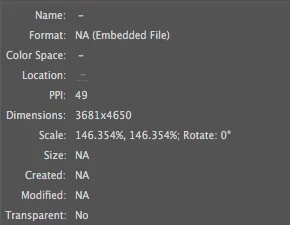
Some of the images (mainly jpgs) embedded in the PDF have a low resolution, around 50ppi.

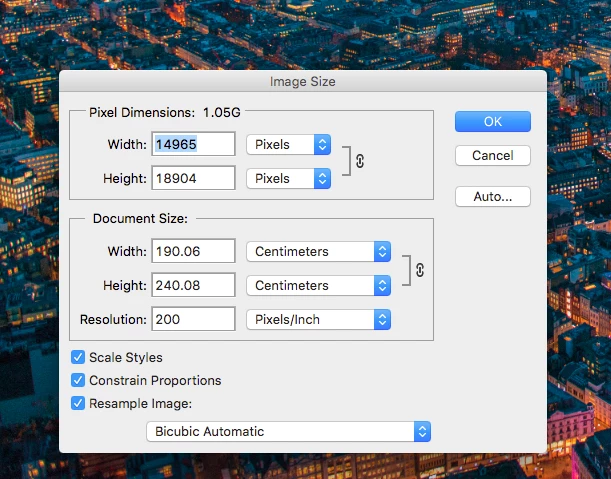
However if I copy a low quality image (ipg) from the pdf file (opened in Illustrator) and paste it in Photoshop, the image suddenly has a higher resolution.

I understand that this might be an issue related to how the pdf is exported from Indesign but I am not sure why this si happening and how to solve this issue without saving and relinking every single image embedded.

Here below is the resolution of the same image in Illustrator and in Photoshop
Has anyone ever experienced this issue or  have any suggestion on how to work around this problem (eg. Export Indesign settings) ?

This topic has been closed for replies.

2 replies

Monika Gause
Community Expert
Community Expert
May 18, 2018

What you see in Illustrator is the effective resolution. That is the resolution after scaling the image.

c.pfaffenbichler
Community Expert
Community Expert
May 18, 2018

And copying an embedded image in Illustrator and pasting it in Photoshop does not seem particularly meaningful as it does not paste the actual pixel content but the pixel content within an ai, as far as I can tell.

c.pfaffenbichler
Community Expert
Community Expert
May 18, 2018
However if I copy a low quality image (ipg) from the pdf file (opened in Illustrator) and paste it in Photoshop, the image suddenly has a higher resolution.

If you unembedd the image (via the Links Panel’s flout menu) from the pdf opened in Illustrator and open the resulting file in Photoshop what is its resolution?

Participant
May 18, 2018

as low as in illustrator...