Inspiring
January 3, 2024
Answered

Illustrator fill and stoke not aligned

  • January 3, 2024
  • 4 replies
  • 1748 views

Hello,

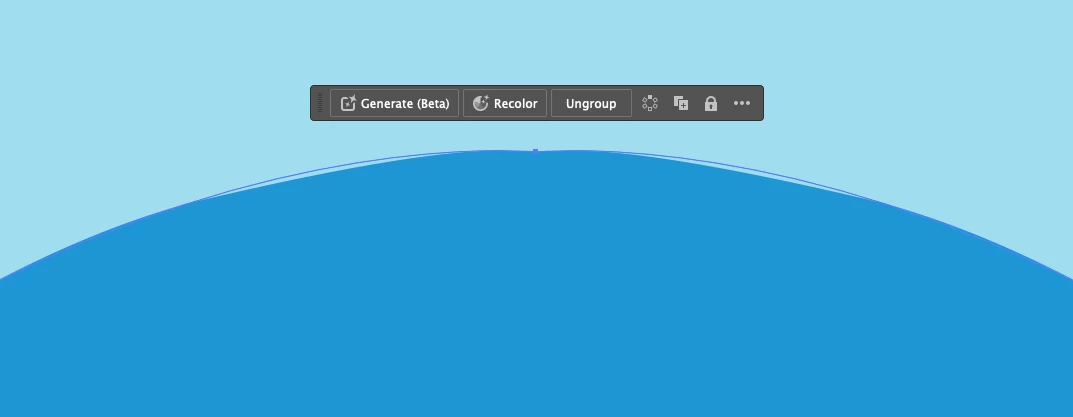
I am having a display issue in which the edge (stroke) of a shape looks cruddy up close and prevents me from being able to create precise shapes.

Please see below.

I have uninstalled and re-installed Illustrator and removed all previous preferences.

Thanks!
This topic has been closed for replies.
Correct answer Adar29551398veyv

Yesterday I upgraded the operating system to Sonoma 14.2.1

That, combined with turning off GPU Preview seems to have fixed the problem. 

In the old operating system, turning off GPU Preview by itself did not work but in the new operating system, it does.

I was on the phone with Adobe Support directly and they confirmed that operating system upgrades can resolve graphics/display issues.

I hope this helps anyone who has this issue! : )

4 replies

Nicky G.
Known Participant
March 7, 2024

Illustrator CC 2014 latest release installed, I have the same problem on windows 10.
This is solved by deactivating GPU preview, but you lose the convenience of dynamic zoom...

Is it possible that in each new version I notice more and more slowness, less stability and precision of the software?
It is increasingly cumbersome and less fluid to work with Illustrator, unless you find the bottleneck that makes AI slow down, wouldn't it be better to rewrite the software from scratch? If 30 year old software doesn't hold up in speed, fluidity and precision, let alone in 5/10 years. Technology has made giant strides, 16/24/32 core multicore processors, 32/64/128GB RAM, very fast M.2 nvme hard drives, monstrous 8/12/16GB graphics cards... Then you have all this power and illustrator only handles 1core??? But have we gone crazy? when we wake up a little

Monika Gause
Community Expert
Community Expert
March 7, 2024

@Nicky G.  schrieb:

wouldn't it be better to rewrite the software from scratch? 


That would be version 1.0 for years and years to come. Rewriting all the functionality? It seems you do not use a lot of the Illustrator functionality.


And maybe your computer needs someone to take a look into it. You can contact Customer Care: https://helpx.adobe.com/contact.html 

Nicky G.
Known Participant
March 7, 2024

and of course I don't use many features! Even with the simple ones it drives me crazy! imagine the rest. 🙂

Adar29551398veyvAuthorCorrect answer
Inspiring
January 5, 2024

Yesterday I upgraded the operating system to Sonoma 14.2.1

That, combined with turning off GPU Preview seems to have fixed the problem. 

In the old operating system, turning off GPU Preview by itself did not work but in the new operating system, it does.

I was on the phone with Adobe Support directly and they confirmed that operating system upgrades can resolve graphics/display issues.

I hope this helps anyone who has this issue! : )

Bill Silbert
Community Expert
Community Expert
January 3, 2024

Does it look any better if it's printed or saved as a PDF and viewed in Acrobat or any other PDF viewer than Illustrator?

Inspiring
January 4, 2024

Bill, Thanks for your question

Pdfs (see attached) look fairly sharp up close but I am noticing that .pngs look pixelated around the edge which I don't think normally would be the case.

My colleague just recommended updating to the last Mac OS which I haven't done yet so I am going to try that.

Monika Gause
Community Expert
Community Expert
January 4, 2024

PNG is a raster based format. Of course you will have to expect pixels in it.

Monika Gause
Community Expert
Community Expert
January 3, 2024

Might be a GPU issue

Does it get better when you View > Preview on CPU?

Inspiring
January 3, 2024

Thanks for the comment, It does not : (

I have tried CPU, GPU and Overprint

Monika Gause
Community Expert
Community Expert
January 3, 2024

GPU preview causes this. But in COPU preview it is usually gone.

Is there perhaps an update for your graphic card driver?