
Participant
March 24, 2021
Answered

Illustrator Fonts Showing up as Unavailable

  • March 24, 2021
  • 5 replies
  • 1202 views

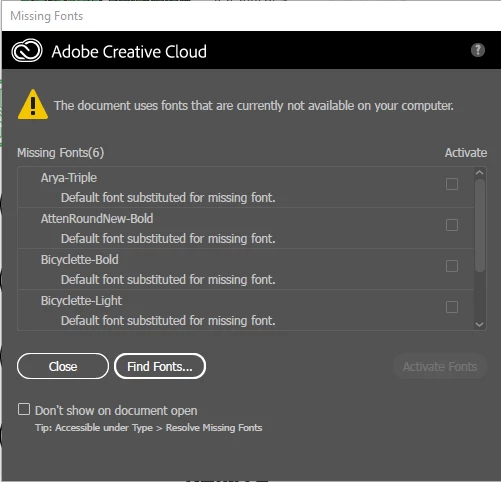
I'm a student, and I've been using Adobe Illustrator through my school acount for the past several months, and over that time I've downloaded quite a few fonts through Adobe Fonts. Just today I was working on a project in which I used some newly downloaded/activated fonts and some old ones as well. I stepped away for a little while and when I came back, there was a pink highlight around all of my text (across several other documents as well - I opened past ones to see if this was a recurring problem, and it seemed like it was) and a message saying "The document uses fonts that are currently not available on your computer." There's a little box that was below the message that allowed me to reactivate the fonts that I was apparently missing, but the checkbox wouldn't work. I closed and reopened the documents and the same problem kept occuring. I finally decided to check the Adobe Fonts website to see if the fonts were straight up removed, but there they were. However, this time there was a prompt that said "this font isn't included with your plan," even though I've been using some of these fonts for the past few months... I have no clue what's going on (and I'm a little frustrated), and if someone could please help I'd greatly appreciate it. Thanks 🙂

 

This topic has been closed for replies.
Correct answer Met1

Adobe recently lost licensing agreements with several font foundries, check if yours was one of them: https://helpx.adobe.com/fonts/user-guide.html/fonts/using/removed-fonts.ug.html

5 replies

Ashutosh_Mishra
Inspiring
April 14, 2021

Hi there,


I hope your issue is resolved now. In addition to suggestions given earlier, you may also try troubleshooting steps given on this help article(https://helpx.adobe.com/in/fonts/kb/troubleshoot-fonts-illustrator-indesign.html). Hope it helps.


Regards,

Ashutosh

Met1
Met1Correct answer
Legend
April 7, 2021

Adobe recently lost licensing agreements with several font foundries, check if yours was one of them: https://helpx.adobe.com/fonts/user-guide.html/fonts/using/removed-fonts.ug.html

Participant
April 7, 2021

We have the same problem with 8 of our 9 individual subscriptions (one-year, Creative Cloud). It's not an Illustrator problem, it's a subscription problem. Hours of chatting with Adobe (with the same advises as Monika Gause like logging in and out) did not bring a solution. It seems like the subscription suddenly changed to an educational subscriptions (my opinion). But Adobe can't help or change it. Anyone else the same problem?

Monika Gause
Community Expert
Community Expert
April 7, 2021

The forum can't answer your account issues. We have no access to account data, so we can't know if Fonts are a part of it or not.


Are the fonts not working in Illustrator or other applications as well?

Which fonts are they? Is it all fonts or just some?

Do you use font management?

Monika Gause
Community Expert
Community Expert
March 24, 2021

You could try if logging out and then logging into your account helps.

Peru Bob
Community Expert
Community Expert
March 24, 2021

I've moved this from the Using the Community forum (which is the forum for issues using the forums) to the Illustrator forum so that proper help can be offered.