
Participating Frequently
February 24, 2022
Answered

Illustrator gradient appears different than Photoshop gradient

  • February 24, 2022
  • 7 replies
  • 1931 views

I'm using the exact same colors and have draw the gradient the same way, and yet the gradient appears differently in Illustrator versus Photoshop. Is there a way to fix this? I want to be able to use Illustrator with this gradient but because it's a coroporate brand color, I need to appear consistently as it does in Photoshop.


In this image, the top image is Photoshop, bottom image is Illustrator.
This topic has been closed for replies.
Correct answer pixxxelschubser

😉

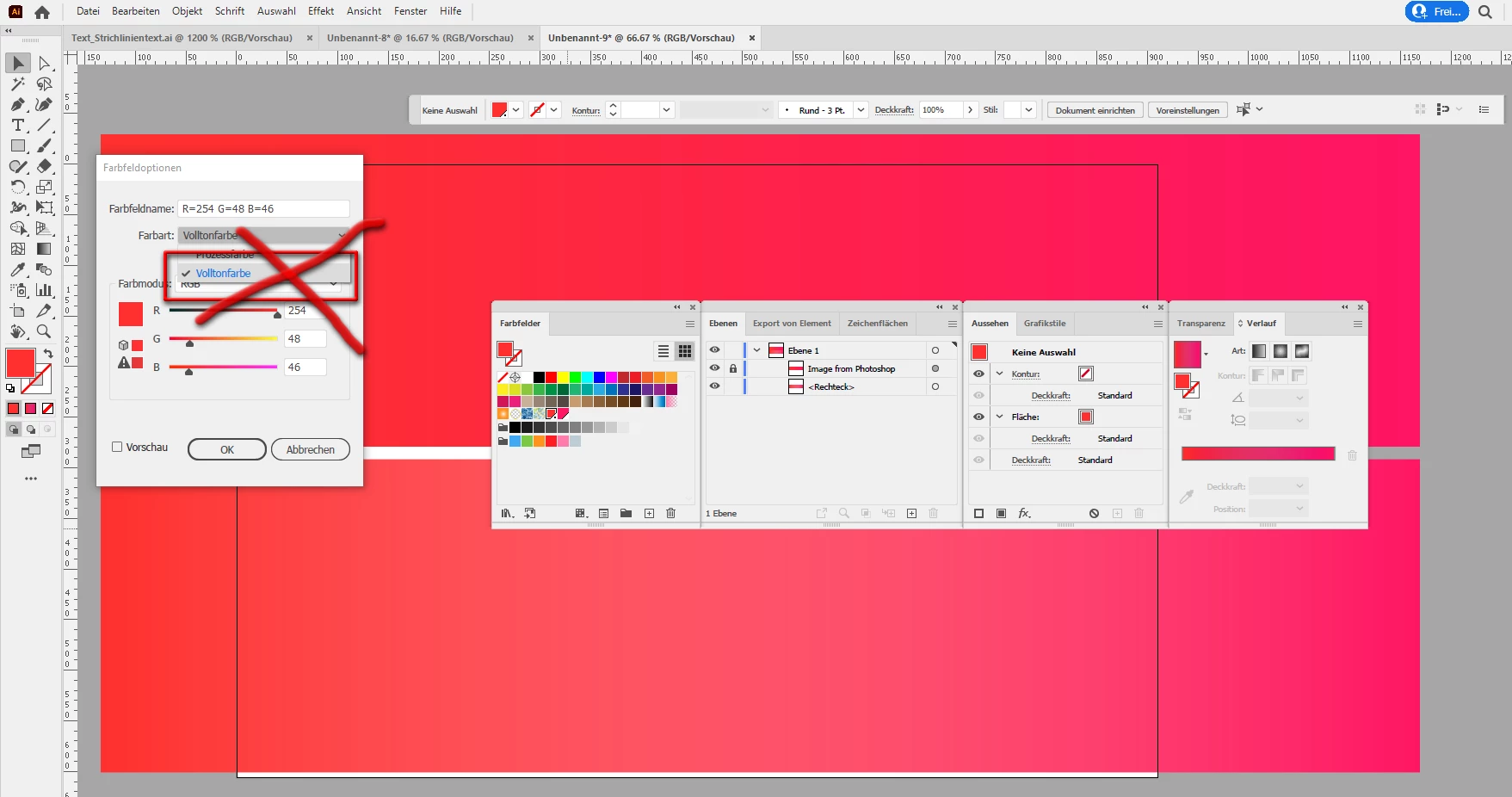
Do not use Spot color


7 replies

Ton Frederiks
Community Expert
Community Expert
February 24, 2022

When using the same color stops, Photoshop gradients have always been different from the other Adobe apps.

Especially now with the new interpolation methods it becomes difficult to share gradients between applications.

645 votes here: https://illustrator.uservoice.com/forums/333657-illustrator-desktop-feature-requests/suggestions/30997678-allow-gradient-swatches-to-be-added-to-cc-library


pixxxelschubser
Community Expert
pixxxelschubserCommunity ExpertCorrect answer
Community Expert
February 24, 2022

😉

Do not use Spot color


Participating Frequently
February 24, 2022

That was the problem!! Thank you so much!!

pixxxelschubser
Community Expert
Community Expert
February 24, 2022

And please

use always Process colors and NOT Spot colors for gradients.

Mike_Gondek10189183
Community Expert
Community Expert
February 24, 2022

Are you in the same color  mode in boths applications (RGB or CMYK)

Photohsop has a method interpolation that will slightly change how the 2 colors combine whcih seems your issue, but yours seems more weak in the middle on one example


Use Adobe Bridge >> Edit >> Color Settings to sync between all apps.


What happens if you copy the gradient fromillustrato and paste into Photohsop as smart object?


Monika Gause
Community Expert
Community Expert
February 24, 2022

Photoshop has some advanced algorithms for calculation gradients that Illustrator doesn't have.


You can see a comparison in here: https://sergosokin.gumroad.com/l/gradientblender

pixxxelschubser
Community Expert
Community Expert
February 24, 2022

Sorry, but to me there is no difference between a Photoshop gradient and Illustrator.


top: Photoshop image with gradient
below: Illustrator gradient

Participating Frequently
February 24, 2022

And both of yours look correct, while my illustrator one is getting this pinkish color blending. This is so frustrating!

pixxxelschubser
Community Expert
Community Expert
February 24, 2022

Please show us a screenshot of the selected path with layer panel, gradient panel and appearance panel and visible control bar.

Participating Frequently
February 24, 2022